View architectures
In Oinone, whether it is Master (Mask), Layout, or View (DSL), they are uniformly defined and stored in XML format on the backend. After compilation via backend requests, the frontend receives template data in JSON format and renders it on the Web Client.
This chapter provides a comprehensive introduction to the architectural design, operational logic, and usage methods of Oinone Views.
Tip
Before studying this chapter, you need to have a basic understanding of Oinone metadata and Views. Please refer to:
Tip: Explanation of "View" in Different Contexts
To avoid confusion with the DSL concept, the specific meanings of "View" in different scenarios are clarified as follows:
- When used as Oinone Metadata
A View is one of the core metadata types in Oinone. In most scenarios, "View" specifically refers to the View model—i.e., the View entity itself defined in the system, including various attributes, configurations, and associated information of the model. - When Describing DSL
When discussing content related to DSL (Domain-Specific Language), "View" usually refers to the XML data stored in the View#template field—i.e., the template structure definition of the View, which describes the interface layout and component relationships. - In Page Loading Scenarios
During the page loading process, "View" generally refers to the entire page—i.e., the complete page content finally presented to the user, including all nested components and layout structures.
Ⅰ. Architectural Design
(Ⅰ) Obtaining a View
First, let’s look at the operational process of the viewAction#load request:

1. View Acquisition Requests
viewAction#load is not the only request for obtaining a View. Other requests include view#load and viewAction#homepage, which serve different purposes in various scenarios:
- viewAction#homepage: Invoked during login or when the
URLdoes not containmodelandactionparameters. - viewAction#load: Invoked when the
URLcontainsmodelandactionparameters. - view#load: Invoked when manually rendering a partial page. (Only retrieves the View)
2. View Compilation
View Compilation refers to the process of automatically supplementing model metadata into the DSL (Domain-Specific Language) content while processing the DSL. Its core purpose is to simplify DSL configuration and ensure that complete metadata information is available during runtime.
After the View is compiled, DSL content in JSON format is generated.
3. View Permission Control
The core logic of View permission control is to perform permission verification through action permissions and field read permissions, and remove unauthorized actions or fields from the View to achieve permission isolation at the interface layer. Meanwhile, this permission control is not limited to the frontend display layer but runs through the entire workflow, ensuring that unauthorized operations are strictly restricted in all scenarios.
4. Master and Layout
A complete Web page consists of three core components: Master, Layout, and View. These three work together to determine the final presentation of the page. When a jump action does not explicitly specify a Master or Layout, the system uses an automatic matching mechanism to determine the applicable Master and Layout.
Master Priority Frontend-registered Master > Backend-specified Master > Default Master
Layout Priority Frontend-registered Layout > Backend-specified Layout > Default Layout
(Ⅱ) Backend View Loading
In the resources directory, we can create XML files in specific subdirectories to define Masters, Layouts, and Views.
1. Loading a Master
Place the XML file in the resources/pamirs/views/${module}/mask directory to enable automatic loading. During loading, at least the Master name must be specified as its unique identifier.
For example, add demo_mask.xml to the demo module to enable automatic loading:
main
├── java
└── resources
    └── pamirs
        └── views
            └── demo
                └── mask
                    └── demo_mask.xml
demo_mask.xml
<mask name="demo_common_mask">
    ......
</mask>
In this Master, the name attribute specifies the unique identifier of the Master stored in the database. This unique identifier can be used to reference the Master in other places where it is used.
Tip
For more information about Masters, please refer to: Mask
To verify whether the Master is loaded correctly, you can query the base_mask_definition table in the database:
select * from base_mask_definition where name = 'demo_common_mask' and is_deleted = 0;2. Loading a Layout
Place the XML file in the resources/pamirs/views/${module}/layout directory to enable automatic loading. During loading, at least the Layout name must be specified as its unique identifier.
For example, add demo_layout.xml to the demo module to enable automatic loading:
main
├── java
└── resources
    └── pamirs
        └── views
            └── demo
                └── layout
                    └── demo_layout.xml
demo_layout.xml
<view type="TABLE" name="demo_table_layout">
    ......
</view>
In this Layout, the type attribute specifies the View type corresponding to the Layout (ViewTypeEnum), and the name attribute specifies the unique identifier of the Layout stored in the database. This unique identifier can be used to reference the Layout in other places where it is used.
Tip
For more information about Layouts, please refer to: Layout
To verify whether the Layout is loaded correctly, you can query the base_layout_definition table in the database:
select * from base_layout_definition where name = 'demo_table_layout' and is_deleted = 0;3. Loading a View
Place the XML file in the resources/pamirs/views/${module}/template directory to enable automatic loading. During loading, at least the Layout name must be specified as its unique identifier.
For example, add demo_view.xml to the demo module to enable automatic loading:
main
├── java
└── resources
    └── pamirs
        └── views
            └── demo
                └── template
                    └── demo_view.xml
demo_view.xml
<view type="TABLE" model="demo.DemoModel" name="demo_table_view">
    ......
</view>
In this View, the type attribute specifies the View type corresponding to the View (ViewTypeEnum), the model attribute specifies the model code corresponding to the View, the name attribute specifies the name of the View stored in the database, and the model and name attributes are jointly unique in the database.
Tip
For more information about DSL, please refer to: DSL
To verify whether the View is loaded correctly, you can query the base_view table in the database:
select * from base_view where model = 'demo.DemoModel' and name = 'demo_table_view' and is_deleted = 0;(Ⅲ) Assigning a Layout to a View
When loading a View, we can specify a Layout via the layout attribute in the XML. This allows the View to use the corresponding Layout during rendering to modify the page display effect:
<view type="TABLE" model="demo.DemoModel" name="demo_table_view" layout="demo_table_layout">
    ......
</view>
(Ⅳ) Assigning a Master to a Jump Action
Taking the creation of a jump action using the UxRouteButton annotation as an example, we can specify a Master using the UxRoute#mask attribute. This ensures that when the jump action navigates to the corresponding View, the specified Master is used to modify the page display effect:
@UxRouteButton(
        action = @UxAction(name = "redirectDemoPage", displayName = "跳转到演示页面", contextType = ActionContextTypeEnum.CONTEXT_FREE),
        value = @UxRoute(viewName = "demo_table_view", mask = "demo_common_mask"))
@Model.model(DemoModel.MODEL_MODEL)
public class DemoModelAction {
}
Tip
For more information about UxRouteButton, please refer to: Interaction API
(Ⅴ) Metadata Model Class Diagram
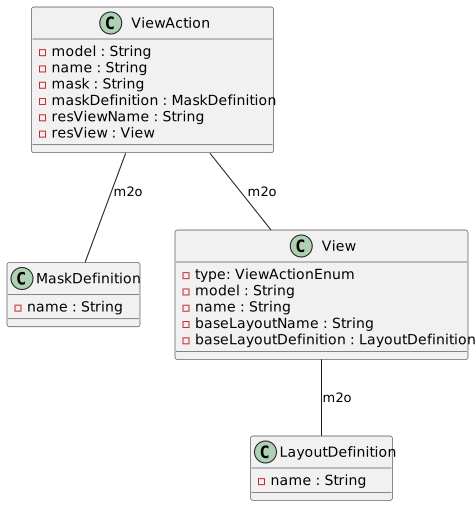
Ⅱ. DSL Design
In Oinone, Masters, Layouts, and Views are all stored in XML format in the database, while the DSL obtained by the frontend is in JSON format. Understanding the basic principles of DSL design and the representation of data types can help us use DSL more effectively.
(Ⅰ) XML Syntax Basics
Let’s first look at the following XML content:
<view type="TABLE" model="demo.DemoModel" name="demo_table_view">
    ......
</view>
A standard XML content has the following characteristics and concepts:
- XML uses nodes to describe the document structure. Each node consists of three elements: tag name, attributes, and child nodes.
- Any XML document has exactly one root node.
- Node/Element/Tag: These three terms refer to the same concept and are used in different scenarios. For example: "
Root Node", "<view> Element", and "view Tag" all describe the same<view></view>object.
(Ⅱ) Data Types
Since XML only supports string-type values for attributes, but the frontend needs to convert and map these attributes to the required types. The following lists common data types in Oinone DSL and their representation methods in documents.
1. Common Data Types and Conversion Rules
- string: No conversion required.
- number: Converted to
numbertype viaNumberHelper#toNumber. - enum: Depends on the enum value type.
- boolean: Converted to
booleantype viaBooleanHelper#toBoolean. - Date: Depends on the format string; converted to
Datetype viaDateUtil#toDate. - array: Converted to
string[]type viaStringHelper#convertArray. Unless specifically stated, all array types are separated by half-width commas (,).
Tip
These conversion rules apply to the attribute configuration of most components provided by the Widget framework. For the configuration of some special attributes, hints will be provided in the component attribute examples.
2. Data Type Notations
In frontend-related documents, we use a notation similar to TypeScript type declarations to represent the types of attributes. The following lists several common data type notations:
string: String.number: Number.string | number: String or number.'click' | 'dblclick': Explicitly lists enum options.ButtonType: Enum type; used when there are too many enum options.url: String in link format.rsql: String in RSQL format.expression: String in expression format.color: CSS color value.gutter: CSS gutter configuration.icon: Icon (Font Class corresponding to the iconfont library).string[]: Array of strings.number[]: Array of numbers.string[] | number[]: Array of strings or array of numbers.(string | number)[]: Mixed array of string or number types.('click' | 'dblclick')[]: Array of enums.
(Ⅲ) Structural Representation
According to XML syntax characteristics, there are sequential relationships and relative relationships between nodes. In Oinone DSL, except for the xslot and template tags, all other tags are ultimately parsed into corresponding Widget components for rendering and to provide related functions.
1. Sequentiality
Let’s look at these two DSL snippets:
<field data="code" />
<field data="name" /><field data="name" />
<field data="code" />When we swap the order of the two tags in the DSL, their rendering order also changes accordingly. This is the sequentiality of DSL.
2. Relative Relationships
Sibling Relationship: Two adjacent nodes at the same level have a sibling relationship.
<field data="code" />
<field data="name" />
Parent-Child Relationship: Two nodes at adjacent levels have a parent-child relationship.
<pack widget="tabs">
  <pack widget="tab">
    ......
  </pack>
</pack>
3. Component Autonomy Principle
The management scope of any Widget component is strictly limited to itself and all its child nodes. Each component can define attributes and slots, and adapt to business scenarios through configuration in the DSL.
For example:
- An input box component can function as an independent component without relying on any other components.
- For a tab component, the
tabsandtabcomponents must be used together in a parent-child relationship to ensure normal functionality. The management scope of thetabscomponent is limited to its child nodes and does not include grandchild nodes; thetabcomponent does not care about any child nodes and only provides an area for dynamic rendering.
It is worth noting that regardless of the implementation method, direct associations should not be established between components. Violating this principle will not only break the autonomy of components but also cause them to lose universality—which is a core principle that must be adhered to in component design.