Ⅰ. Overview of Framework Information
In the process of backend data interaction, in addition to returning error information to the frontend, it also has the ability to return different levels of information such as debugging, warnings, success, and general information. However, by default, the frontend only prompts for error information. If you want to implement prompts for other levels of information, you can adjust the prompt level through the frontend's unified configuration. This mechanism is similar to the backend's log level setting, and through flexible configuration, the frontend can differentially present and process information of different importance.
Ⅱ. Framework MessageHub
For the Oinone platform, how to achieve friendly error prompts is a crucial consideration. Next, we will introduce MessageHub in detail. This tool opens up extremely broad space for implementing custom error prompts, giving the platform great flexibility and possibility in error prompt customization.
Ⅲ. When to Use
Error prompting is a particularly important part of the user experience, and most errors are reflected at the whole page level, field level, and button level. What should a friendly error prompt look like? We assume it is like this:
- Closely契合 with user operations
- When the field input is abnormal, the error is displayed at the bottom of the error box
- When the button triggers the service abnormally, the error is displayed at the bottom of the button
- Distinguish different types
- Error
- Success
- Warning
- Tip
- Debug
- Concise and easy-to-understand error messages
Ⅳ. Examples of Different Information Types
package pro.shushi.pamirs.demo.core.action;

import org.springframework.stereotype.Component;
import pro.shushi.pamirs.demo.api.model.PetCatItem;
import pro.shushi.pamirs.demo.api.model.PetType;
import pro.shushi.pamirs.meta.annotation.Action;
import pro.shushi.pamirs.meta.annotation.Model;
import pro.shushi.pamirs.meta.api.dto.common.Message;
import pro.shushi.pamirs.meta.api.session.PamirsSession;
import pro.shushi.pamirs.meta.enmu.ActionContextTypeEnum;
import pro.shushi.pamirs.meta.enmu.InformationLevelEnum;
import pro.shushi.pamirs.meta.enmu.ViewTypeEnum;

@Model.model(PetType.MODEL_MODEL)
@Component
public class PetTypeAction {

    @Action(displayName = "Message",bindingType = ViewTypeEnum.TABLE,contextType = ActionContextTypeEnum.CONTEXT_FREE)
    public PetType message(PetType data){
        PamirsSession.getMessageHub().info("info1");
        PamirsSession.getMessageHub().info("info2");
        PamirsSession.getMessageHub().error("error1");
        PamirsSession.getMessageHub().error("error2");
        PamirsSession.getMessageHub().msg(new Message().msg("success1").setLevel(InformationLevelEnum.SUCCESS));
        PamirsSession.getMessageHub().msg(new Message().msg("success2").setLevel(InformationLevelEnum.SUCCESS));
        PamirsSession.getMessageHub().msg(new Message().msg("debug1").setLevel(InformationLevelEnum.DEBUG));
        PamirsSession.getMessageHub().msg(new Message().msg("debug2").setLevel(InformationLevelEnum.DEBUG));
        PamirsSession.getMessageHub().msg(new Message().msg("warn1").setLevel(InformationLevelEnum.WARN));
        PamirsSession.getMessageHub().msg(new Message().msg("warn2").setLevel(InformationLevelEnum.WARN));
        return data;
    }
}2
3
4
5
6
7
8
9
10
11
12
13
14
15
16
17
18
19
20
21
22
23
24
25
26
27
28
29
30
31
32
Ⅴ. Query Operation Return and Effect
System prompt return results 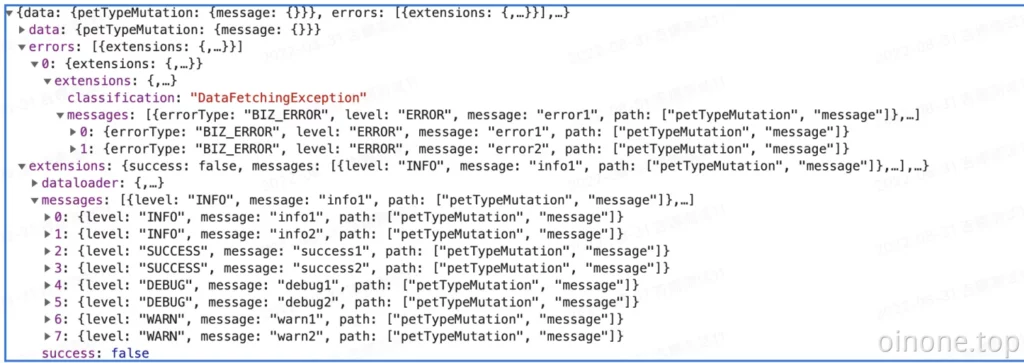
System prompt example effect 