Implementing User Center Menu Replacement Using Extension Points
Ⅰ、Adding pamirs-user-api Dependency in the Project
xml
<dependency>
  <groupId>pro.shushi.pamirs.core</groupId>
  <artifactId>pamirs-user-api</artifactId>
</dependency>Ⅱ、Implementing Post Extension of TopBarUserBlockAction
- Implement the
HookAfterpost-extension interface - Add the
@Hookannotation to specify it as a post-extension for theconstructfunction of theTopBarUserBlockmodel:@Hook(model = {TopBarUserBlock.MODEL_MODEL}, fun = {"construct"})
(Ⅰ)Adding User Center Menu
java
@Component
@Order(1)
@SPI.Service
public class MyTopBarActionExt implements TopBarActionExtendApi {

    public void edit(List<TopBarAction> list) {
        list.add(new TopBarAction("top_demo", "top.Teacher", "uiView9a0caf1d574a42c9847a057a0c4a4ad1", ActionTypeEnum.VIEW, 1)
                 .setDisplayName("商品管理")
                 .setIcon("oinone-gongzuotai")
                );
    }

}Implementation Effect
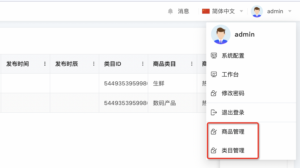
(Ⅱ)Replacing Original User Center Menu
- Replacing Original Menu Redirection
java
@Component
public class DemoTopBarUserBlockDataHookAfter implements HookAfter {

    @Override
    @Hook(model = {TopBarUserBlock.MODEL_MODEL}, fun = {"construct"})
    public Object run(Function function, Object ret) {
        if (ret == null) {
            return null;
        }
        TopBarUserBlock result = null;
        if (ret instanceof Object[]) {
            Object[] rets = (Object[]) ((Object[]) ret);
            if (rets.length == 1) {
                result = (TopBarUserBlock) rets[0];
                // Example: Replace User Center: Change Password Menu
                // Query the model's ViewAction by name and model to replace the change password ViewAction
                ViewAction demoViewAction = PamirsSession.getContext().getExtendCache(ActionCacheApi.class).get(Dog.MODEL_MODEL, "changePassword");
                // Set the menu icon
                Map<String, Object> attributes = Optional.ofNullable(demoViewAction.getAttributes()).orElse(new HashMap<>());
                attributes.put("icon", "oinone-xiugaimima");
                demoViewAction.setAttributes(attributes);
                // The 0th index of UserViewAction is the change password ViewAction; replacing with a custom ViewAction achieves the replacement
                result.getUserViewAction().set(0, demoViewAction);
            }
        } else {
            result = (TopBarUserBlock) ret;
        }
        return result;
    }
}- Adding
ViewActionUsing@UxRouteButton
java
@Model.model(Dog.MODEL_MODEL)
@Component
@UxRouteButton(
        action = @UxAction(name = "changePassword", displayName = "修改密码"),
        value = @UxRoute(model = Dog.MODEL_MODEL, openType = ActionTargetEnum.DIALOG))
public class DogAction {
}Ⅲ、Replacing Original Profile Avatar Redirection
- Modifying the Redirection Logic Bound to Avatar Click
java
@Order(10)
@Component
@SPI.Service
public class DemoTopBarUserBlockDataApi implements TopBarUserBlockDataApi {

    @Override
    public TopBarUserBlock extendData(TopBarUserBlock data) {
        // For example, adding a menu: PamirsDemo.MODEL_MODEL: model. MenuuiMenu31f22466735a4abe8e0544b428ed88ac: viewAction's name.
        Action demoViewAction = PamirsSession.getContext().getExtendCache(ActionCacheApi.class).get(PamirsDemo.MODEL_MODEL, "MenuuiMenu31f22466735a4abe8e0544b428ed88ac");
        if (demoViewAction != null){
            AccessResourceInfo info = PageLoadHelper.generatorAccessResourceInfo(TopModule.MODULE_MODULE, demoViewAction);
            AccessResourceInfoSession.setInfo(info);
            String path = ResourcePath.generatorPath(demoViewAction.getModel(), demoViewAction.getName());
            demoViewAction.setSessionPath(path);
            data.setUserAvatarAction(demoViewAction);
        }
        return data;
    }
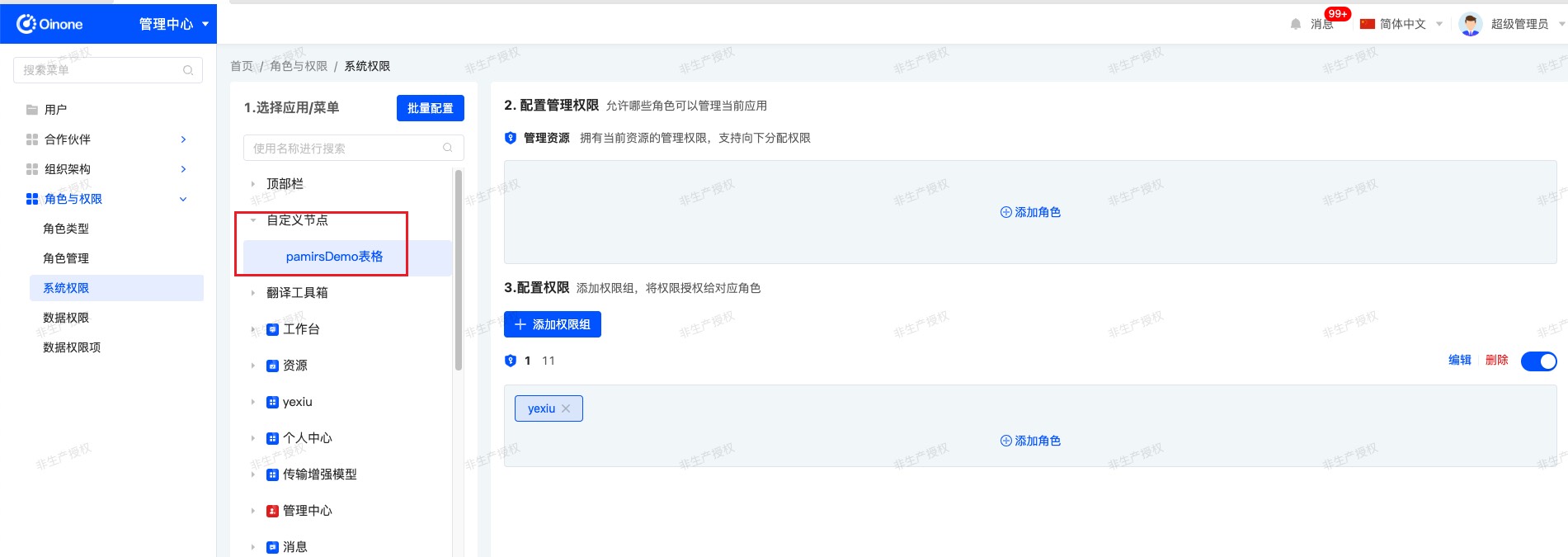
}- Adding Permission Nodes for Permission Control
java
@Component
@Order(88)
@SPI.Service
public class MyTestNodeLoadExtend implements PermissionNodeLoadExtendApi {

    @Override
    public List<PermissionNode> buildRootPermissions(PermissionLoadContext loadContext, List<PermissionNode> nodes) {
        PermissionNode root = AuthNodeHelper.createNodeWithTranslate("CustomNode", "自定义节点");
        List<PermissionNode> newNodes = new ArrayList<>();
        newNodes.add(root);
        Action demoViewAction = PamirsSession.getContext().getExtendCache(ActionCacheApi.class).get(PamirsDemo.MODEL_MODEL, "MenuuiMenu31f22466735a4abe8e0544b428ed88ac");

        if (demoViewAction != null) {
            // Add this Action to the permission tree
            // The permission authentication path is concatenated as 【cacheAction.getModel() + cacheAction.getName()】, irrelevant to MODULE, which can be customized here.
            AuthNodeHelper.addNode(newNodes, root, AuthNodeHelper.createActionNode(TopModule.MODULE_MODULE, demoViewAction, root));
        }
        nodes.add(0, root);
        return newNodes;
    }
}- Controlling Profile Avatar Permissions in the Management Center