Ⅰ. Introduction to Oinone Platform Home Pages
(Ⅰ) Home pages include two types: global home page and application home page
- Global home page: Refers to the application home page used when users do not specify a redirect address during login.
- Application home page: Refers to the home page used when users switch applications.
Note:
The global home page is essentially an application home page, serving as the home page when no specific application is specified (e.g., after login).
(Ⅱ) Global Home Page Search Rules
- Retrieve all applications accessible to the current user.
- If the home page is configured using AppConfig, this configuration takes precedence as the global home page. If not specified or no access permission exists, proceed to step 3.
- Sequentially obtain accessible home pages or menus as the global home page based on application priorities.
- If no accessible pages are found, prompt an unauthorized access exception, preventing users from entering the platform.
(Ⅲ) Application Home Page Search Rules
- Under the specified application, obtain accessible home pages or menus as the application home page.
- If no accessible pages are found, prompt an unauthorized access exception, preventing users from normal viewing or operation after entering the application.
Ⅱ. Configuring the Global Home Page
Set the global home page using application priority
/**
 * Demo Module
 *
 * @author Adamancy Zhang at 16:55 on 2024-03-24
 */
@UxHomepage(@UxRoute(DemoDepartment.MODEL_MODEL))
@Component
@Boot
@Module(
    name = DemoModule.MODULE_NAME,
    displayName = "Demo Application",
    version = "1.0.0",
    dependencies = {ModuleConstants.MODULE_BASE},
    priority = 0
)
@Module.module(DemoModule.MODULE_MODULE)
@Module.Advanced(selfBuilt = true)
public class DemoModule implements PamirsModule {

    public final static String MODULE_MODULE = "demo";

    public final static String MODULE_NAME = "demo";

    @Override
    public String[] packagePrefix() {
        return new String[]{"pro.shushi.pamirs.demo"};
    }

}Note:
@UxHomepagespecifies the application home page.@Module#priorityspecifies the module priority, sorted in ascending order.
Ⅲ. Configuring the Application Home Page
(Ⅰ) Configuring the Application Home Page with @UxHomepage
1. Designate the default table view of a model as the application home page
@UxHomepage(@UxRoute(DemoDepartment.MODEL_MODEL))This designation produces the following results:
- Generates a navigation action (ViewAction) with the model code
DemoDepartment.MODEL_MODELand action namehomepage. - Sets
ModuleDefinition#homePageModelandModuleDefinition#homePageNameto this navigation action.
2. Designate the menu corresponding to the model as the application home page
The current application has the following menu definitions:
/**
 * Demo Module Menus
 *
 * @author Adamancy Zhang at 17:16 on 2024-03-24
 */
@UxMenus
public class DemoMenus {

    @UxMenu("Demo Department")
    @UxRoute(DemoDepartment.MODEL_MODEL)
    class DepartmentManagement {
    }

    @UxMenu("Demo Employee")
    @UxRoute(DemoEmployee.MODEL_MODEL)
    class EmployeeManagement {
    }
}Based on the menu definitions: The "Demo Department" menu generates a navigation action (ViewAction) with the model code DemoDepartment.MODEL_MODEL and action name DemoMenus_DepartmentManagement.
Therefore, the application home page can be designated as the "Demo Department" menu using:
@UxHomepage(actionName = "DemoMenus_DepartmentManagement", value = @UxRoute(DemoDepartment.MODEL_MODEL))Ⅳ. Modifying the Application Home Page in the App Center
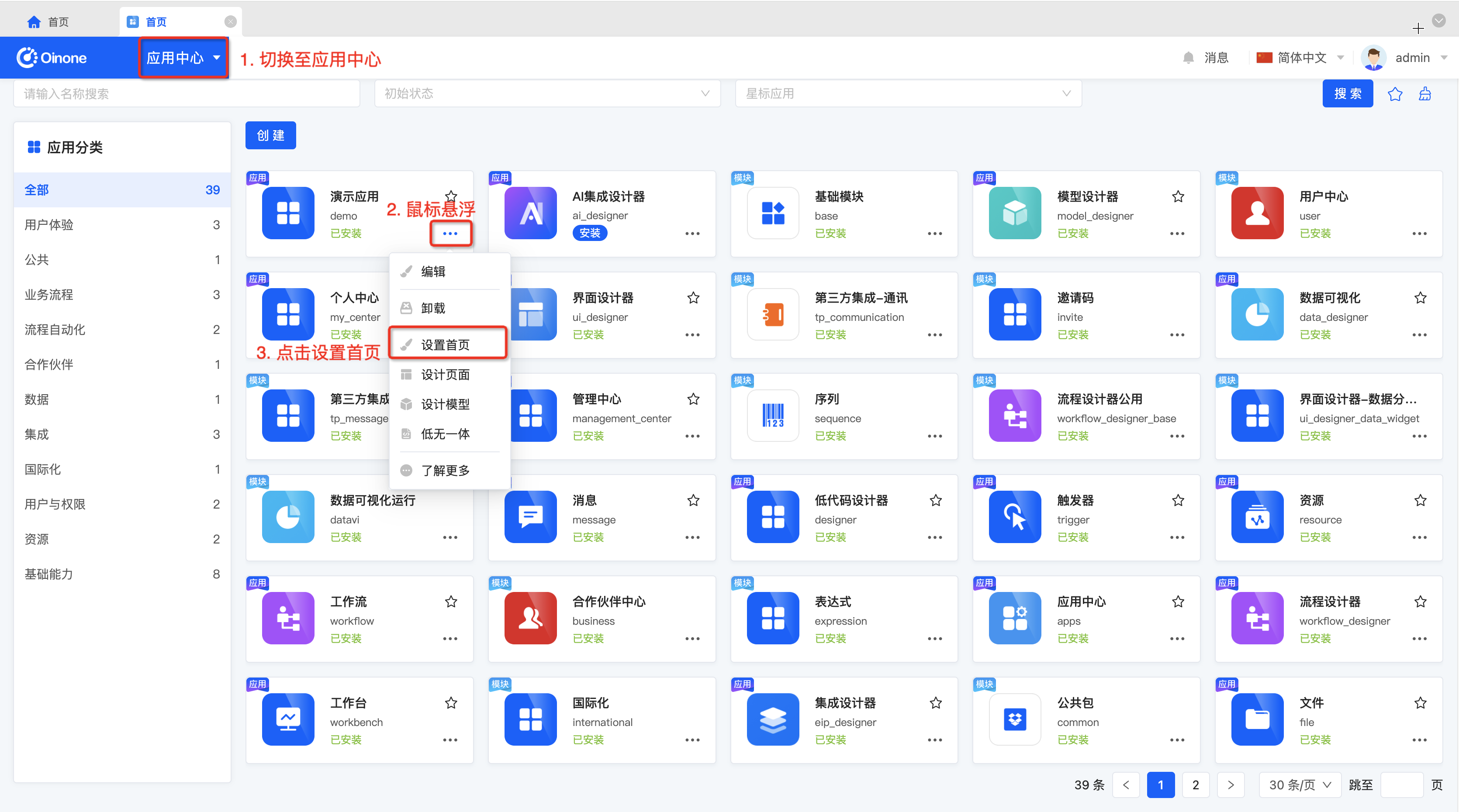
After the platform starts, the home page cannot be modified via code, requiring modifications in the App Center.
Follow the operations shown in the figure to set the application home page.
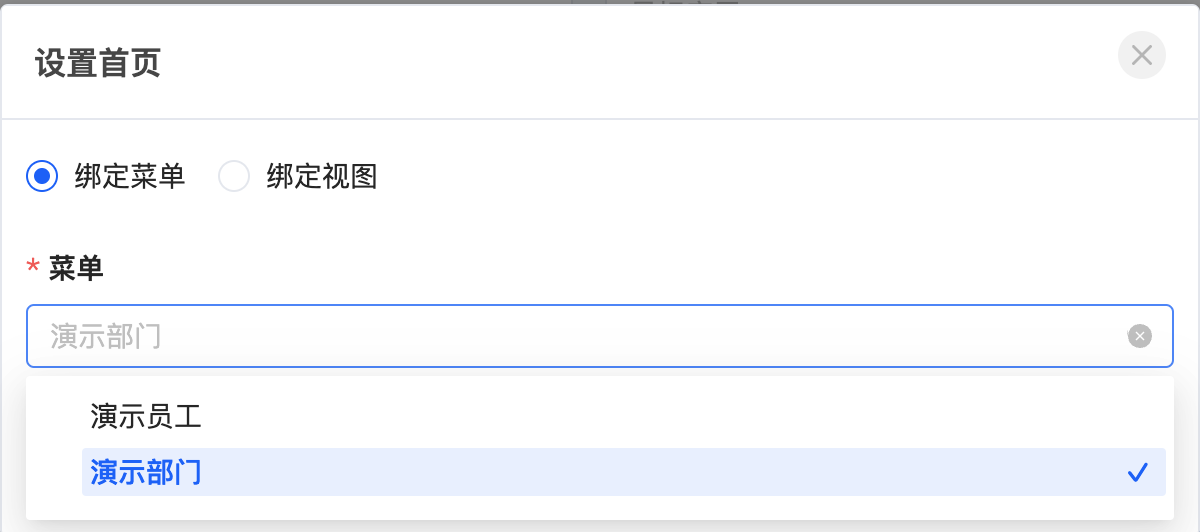
In the menu binding options, select the specified menu.