I. Mindset
We are making it work for us, not verifying its intelligence. AI may seem very stupid in some aspects, so we don't need to get entangled. Manually correcting it will be faster and beneficial for the subsequent learning of AI. At the same time, we need to provide it with a normal workflow and avoid problems as much as possible. We are programming in tandem with AI, not leaving everything to it. Of course, the better you know how to cooperate, the more AI can do.
(I) Experience in Programming in Tandem with AI
- Engineering environment: Errors may occur due to engineering dependencies. Although we have source code in the
.traedirectory and AI will automatically scan the code and add dependencies. However, it is very time-consuming and prone to errors when scanning a large number of files. If we do it manually, it will reduce the understanding cost ofAI. Just like beginners, they usually get stuck in environment setup, and so doesAI. If the environment is set up well, thenAIwill also give you better feedback. - Don't expect to complete a task at once. Break down large tasks into small ones and layer the tasks. Finally, execute them in batches according to the layers. For example, first create models and menus, and then write
serviceandAction. - Don't expect perfection at once. Perfect code is the result of multiple tasks being superimposed. For example, after all
Actionhas been executed normally, letAIcheck allActionaccording to theOinonespecification (such as naming conventions, input and output parameter specifications). Finally, letActioncreate proxy models and modify or add newActionaccording to the unique interaction ofOinone(for example, if there are multiple model inputs, they can be merged into a proxy model or a transmission model, and the corresponding methods can be placed in the transmission model).
II. What We Have
That is, under the .trae directory, we have the workflow (commands, skills) of the open-source opsx, the rules we have accumulated, and the open-source source of Oinone (documentation oinone-docs, source code oinone-pamirs).
| Materials | Sub - materials | Description | Remarks |
|---|---|---|---|
| commands | opsx-new | Do work | Regular operations (for beginners) |
| opsx-verify | Verify | Regular checks (for beginners) | |
| opsx-explore | Explore | May have miraculous effects | |
| rules | project_rules | Default rules | Basic rules |
| oinone-action-service-rules | Basic rules for action - service | Used for secondary improvement work after the generation of action and service | |
| oinone-action-ux-rules | Analyze the jump logic from the input parameters of action. Complete the default jump logic and transmission model | Make Action comply with the front - end and back - end interaction specifications of Oinone | |
| oinone-exception-rules | Exception specifications | Execute at the end | |
| oinone-business-data-init-rules | Initialization of test data | Initialization of test data | |
| oinone-dataPermission-extends-rules | An example of business permission extension | An example of business permission extension | |
| oinone-menu-rules | Menu regularization | Arrange the default menu in the business order and add icons to the menu | |
| source | oinone-docs | Documentation | Oinone documentation helps AI understand quickly |
| oinone-pamirs | Kernel source code | The source code makes it easier for AI to identify the deep - level principles and answer single - problem questions more professionally |
Remarks: It will be more effective if there is an example project in the engineering project. The example project should be added as a sub - module, and AI will refer to the example project preferentially.
III. Working Mode
(I) Basic Configuration
1. Configuration of Oinone
- (Required) Install the
traeplugin of Oinone oinone-pamirs-plugin-1.0.1.vsix.zip
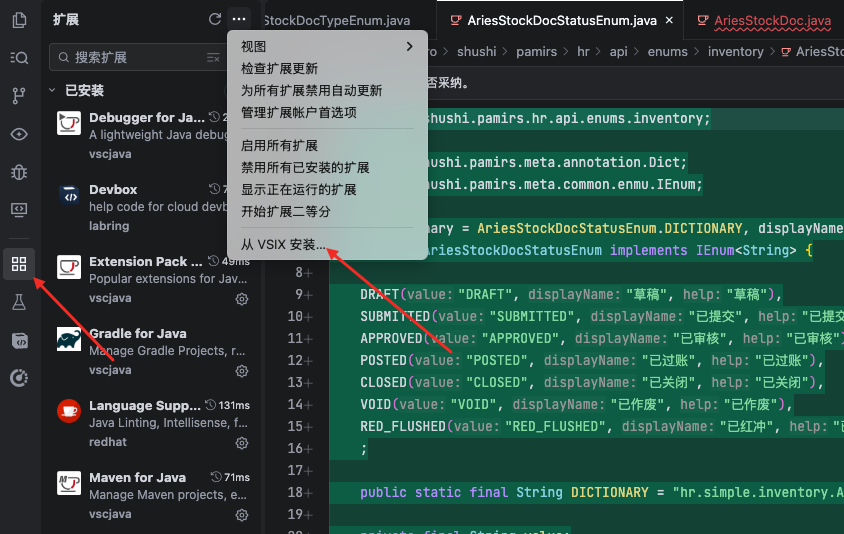
- (Optional) Manually install
docker - (Optional) Use the Oinone plugin to install middleware (currently available for the mac environment. For the windows environment, please refer to the official Oinone documentation Oinone Documentation)
| Middleware | Username and Password |
|---|---|
| MySQL | root/oinone123, and there is also an application user oinone/oinone123 |
| Redis | requirepass: oinone123, database index: 0 |
| MiniIO | User: oinone, Password: oinone123 |
| ElasticSearch | User: elastic, Password: oinone123 (xpack.security is enabled) |
| Zookeeper | No account and password (default no authentication) |
| RocketMQ | No account and password (ACL is not enabled by default) |
2. Configuration of Trae
Step 1: Download .trae .trae.zip
Step 2: Copy .trae to the root directory of the project.
Step 3: Download the Oinone source code.
Run the .trae/source/git-clone.sh script:
sh .trae/source/git-clone.shThis script will automatically clone the following repositories:
https://gitee.com/oinone/oinone-pamirs.git(Oinone framework source code)https://gitee.com/oinone/oinone-docs.git(Oinone official documentation)
Step 4: Configure the Trae project rules.
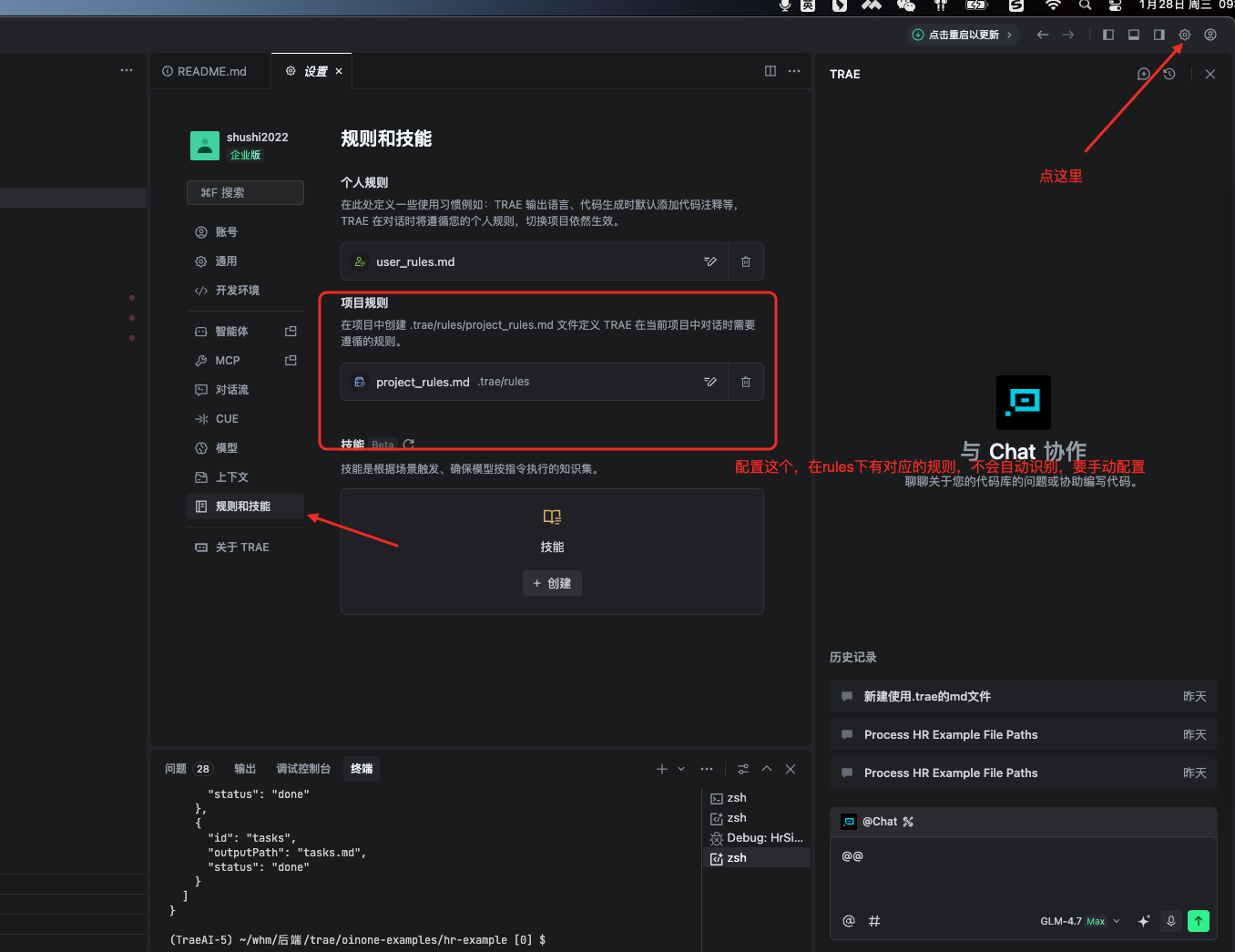
3. Which model is better to choose in Trae
Select GLM - 4.7, turn on the MAX - MODE mode, and select the Builder with MCP mode.
(II) Operation Example (Actual operations should follow the workflow)
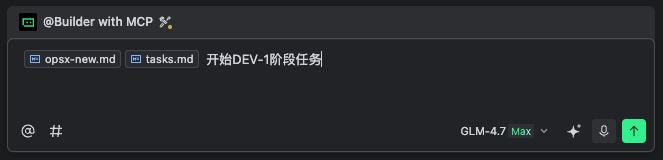
The basic operation method is to drag the workflow file, prd, or tasks into the AI dialog box. For example:
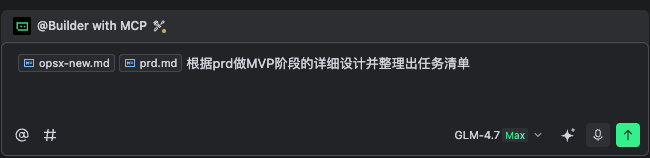
Normally, it will generate an outline (proposal), product requirement understanding (specs), detailed design (design), and task list (tasks). As follows:
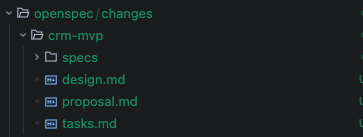
Once you have the tasks, you can start executing them. You can execute them in batches according to the task coding or stages. As follows:
IV. Workflow
(I) Explore Design Solutions with AI (Optional)
Use the workflow opsx-explore, which allows AI to do a good job in project planning and complete project setup. To reduce the difficulty for AI, you can manually check the dependencies of the established project. For example, add the following dependencies to the api project:
<dependency>
    <groupId>pro.shushi.pamirs</groupId>
    <artifactId>a</artifactId>
</dependency>
<dependency>
    <groupId>pro.shushi.pamirs.boot</groupId>
    <artifactId>pamirs-boot-standard</artifactId>
</dependency>
<dependency>
    <groupId>pro.shushi.pamirs.core</groupId>
    <artifactId>pamirs-user-api</artifactId>
</dependency>(II) Let AI Generate Design Documents and Task Lists Based on PRD
Use the workflow opsx-new, which allows AI to do a good job in detailed design and task lists. This check is very important to ensure that the detailed design is correct and the task list is complete.
1. Produce detailed design and task lists
opsx-new.md, prd.md Please help me with the detailed design and task list for the "xxx version".
2. Preliminary check of the detailed design and tasks (reduce the probability of errors in the generated code)
opsx-new.md,tasks.md,oinone-action-service-rulesPlease check whether the action and service corresponding to the tasks comply with the specifications and make adjustments.opsx-new.md,tasks.md,oinone-action-ux-rulesPlease check whether the action and service corresponding to the tasks comply with the specifications and make adjustments.
3. Manually check again
(III) Execute in Batches According to the Task List
Use the workflow opsx-new to control the amount of code generated each time. If it is too long, AI will make mistakes. It is recommended to execute in layers in the following order, and each layer can be executed in batches:
1. Create models and menus
In this step, you need to drag opsx-new.md and tasks.md into the dialog box and then enter: Start DEV - 1.
2. Create Action and Service
In this step, you need to drag opsx-new.md and tasks.md into the dialog box and then enter: Start DEV - 2.
3. Optimize Action and Service
In this step, you need to drag opsx-new.md, tasks.md, and the oinone-action-service-rules rule into the dialog box. The wording is: Please check whether the code corresponding to the tasks for action and service complies with the specifications and make code adjustments.
4. Optimize Action According to the Interaction
In this step, you need to drag opsx-new.md, tasks.md, and the oinone-action-ux-rules rule into the dialog box. The wording is: Please check whether Action complies with the Oinone Action development specifications.
(IV) Verify the Execution Results
1. Overall Check
Use the workflow opsx-verify and drag the tasks to be verified into the trae dialog box.
2. Single - point Check
If an error is found, you can select the line and add it to the dialog box, then select the corresponding rule file and let it check other similar situations.
(V) Additional Steps to be Executed at the End
1. Menu
oinone-menu-rules.md, please adjust the menu according to the Oinone menu rules.
2. Check Exception Handling
opsx-verify, oinone-exception-rules.md, fix the code according to the Oinone exception specifications.
3. Initialization of Business Data
tasks.md, oinone-business-data-init-rules.md, help me initialize the business test data.
V. Common Problems
(I) Incorrect File Path
This seemingly stupid behavior can be regarded as a careless mistake by AI. You can manually delete or move the files.
(II) Incomplete Work, i.e., AI Being Lazy
Not all files are modified correctly. Since the context of AI is limited, try to include tasks.md or execute the tasks several times.
(II) Implementation Errors or Non - compliance with Specifications
There must be scenarios that are not covered. You can give the requirements to AI and let it correct them first. Then let it precipitate the rules into a new oinone-xxx-rules.md. If you want to merge the rule adjustments into the original rule file, you need to let AI check for conflicts with the content of the original rule file. After going through these processes, using AI will become smoother.
How to determine whether to use a new rule file or merge it into the original rule file mainly depends on whether the rules need to exist independently. Don't expect AI to understand everything at once, especially domestic models. They are prone to making mistakes when the context is too