In the early implementation of Oinone Kunlun, we used rxjs as the specific implementation for inter-component communication. In the current latest version, we only retain a very small part of the functions that use the "Peer-to-Peer (P2P)" communication method, and most of them have been changed to the Provide / Inject method.
Ⅰ. Overview
At the beginning of this chapter, we think it is necessary to explain to readers the pros and cons of these two communication methods in automated rendering scenarios, so as to help readers choose a more appropriate communication method when implementing custom components to cope with different application scenarios.
(Ⅰ) RxJS
1. Basic Concepts
- Observable: Represents a concept, which is a collection of callable future values or events.
- Observer: A collection of callback functions that know how to listen to the values provided by the Observable.
- Subscription: Represents the execution of an Observable, mainly used to cancel the execution of the Observable.
- Operators: Pure functions in a functional programming style, using operators like map, filter, concat, flatMap, etc. to process collections.
- Subject: Equivalent to an EventEmitter, and is the only way to multicast values or events to multiple Observers.
- Schedulers: Centralized dispatchers used to control concurrency, allowing us to coordinate when calculations occur, such as setTimeout or requestAnimationFrame, etc.
Note:
Most of the content in this section introduces and explains some basic concepts of RxJS. For more information about RxJS, please refer to: RxJS
2. Subject
RxJS Subject is a special type of Observable that allows values to be multicast to multiple observers. As shown below:
import { Subject } from '@oinone/kunlun-dependencies';

const subject = new Subject<string>();
subject.subscribe((v) => {
  console.log(`subscribe 1: ${v}`);
});
subject.subscribe((v) => {
  console.log(`subscribe 2: ${v}`);
});
subject.next('1');
subject.next('2');
subject.next('3');

// Console output
// subscribe 1: 1
// subscribe 2: 1
// subscribe 1: 2
// subscribe 2: 2
// subscribe 1: 3
// subscribe 2: 3Note:
For more information about RxJS Subject, please refer to: RxJS Subject
3. BehaviorSubject
One variant of Subject is BehaviorSubject, which has the concept of a "current value". It stores the latest value sent to consumers. And when a new observer subscribes, it will immediately receive the "current value" from the BehaviorSubject.
import { BehaviorSubject } from '@oinone/kunlun-dependencies';

const subject = new BehaviorSubject<string | null>(null);
subject.subscribe((v) => {
  console.log(`subscribe 1: ${v}`);
});
subject.next('1');
subject.next('2');
subject.subscribe((v) => {
  console.log(`subscribe 2: ${v}`);
});
subject.next('3');

// Console output
// subscribe 1: null
// subscribe 1: 1
// subscribe 1: 2
// subscribe 2: 2 // New subscription occurs
// subscribe 1: 3
// subscribe 2: 3Note:
For more information about RxJS BehaviorSubject, please refer to: RxJS BehaviorSubject
(Ⅱ) Provide / Inject
1. Vue Provide / Inject Mechanism
As explained in the official Vue documentation, Provide / Inject is designed to solve the problem of "prop drilling". A parent component acts as a dependency provider relative to all its descendant components. Any descendant component tree, regardless of depth, can inject dependencies provided by the parent component along the chain.
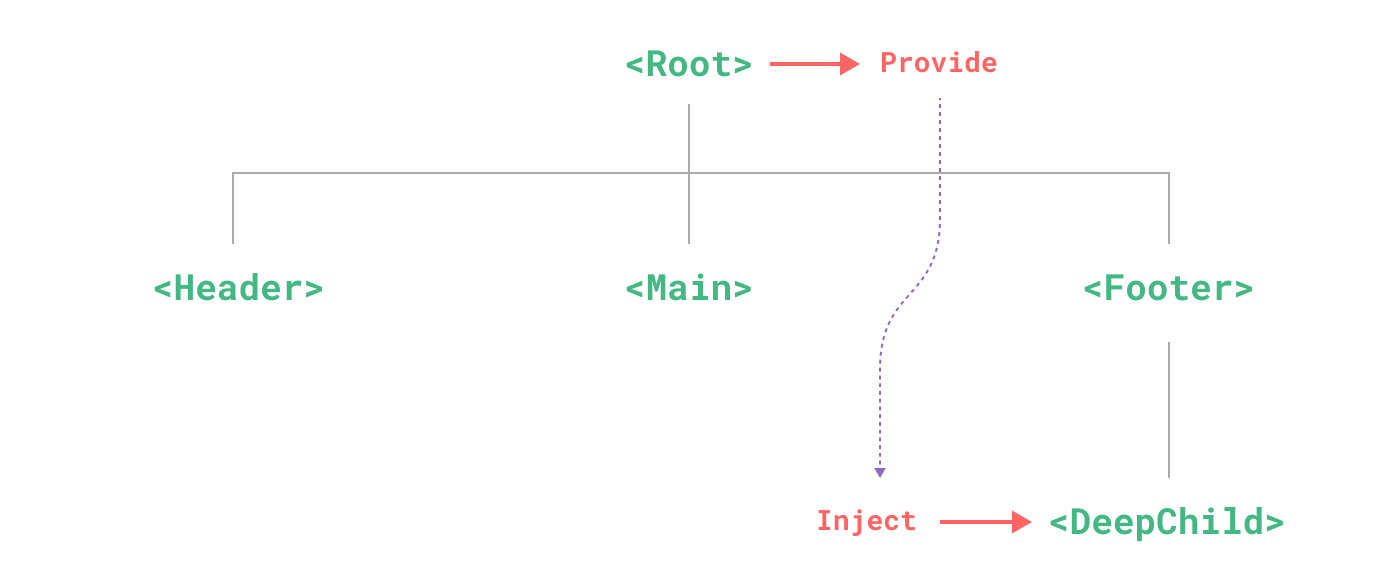
Note:
For more information about Provide / Inject, please refer to: Vue Dependency Injection
2. Basic Usage
In the context of the Provide / Inject mechanism, for parent-child components, the parent component is usually called the provider component, and the child component is usually called the injector component. The following is the internationalization example code provided by the official Vue documentation: (The example code has been modified to better illustrate the content of the next section)
<!-- In the provider component -->
<script setup>
import { provide, ref } from 'vue';

const location = ref('North Pole');

function updateLocation(value) {
  location.value = value;
}

provide('location', {
  location,
  updateLocation
});
</script><!-- In the injector component -->
<script setup>
import { inject } from 'vue';
const { location, updateLocation: parentUpdateLocation } = inject('location');
const updateLocation = () => {
parentUpdateLocation('South Pole');
};
</script>
<template>
<button @click="updateLocation">{{ location }}</button>
</template>Note:
It is worth mentioning that this example provides the updateLocation method so that the injector component does not directly modify the location reactive object, and ensures the basic principles of one-way data flow and one-way modification. Readers should also pay attention to this in actual use.
3. Scope Isolation and Event Bubbling
Due to the mechanism principle of Provide / Inject, any properties or methods provided by the dependency provider can only be obtained in child components, that is, the two components need to have a parent-child relationship to communicate.
Then, as long as we re-provide new properties or methods in any component between parent and child components, we can generate a new communication method with scope isolation and event bubbling. This is also the communication method finally adopted by Oinone in the implementation process.
Let's add a new provider between the above provider and injector. This provider will re-provide a new update method to provide new capabilities when the child component triggers the updateLocation method.
<!-- In the new provider component -->
<script setup>
import { inject, provide } from 'vue';

const locationInject = inject('location');
const { updateLocation: parentUpdateLocation } = locationInject;

function updateLocation(value) {
  // do something.
  parentUpdateLocation(value);
}

provide('location', {
  ...locationInject,
  updateLocation
});
</script>At this time, when the injector component calls the updateLocation method, the intermediate layer can monitor and modify the data. As shown in the sequence diagram:
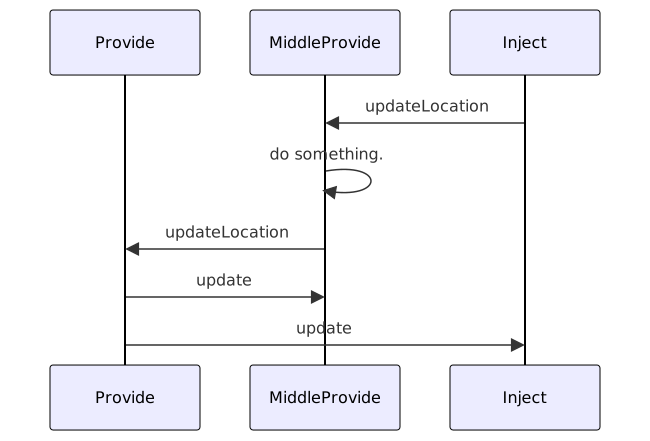
Note:
The above example is only used to illustrate an implementation method when a new provider component is added between parent and child components. In Oinone, the formData of the form field component is essentially implemented recursively through this principle.
(Ⅲ) Applicable Scenarios
1. RxJS Applicable Scenarios
- Both components that need to communicate are custom components, and can decide to publish/subscribe by themselves.
- The component hierarchy is unclear or it is out of the VDOM document flow. For example: pop-ups opened through the
executeViewActionmethod. - The scenario is single, and there are no side effects caused by recursive rendering when used.
2. Provide / Inject Applicable Scenarios
- Each component does not care about its position, as long as the parent-child relationship is guaranteed. For example: there is always a parent-child relationship between
FormWidgetandFormFieldWidget. - The scenario is general, allowing external providers to affect child components, so that they have similar functions but can produce different results. Suitable for recursive rendering scenarios. For example: the input box component can be used for any component of text type in any model without caring about the specific hierarchy.
Ⅱ. Using RxJS in Widget Components
(Ⅰ) Using Subject in Widget Components
- Define a
Keyfor communication, so that the publisher and subscriber use the sameSubjectobject.
export const subContextSymbol = Symbol('subContext');- Initiate a subscription in the subscriber component:
@Widget.SubContext(subContextSymbol)
protected subContext$!: WidgetSubjection<boolean>;

protected doSubject() {
  this.subContext$.subscribe((value) => {
    console.log(this.currentHandle, value);
  });
}

protected mounted() {
  // Initiate subscription when the component is mounted
  this.doSubject();
}Note:
There is a difference between using the this.subContext$.subscribe subscription method and the this.subContext$.subject.subscribe subscription method here:
- this.subContext$.subscribe: The Widget framework encapsulates the subscription method, which automatically unsubscribes when the component is unmounted.
- this.subContext$.subject.subscribe: RxJS native subscription method, which needs to be unsubscribed manually.
- Publish a new value in the publisher component to trigger all subscriptions:
@Widget.SubContext(subContextSymbol)
protected subContext$!: WidgetSubjection<boolean>;

protected doPublish() {
  this.subContext$.subject.next(true);
}Note:
When the publisher repeatedly publishes the same "new value", the subscriber will decide whether to receive the duplicate value according to the subscription logic. The default subscription logic allows receiving duplicate values. This is completely consistent with the RxJS default implementation.
(Ⅱ) Using BehaviorSubject in Widget Components
Change the Widget.SubContext decorator to Widget.BehaviorSubContext to use the publish-subscribe function with BehaviorSubject features:
@Widget.BehaviorSubContext(behaviorSubContextSymbol)
protected behaviorSubContext$!: WidgetBehaviorSubjection<boolean>;Warning:
The same Symbol needs to be processed with the same decorator in each Widget component, otherwise there will be a problem of invalid subscription.