I. Overview
(Ⅰ) Nomenclature Explanation
- Business Entity (PamirsPartner): Refers to an independent entity participating in commercial activities, continuing the socialized concept, representing natural persons or legal persons, and serving as the subject of commercial relationships and transaction behaviors (such as signing contracts, performing contracts).
- An independent entity participating in commercial activities, continuing the socialized concept, representing natural persons or legal persons, and serving as the subject of commercial relationships and transaction behaviors (such as signing contracts, performing contracts).
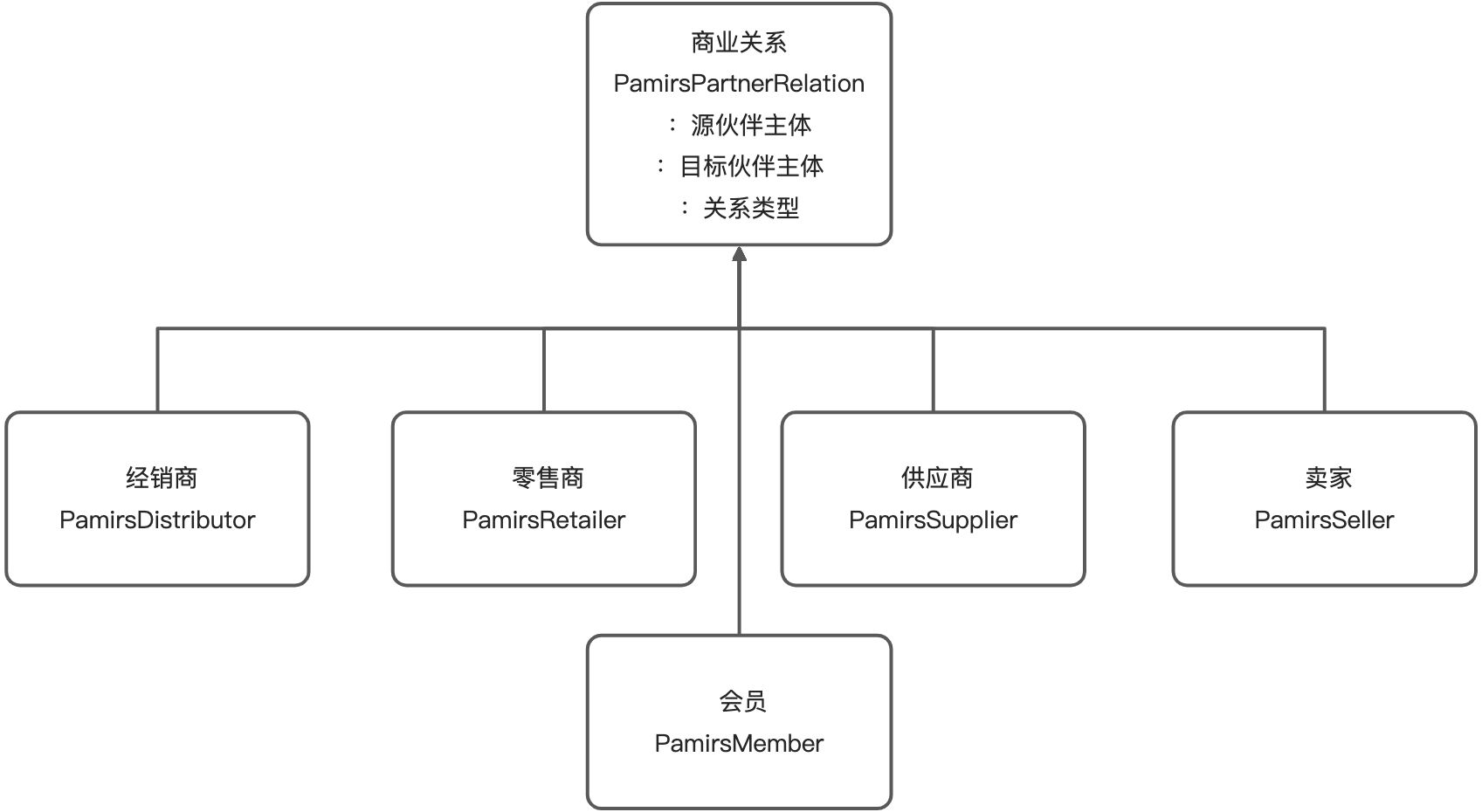
- Business Relationship (PamirsPartnerRelation): Refers to the association type between business entities, used to clarify the roles of both parties in specific scenarios (such as "supplier - purchaser", "parent company - subsidiary", "general agent - distributor", etc.).
- Key Elements:
- Relationship Type: Defines the nature of the relationship (such as supply relationship, holding relationship, agency relationship).
- Bidirectionality: Relationships usually have a two-way perspective (e.g., A is B's supplier → B is A's customer).
- Business Rules: Relationships can be associated with business logic (such as restricting transaction scope, automatically matching processes).
- Key Elements:
- User (PamirsUser): Focuses on the "system user", referring to an entity with an account (including username, password, or third-party login credentials) that operates through interface interaction, emphasizing the subject of operational behavior (such as logging in, editing data).
(Ⅱ) Design Logic of Business Entities and Users
These two are independent at the underlying level and associated through upper-layer business logic (such as binding the customer entity through the user account during login):
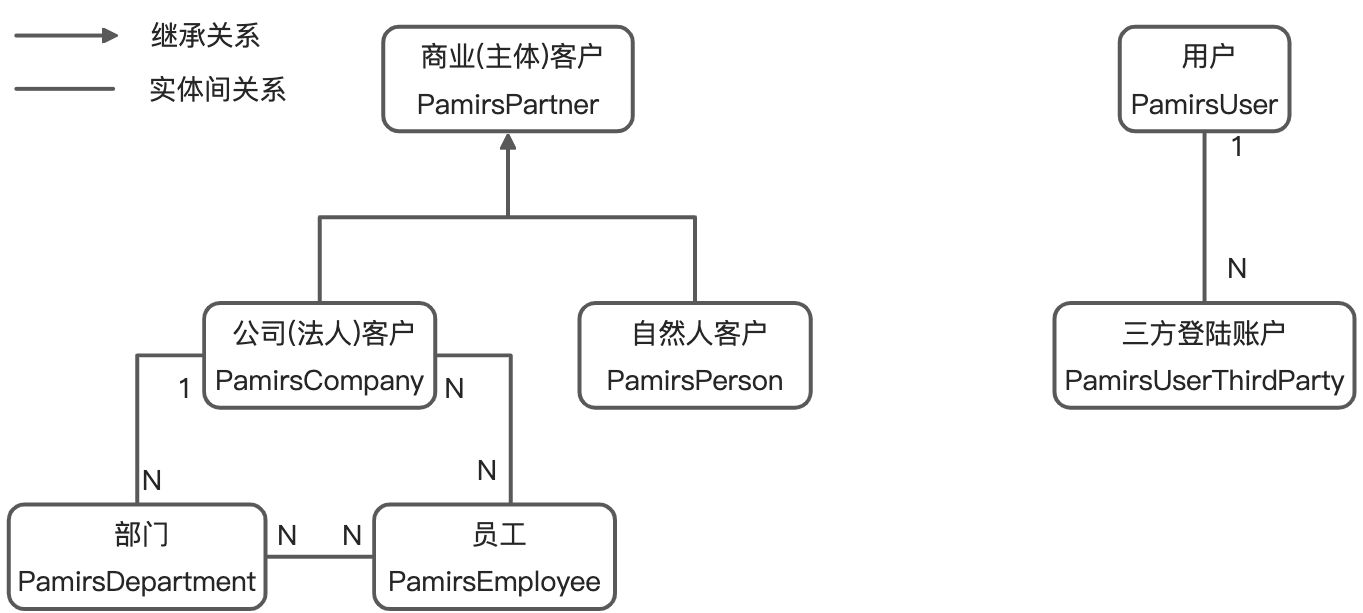
1. Business Entity: Modeling the Subject of Business Relationships
- Basic Model:
PamirsPartnerserves as the abstraction of a business entity, deriving two subclasses:PamirsCompany(legal entity customer): Associated with multiplePamirsDepartment(departments) andPamirsEmployee(employees), supporting enterprise organizational structure management.PamirsPerson(natural person customer): Directly corresponding to individual customers, focusing on personal information management.
- Associative Relationships:
- One
PamirsCompanycontains multiple departments and employees, departments belong to a unique customer, and employees can belong to multiple departments or customers (supporting primary customer association).
- One
2. User Design: Modeling the Subject of Operational Behavior
PamirsUseras the operational subject, core features include:- Bound to a login account (username/password), supporting multiple
PamirsUserThirdParty(third-party login accounts, such as WeChat, DingTalk). - Independent of the customer system, associated with one or more customer entities through upper-layer business logic (e.g., session management) (for example: an employee account can operate the business of multiple customers belonging to the company).
- Bound to a login account (username/password), supporting multiple
(Ⅲ) Oinone's Business Relationships (Partnerships)
In the Oinone platform, through the combination of relationship design patterns + multi-table inheritance, a flexible and extensible partnership system can be efficiently constructed, providing underlying support for scenarios such as supply chain management, distribution networks, and group-level businesses. In enterprise-level system architecture, business relationship modeling is one of the core challenges. Mainstream design patterns are mainly divided into role patterns and relationship patterns. Oinone's choice of relationship patterns is based on a comprehensive trade-off among extensibility, business flexibility, and system complexity.
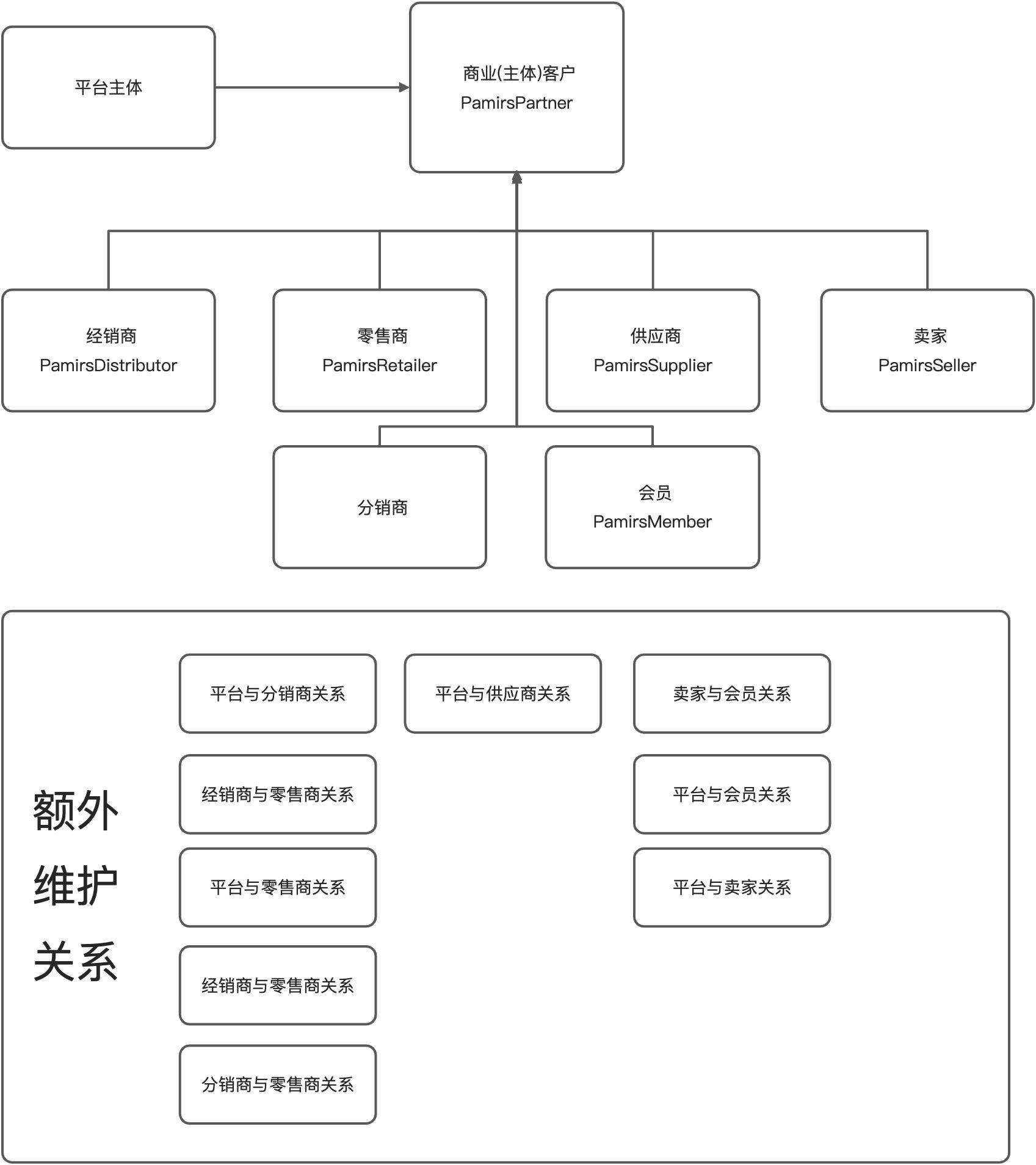
1. Role Design Pattern (Based on Subject Extension)
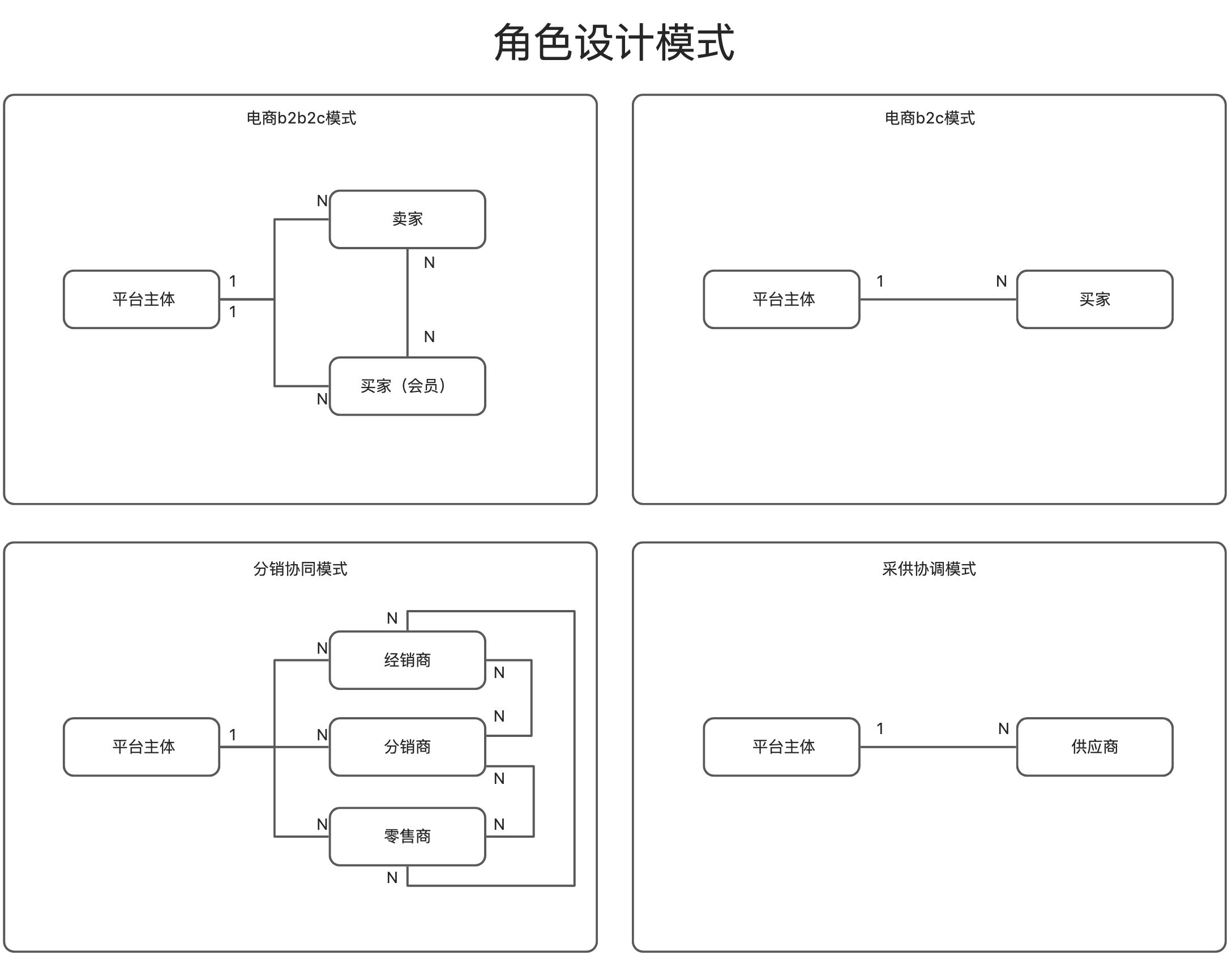
- Idea: Enumerate business roles (such as distributors, suppliers), each role corresponds to an independent subject subclass, and maintains the relationship between subjects through fields or relationship tables.
- Advantages and Disadvantages: Roles are strongly bound to subjects, and business semantics are clear.
- Implementation Pain Points:
- Subjects and relationships need to be extended synchronously (adding roles requires creating subclasses and maintaining M2O/O2M/M2M relationship tables), with high complexity.
- Scenario limitations: For example, when creating a contract, if the乙方 must be the甲方's "distributor", a large number of role associations need to be maintained in advance, with poor flexibility.
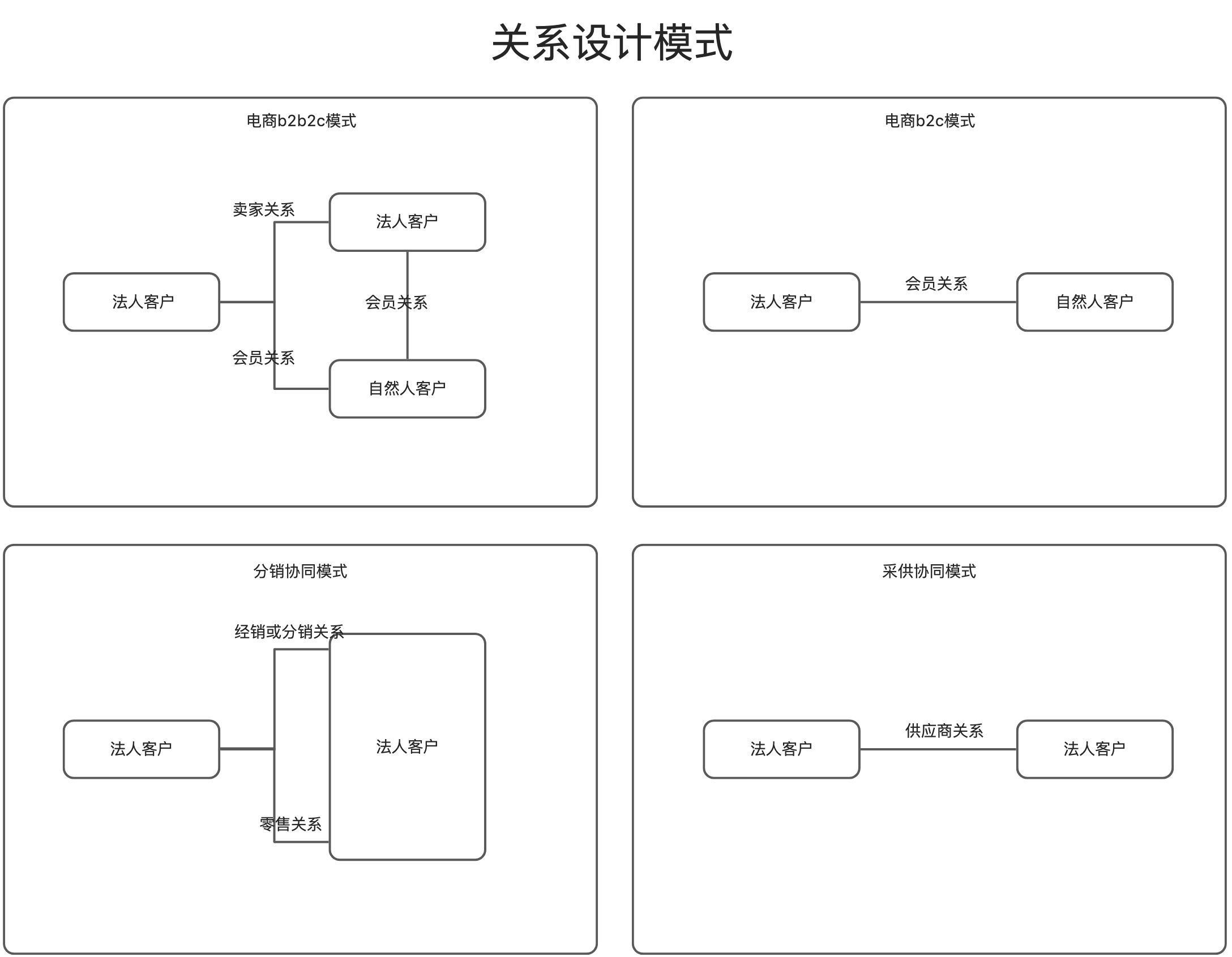
2. Relationship Design Pattern (Chosen by Oinone)
- Idea: Uniformly abstract "business relationships", describing the association between subjects through an independent model (such as "cooperative relationship", "parent-subsidiary relationship"), without relying on subject subclasses.
- Implementation Advantages:
- Only need to maintain relationship model extension, the subject model remains stable, reducing complexity.
- Uniformly manage all business relationships (such as cooperation type, validity period, permission scope), supporting flexible scenario combinations (such as cross-industry cooperation, multi-level association).
- Technical Implementation:
- Adopt multi-table inheritance: The parent model
PamirsPartnerRelationdefines core fields (such as Subject A, Subject B, relationship type), and the child model extends personalized attributes (such as contract validity period, cooperation terms). - Converge relationship types and manage them through a unified interface to avoid repeated development.
- Adopt multi-table inheritance: The parent model
II. Common Examples
(Ⅰ) Example Design: User-Employee-Company Association Modeling and Session Integration
1. Scenario Objectives
Achieve automatic association of the affiliated company after user login, and automatically fill in the company entity information when creating business objects (such as stores), demonstrating multi-model association and Session context management based on the Oinone framework.
2. Preparation Work
Objective: Introduce basic business modules and establish model inheritance relationships.
- Add Maven Dependency
<dependency>
    <groupId>pro.shushi.pamirs.core</groupId>
    <artifactId>pamirs-business-api</artifactId>
</dependency>Explanation: pamirs-business-api contains basic models such as PamirsCompany (company) and PamirsEmployee (employee).
- Declare Module Dependencies
@Module(
    dependencies = { BusinessModule.MODULE_MODULE }
)
public class TestModule { /* ... */ }3. Scenario Example
Step 1: Create New Business Models and Services
Objective: Extend basic models and define the association between users, employees, and companies.
Employee Model (TestEmployee)
@Model.model(TestEmployee.MODEL_MODEL)
@Model(displayName = "Company Employee", labelFields = "name")
public class TestEmployee extends PamirsEmployee {
    public static final String MODEL_MODEL = "test.TestEmployee";

    @Field(displayName = "User")
    private PamirsUser user; // Associate with the user model
}Company Model (TestCompany)
@Model.model(TestCompany.MODEL_MODEL)
@Model(displayName = "Company", labelFields = "name")
public class TestCompany extends PamirsCompany {
    public static final String MODEL_MODEL = "test.TestCompany";

    @Field.Text
    @Field(displayName = "Introduction")
    private String introduction; // Extend the company introduction field
}Employee Query Service
@Fun(TestEmployeeQueryService.FUN_NAMESPACE)
public interface TestEmployeeQueryService {
    String FUN_NAMESPACE = "test.TestEmployeeQueryService";

    @Function
    TestEmployee queryByUserId(Long userId); // Query employees by user ID
}Implementation Class:
@Fun(TestEmployeeQueryService.FUN_NAMESPACE)
@Component
public class TestEmployeeQueryServiceImpl implements TestEmployeeQueryService {
    @Override
    public TestEmployee queryByUserId(Long userId) {
        if (userId == null) return null;
        return new TestEmployee()
            .queryOneByWrapper(new QueryWrapper<TestEmployee>()
                .from(TestEmployee.MODEL_MODEL)
                .eq("user_id", userId)
            );
    }
}Company Query Service
@Fun(TestCompanyQueryService.FUN_NAMESPACE)
public interface TestCompanyQueryService {
    String FUN_NAMESPACE = "test.TestCompanyQueryService";

    @Function
    TestCompany queryByCode(String code); // Query companies by company code
}Implementation Class:
@Fun(TestCompanyQueryService.FUN_NAMESPACE)
@Component
public class TestCompanyQueryServiceImpl implements TestCompanyQueryService {
    @Override
    public TestCompany queryByCode(String code) {
        return StringUtils.isBlank(code) ? null : new TestCompany().queryByCode(code);
    }
}Step 2: Session Context Integration
Reference: Documentation related to this topic can be found in "Extending PamirsSession;
// Get the current user
public static PamirsUser getUser() { /* ... */ }

// Get the current company
public static TestCompany getCompany() { /* ... */ }


// Initialize the context
public static void init() {
    Long uid = PamirsSession.getUserId();
    if (uid == null) return;

    // 1. Query the user
    PamirsUser user = CommonApiFactory.getApi(UserService.class).queryById(uid);
    if (user == null) return;

    // 2. Query the employee through the user
    TestEmployee employee = CommonApiFactory.getApi(TestEmployeeQueryService.class).queryByUserId(uid);
    if (employee == null) return;

    // 3. Query the company by the employee's company code
    TestCompany company = CommonApiFactory.getApi(TestCompanyQueryService.class).queryByCode(employee.getCompanyCode());

    // 4. Store in the Session
    TestSessionData data = new TestSessionData();
    data.setUser(user);
    data.setCompany(company);
    BIZ_DATA_THREAD_LOCAL.set(data);
}
}
#### Step 3: Business Model Association and Automatic Filling

**Override the business model's creation method**

``` java
@Component
@Model.model(TestShop.MODEL_MODEL)
public class TestShopAction {
    @Action.Advanced(name = FunctionConstants.create, type = {FunctionTypeEnum.CREATE}, managed = true,check = true)
    public TestShop create(TestShop data) {
        // Get the current company from the Session
        TestCompany company = DemoSessionCache.getCompany();
        if (company != null) {
            data.setPartner(company); // Automatically fill in the affiliated entity
        }
        data.create();
        return data;
    }
}Logic: When creating a store, if the entity is not manually selected, obtain the company associated with the current user from the Session.
4. Notes and Optimization Points
- Employee Creation Logic
- Need to override the
createmethod ofTestEmployeeto ensure that theemployeeTypefield is not empty (required in the basic model):
- Need to override the
@Action.Advanced(name = FunctionConstants.create, type = {FunctionTypeEnum.CREATE}, managed = true,check = true)
public TestEmployee create(TestEmployee data) {
    data.setEmployeeType(EmployeeTypeEnum.COMMON); // Manually assign a value
    return data.create();
}- Multi-Employee Scenario
- The current
queryByUserIdmethod does not handle the scenario of "one user with multiple employees" and needs to be adjusted to return a list or specify the primary employee:****
- The current
// Modify the service interface
List<TestEmployee> queryByUserId(Long userId);5. Summary
This example demonstrates the core capabilities of model inheritance, Session context management, and automatic business logic filling in the Oinone framework through the three-layer association of user→employee→company. Key technical points include:
- Model extension
- ThreadLocal implementation of request-level context management
- Invocation of Session data in business actions (Action)
- Application of automatic filling rules in creation scenarios
Through such design, automatic association of business entities after user login can be achieved, reducing manual operations and improving data consistency, suitable for enterprise-level scenarios such as permission control and organizational structure management.
III. More Commonly Used APIs
Describes the Oinone platform's APIs related to user login, password management, and information maintenance, including core models, interface definitions, extension mechanisms, and sample code, suitable for secondary development and function extension.
(Ⅰ) PamirsUserTransient (User Temporary Model)
Class Path: pro.shushi.pamirs.user.api.model.tmodel.PamirsUserTransientFunction: Processes temporary data such as user login, registration, and information modification, including encrypted fields and business status identifiers.
1. Member Variables
| Field Name | Type | Comment | Example Value |
|---|---|---|---|
| login | String | Login account (encrypted field), required | "user123" |
| password | String | Password (encrypted field), required | "******" |
| verificationCode | String | Verification code, required | "123456" |
| errorCode | Integer | Error code, used for extended logic return | 40001 |
| broken | Boolean | Whether to interrupt the process (default false) | true |
| autoLogin | Boolean | Auto-login identifier | true |
| userBehaviorEvent | UserBehaviorEventEnum | User behavior event (such as login, registration) | LOGIN_BY_PHONE_CODE |
Other fields are as detailed in the source code
2. Key Methods
| Method Name | Description | Parameters | Return Value | Exception Handling |
|---|---|---|---|---|
| getBroken() | Get the interrupt status | None | Boolean | Return false if not set |
| setLogin(String login) | Set the login account (auto-encrypt) | login | void | Encryption exceptions handled by the framework |
(Ⅱ) PamirsUserAction (User Information Maintenance)
Class Path: pro.shushi.pamirs.user.view.action.PamirsUserActionFunction: Processes persistent operations such as user creation, modification, and query, supporting API interface calls.
Key methods are as follows:
| Method Name | Function Description | Parameters | Return Value |
|---|---|---|---|
| create(PamirsUser data) | Create a user | data: User entity (including login, name) | PamirsUser |
| update(PamirsUser data) | Modify user information | data: Fields to be updated (ID is required) | PamirsUser |
| userInfo() | Query current user information | None | PamirsUser |
| active(PamirsUser user) | Activate a user | user: User entity with ID | PamirsUser |
(Ⅲ) UserBehaviorAction (User Behavior Processing)
Class Path: pro.shushi.pamirs.user.view.action.UserBehaviorActionFunction: Processes core behaviors such as login, logout, password modification, and verification code sending, supporting multiple login methods (Cookie, Token, verification code).
Key methods are as follows:
| Method Name | Function Description | Parameters | Return Value |
|---|---|---|---|
| login(PamirsUserTransient user) | Cookie login | user: Including login/password | PamirsUserTransient |
| tokenLoginByVerificationCode | Verification code + Token login | user: Including phone/verificationCode | PamirsUserTransient |
| modifyCurrentUserPassword | Modify the current user's password | user: Including rawPassword/newPassword | PamirsUserTransient |
| firstResetPassword | Reset the password for the first login | user: Including initial password and new password | PamirsUserTransient |
(Ⅳ) Common Examples
To extend user-related APIs, you can use Oinone's "Default Extension Points" and SPI mechanisms.
1. Modify Password on First Login
Customize the User to add an attribute indicating whether it is the first login, and execute an extension point after login. Determine whether it is the first login, and if so, return the corresponding status code, and the front end redirects to the password modification page based on the status code. After modification, reset the first login flag.
/**
 * @author wangxian
 */
@Model.model(DemoUser.MODEL_MODEL)
@Model(displayName = "User", labelFields = {"nickname"})
@Model.Advanced(index = {"companyId"})
public class DemoUser extends PamirsUser {
    public static final String MODEL_MODEL = "demo.DemoUser";

    /**
     * Default true->1
     */
    @Field.Boolean
    @Field.Advanced(columnDefinition = "tinyint(1) DEFAULT '1'")
    @Field(displayName = "Is First Login")
    private Boolean firstLogin;
}@Order(0)
@Component
@Ext(PamirsUserTransient.class)
@Slf4j
public class DemoUserLoginExtPoint implements PamirsUserTransientExtPoint {
@Override
@ExtPoint.Implement
public PamirsUserTransient loginAfter(PamirsUserTransient user) {
return checkFirstLogin(user);
}
private PamirsUserTransient checkFirstLogin(PamirsUserTransient user) {
// Password modification required for first login
Long userId = PamirsSession.getUserId();
if (userId == null) {
return user;
}
DemoUser companyUser = new DemoUser().queryById(userId);
// Determine whether the user is logging in for the first time. If so, return an error code and redirect to the login page
Boolean isFirst = companyUser.getFirstLogin();
if (isFirst) {
// If it is the first login, return an identifier to the front end.
// The first login identifier is already implemented by default in the platform
user.setBroken(Boolean.TRUE);
user.setErrorCode(UserExpEnumerate.USER_FIRST_LOGIN_ERROR.code());
return user;
}
return user;
}
@Override
public PamirsUserTransient loginCustomAfter(PamirsUserTransient user) {
return checkFirstLogin(user);
}
@Override
@ExtPoint.Implement
public PamirsUserTransient firstResetPasswordAfter(PamirsUserTransient user) {
return updateFirstLogin(user);
}
private PamirsUserTransient updateFirstLogin(PamirsUserTransient user) {
Long userId = PamirsSession.getUserId();
if (userId == null) {
return user;
}
// After modifying the password, change the first login flag to false
Integer update = new DemoUser().updateByWrapper(new DemoUser().setFirstLogin(Boolean.FALSE),
Pops.<DemoUser>lambdaUpdate()
.from(DemoUser.MODEL_MODEL)
.eq(IdModel::getId, userId)
);
if (update != 1) {
user.setBroken(Boolean.TRUE);
user.setErrorCode(UserExpEnumerate.USER_CHANGE_PWD_NO_USER.code());
}
return user;
}
@Override
@ExtPoint.Implement
public PamirsUserTransient modifyCurrentUserPasswordAfter(PamirsUserTransient user) {
return updateFirstLogin(user);
}
}2. Modify Platform Password Rules
The platform provides a built-in SPI: UserPatternCheckApi supports users to customize password, user Nick, email, etc., with specified validation rules. The built-in SPI interface is defined as follows:
@SPI(factory = SpringServiceLoaderFactory.class)
public interface UserPatternCheckApi {

    default Boolean userPatternCheck(PamirsUser pamirsUser) {
        // Filter out system users (i.e., password modification of system users is not affected by extension points) 8848:eip_system.; 10088L:workflow_system; 10086L:trigger_system
        if (pamirsUser.getId()!=null && (8848L==pamirsUser.getId() || 10086L==pamirsUser.getId() || 10088L==pamirsUser.getId())) {
            return Boolean.TRUE;
        }

        UserPatternCheckApi checkApi = Spider.getLoader(UserPatternCheckApi.class).getDefaultExtension();
        Boolean result ;
        result = checkApi.checkInitialPassword(pamirsUser.getInitialPassword());
        if(Boolean.FALSE.equals(result)){
            return result;
        }

        result = checkApi.checkPassword(pamirsUser.getPassword());
        if(Boolean.FALSE.equals(result)){
            return result;
        }

        result = checkApi.checkEmail(pamirsUser.getEmail());
        if(Boolean.FALSE.equals(result)){
            return result;
        }

        result = checkApi.checkContactEmail(pamirsUser.getContactEmail());
        if(Boolean.FALSE.equals(result)){
            return result;
        }

        result = checkApi.checkPhone(pamirsUser.getPhone());
        if(Boolean.FALSE.equals(result)){
            return result;
        }

        result = checkApi.checkLogin(pamirsUser.getLogin());
        if(Boolean.FALSE.equals(result)){
            return result;
        }

        result = checkApi.checkName(pamirsUser.getName());
        if(Boolean.FALSE.equals(result)){
            return result;
        }

        result = checkApi.checkNickName(pamirsUser.getNickname());
        if(Boolean.FALSE.equals(result)){
            return result;
        }

        result = checkApi.checkRealName(pamirsUser.getRealname());
        if(Boolean.FALSE.equals(result)){
            return result;
        }

        result = checkApi.checkIdCard(pamirsUser.getIdCard());
        if(Boolean.FALSE.equals(result)){
            return result;
        }
        return result;
    }

    default Boolean checkInitialPassword(String initPassword) {
        UserPatternCheckUtils.checkPassword(initPassword, Boolean.TRUE);
        return Boolean.TRUE;
    }

    default Boolean checkPassword(String password) {
        UserPatternCheckUtils.checkPassword(password, Boolean.TRUE);
        return Boolean.TRUE;
    }

    default Boolean checkEmail(String email) {
        UserPatternCheckUtils.checkEmail(email, Boolean.TRUE);
        return Boolean.TRUE;
    }

    default Boolean checkContactEmail(String contactEmail) {
        UserPatternCheckUtils.checkEmail(contactEmail, Boolean.TRUE);
        return Boolean.TRUE;
    }

    default Boolean checkLogin(String login) {
        UserPatternCheckUtils.checkLogin(login, Boolean.TRUE);
        return Boolean.TRUE;
    }

    default Boolean checkPhone(String phone) {
        UserPatternCheckUtils.checkPhone(phone, Boolean.TRUE);
        return Boolean.TRUE;
    }

    default Boolean checkName(String name) {
        UserPatternCheckUtils.checkName(name, Boolean.TRUE);
        return Boolean.TRUE;
    }

    default Boolean checkNickName(String nickname) {
        UserPatternCheckUtils.checkNickName(nickname, Boolean.TRUE);
        return Boolean.TRUE;
    }

    default Boolean checkRealName(String realname) {
        UserPatternCheckUtils.checkRealName(realname, Boolean.TRUE);
        return Boolean.TRUE;
    }

    default Boolean checkIdCard(String idCard) {
        UserPatternCheckUtils.checkIdCard(idCard, Boolean.TRUE);
        return Boolean.TRUE;
    }
}The following example implements custom validation:
- User accounts are not checked for format, only that the login is not empty;
- Passwords are not checked for format, only that the length is between 3 and 8 characters;
@Slf4j
@SPI.Service
@Order(50) // Default lowest priority, business configuration needs to be set to high priority
@Component
public class DemoUserPatternCheckApi implements UserPatternCheckApi {

    /**
     * As needed (no need to implement if there is no special logic), modify the password validation rules
     **/
    @Override
    public Boolean checkPassword(String password) {
        // Custom validation logic
        checkPasswordPattern(password);
        return Boolean.TRUE;
    }

    /**
     * As needed (no need to implement if there is no special logic), modify the Login validation rules
     **/
    @Override
    public Boolean checkLogin(String login) {
        if (StringUtils.isBlank(login)) {
            throw PamirsException.construct(EMPLOYEE_LOGIN_NOT_BLANK).errThrow();
        }
        return Boolean.TRUE;
    }

    private static void checkPasswordPattern(String password) {
        if (StringUtils.isBlank(password)) {
            throw PamirsException.construct(EMPLOYEE_PASSWORD_NOT_BLANK).errThrow();
        }
        int length = password.length();
        boolean mark = length >= 3 && length <= 8;
        if (!mark) {
            throw PamirsException.construct(EMPLOYEE_PASSWORD_CHECK_RULE).errThrow();
        }
    }
}