The previous chapter introduced methods for adding business logic to our models. Now that we can associate buttons with business code, how do we prevent users from entering incorrect data? For example, in our project management module, there is currently no mechanism to prevent users from setting a negative budget amount.
Oinone provides three methods for setting automatic validation constraints: UI constraints, Java constraints, and SQL constraints.
I. SQL Constraints
Reference: Related documentation can be found in "Models" and the DDL documentation for the corresponding database (such as Mysql).
In the "Models and Basic Fields" chapter, we introduced configuring fields by passing attribute parameters and their correlation with default front-end visual effects and interaction rules. Next, we will introduce several database-related attributes:
- @Field(index): Instructs Oinone to create a database index on this column.
- @Field(unique): Instructs Oinone to create a database unique index on this column.
- @PrimaryKey: Instructs Oinone to create a database primary key constraint on this column.
- @Field.Advanced(columnDefinition): Instructs Oinone to create a database column definition for this column.
The most common approach is:
package pro.shushi.oinone.trutorials.expenses.api.model;

import pro.shushi.pamirs.meta.annotation.Field;
import pro.shushi.pamirs.meta.annotation.Model;
import pro.shushi.pamirs.meta.base.IdModel;

@Model.model(TestConstraintsModel.MODEL_MODEL)
@Model(displayName = "约束测试模型")
public class TestConstraintsModel extends IdModel {
    public static final String MODEL_MODEL="expenses.TestConstraintsModel";

    @Field(displayName = "名称")
    @Field.Advanced(columnDefinition = "varchar(12) NOT NULL ")
    private String name;
}When submitting empty data for the name field, you should see the following error:
Caused by: org.springframework.dao.DataIntegrityViolationException:
### Error updating database.  Cause: java.sql.SQLException: Field 'name' doesn't have a default value
### The error may exist in pro/shushi/pamirs/framework/connectors/data/mapper/GenericMapper.java (best guess)
### The error may involve pro.shushi.pamirs.framework.connectors.data.mapper.GenericMapper.insert-Inline
### The error occurred while setting parameters
### SQL: INSERT INTO `expenses_constraints_test_model`  ( `id`, `write_uid`,  `create_uid` )  VALUES  ( ?, ?,  ? )
### Cause: java.sql.SQLException: Field 'name' doesn't have a default value
; Field 'name' doesn't have a default value; nested exception is java.sql.SQLException: Field 'name' doesn't have a default valueWhen submitting data that exceeds the length limit, you should see:
Caused by: com.mysql.cj.jdbc.exceptions.MysqlDataTruncation: Data truncation: Data too long for column 'name' at row 1If these errors occur, you're on the right track!
Warning
Defining fields or constraints via columnDefinition creates a strong binding to a specific database, which may affect system compatibility when customers use different database types.
II. Validation Constraints
Reference: Related documentation can be found in "Validation".
Objectives: By the end of this section
The project budget will not accept values greater than 100000.
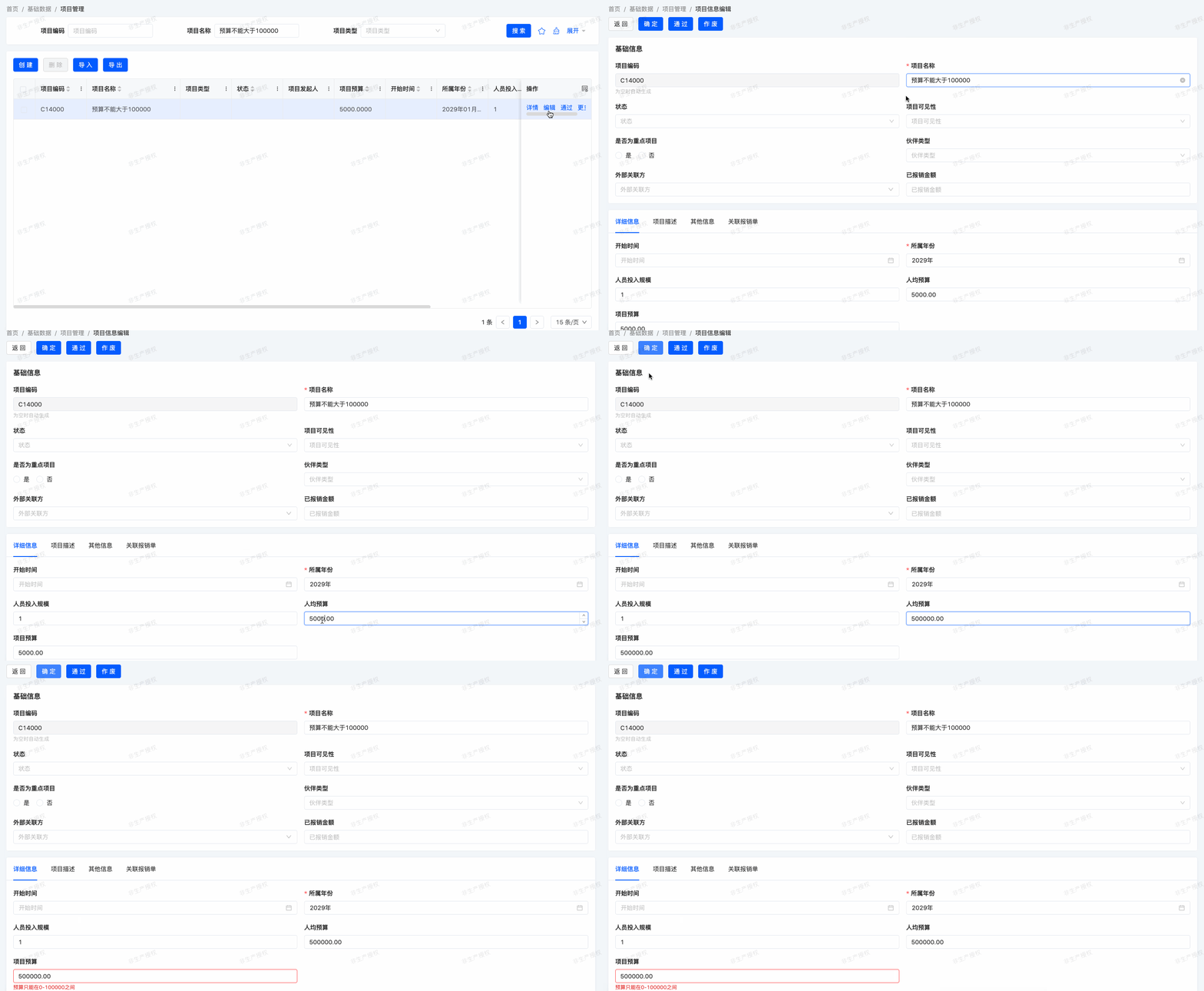
SQL constraints effectively ensure data consistency, but our application may require complex checks without strong database binding, which is where Java validation constraints come into play.
Validation constraints are defined using the @Validation annotation on models and fields, evaluated automatically when related fields are modified. If constraints are not met, an exception should be thrown:
@Validation(ruleWithTips = {
        @Validation.Rule(value = "!IS_NULL(age)", error = "年龄为必填项"),
        @Validation.Rule(value = "age >=0 && age <= 200", error = "年龄只能在0-200之间"),
})
@Field(displayName = "年龄")
private Integer age;For more complex checks, use @Validation(check="X") during model and field definition, where X refers to a function of the given model:
……
@Model.model(TestConstraintsModel.MODEL_MODEL)
@Model(displayName = "约束测试模型")
@Validation(check = "checkData")
public class TestConstraintsModel extends IdModel {
    ……
    @Function
    public Boolean checkData(TestConstraintsModel data) {
        String name = data.getName();
        boolean success = true;
        if (StringUtils.isBlank(name)) {
            PamirsSession.getMessageHub()
                    .msg(Message.init()
                            .setLevel(InformationLevelEnum.ERROR)
                            .setField(LambdaUtil.fetchFieldName(TestConstraintsModel::getName))
                            .setMessage("名称为必填项"));
            success = false;
        }
        if (name.length() > 4) {
            PamirsSession.getMessageHub()
                    .msg(Message.init()
                            .setLevel(InformationLevelEnum.ERROR)
                            .setField(LambdaUtil.fetchFieldName(TestConstraintsModel::getName))
                            .setMessage("名称过长,不能超过4位"));
            success = false;
        }
        return success;
    }
}Exercise
Add validation constraints to ensure the project budget is ≥ 0 and < 100000.
III. UI Interaction Constraints
"UI interaction constraints" refer to front-end constraints. "UI" (User Interface) constraints typically limit user operations and inputs at the interface level to ensure data meets specific requirements, aligning with the concept of front-end constraints.
The most common approach is:
<field span="1" priority="102" data="age" label="年龄"
validator="!IS_NULL(activeRecord.age) && (activeRecord.age >=0 && activeRecord.age <= 200)"
validatorMessage="年龄为必填项,且年龄只能在0-200之间"/>In terms of security, SQL constraints are generally more secure than Java constraints, which are more secure than UI constraints. Conversely, UI constraints offer the highest flexibility, followed by Java and then SQL constraints.
Our expense management module is taking shape. We've added business logic and ensured data consistency, but the user interface still needs refinement. Let's explore improvements in the next chapter.