外部集成:钉钉集成OAuth2.0
一、引言
在企业数字化办公场景中,将业务系统与钉钉(DingTalk)进行集成是实现统一身份认证、组织架构同步、消息推送和页面嵌入的关键手段。本文基于 Java 技术栈,使用官方提供的 DingTalk Open Platform SDK 完成对接。
- 统一登录与身份认证 员工可通过钉钉扫码或免密方式登录系统
- 组织架构自动同步 自动获取部门结构与员工信息,减少人工维护成本
- 消息通知即时推送 系统可向用户发送审批提醒、任务通知等关键信息
- 页面嵌入与 JS API 调用 将业务页面嵌入钉钉工作台,并调用拍照、定位等功能
说明:
本篇文章主要讲解 Oinone 应用跟钉钉的 OAuth2 打通实现免登,包括用户信息的获取。其他接口如:组织架构、获取部门成员、发送钉钉通知等参考钉钉的对接文档,并推荐使用 Oinone 集成平台(EIP)的方式进行对接。
二、接入准备
(一)了解钉钉身份验证(免登)
服务端API身份验证(免登)使用教程实现登录第三方网站: https://open.dingtalk.com/document/orgapp/tutorial-obtaining-user-personal-information
(二)创建钉钉应用
1、登录 钉钉开放平台
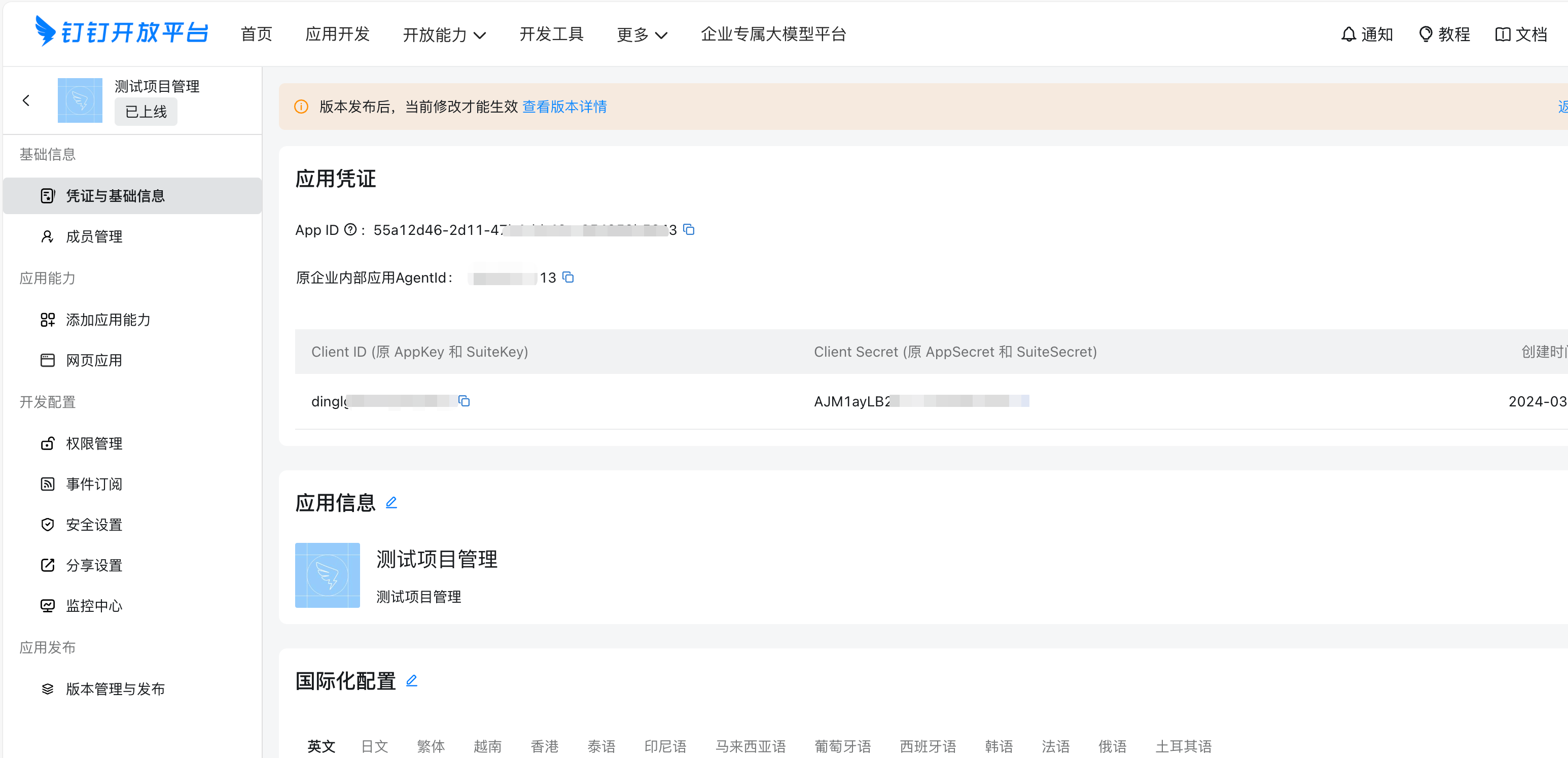
2、进入“应用开发” → “企业内部开发” → 创建应用
3、记录以下参数:
AppKey(Client ID)AppSecret(Client Secret)AgentId(微应用ID)
(三)引入钉钉 SDK 依赖
<dependency>
    <groupId>com.aliyun</groupId>
    <artifactId>dingtalk</artifactId>
    <version>2.2.12</version>
</dependency>
三、具体对接步骤
(一)项目中增加钉钉的配置
1、项目中 application.yml 配置(本文示例采用)
pamirs:
  # 对接钉钉Auth(钉钉统一身份认证)
  dingtalk:
    # 应用基础信息-应用信息的AppKey,请务必替换为开发应用AppKey
    clientId: 你的AppKey
    # 应用基础信息-应用信息的AppSecret,,请务必替换为开发应用AppSecret
    clientSecret: 你的AppSecret
    # 登录后跳转到本地应用的首页(根据实际情况修改)
    appUrl: http://2z98098t60.zicp.fun
2、后端配置方式
/**
 * 对接钉钉配置(页面可配置); 也可以改成yml文件配置的形式
 */
@Model.model(SimpleDingTalkConfig.MODEL_MODEL)
@Model(displayName = "对接钉钉配置", summary = "对接钉钉配置")
public class SimpleDingTalkConfig extends IdModel implements SingletonModel<SimpleDingTalkConfig> {

    private static final long serialVersionUID = -8813811110743840983L;

    public static final String MODEL_MODEL = "hr.dingtalk.SimpleDingTalkConfig";

    @Field.String
    @Field(displayName = "应用的AppKey", required = true)
    private String clientId;

    @Field.String
    @Field(displayName = "应用密码", required = true)
    private String clientSecret;

    @Field.String
    @Field(required = true, displayName = "应用访问地址")
    private String appUrl;

    @Function(openLevel = FunctionOpenEnum.API, summary = "系统基础配置信息构造方法")
    @Function.Advanced(type = FunctionTypeEnum.QUERY)
    public SimpleDingTalkConfig construct(SimpleDingTalkConfig config) {
        SimpleDingTalkConfig config1 = config.singletonModel();
        if (config1 != null) {
            return config1;
        }
        return config.construct();
    }

    @Override
    public void initSystem() {
    }
}- 后端配置的方式需继承 SingletonModel, 具体单例且自动就有缓存功能;
- 给配置模型 SimpleDingTalkConfig 挂上菜单;
- 从配置 SimpleDingTalkConfig 类中获取属性值代码参考
SimpleDingTalkConfig dingTalkConfig = new SimpleDingTalkConfig().singletonModel();
……
dingTalkConfig.getAppUrl();
(二)初始化 DingTalk Client
钉钉客户端类及功能,下面两个客户端是阿里云 SDK 提供的官方封装,分别对应不同的 API 能力模块
| 客户端类 | 功能 |
|---|---|
com.aliyun.dingtalkoauth2_1_0.Client | 用于 OAuth2 认证流程,获取用户 token |
com.aliyun.dingtalkcontact_1_0.Client | 用于调用联系人接口,获取用户详细信息 |
package pro.shushi.pamirs.thirdparty.core.dingtalk.helper;

import com.aliyun.teaopenapi.models.Config;
import pro.shushi.pamirs.meta.annotation.fun.extern.Slf4j;

@Slf4j
public class DingTalkHelper {

    // 使用volatile关键字确保可见性
    private static volatile com.aliyun.dingtalkoauth2_1_0.Client authClient = null;
    private static volatile com.aliyun.dingtalkcontact_1_0.Client contactClient = null;

    // 私有构造函数,防止外部实例化
    private DingTalkHelper() {}

    private static Config createConfig() {
        Config config = new Config();
        config.protocol = "https";
        config.regionId = "central";
        // 可以在这里添加更多配置项,如超时设置等
        return config;
    }

    public static com.aliyun.dingtalkoauth2_1_0.Client authClient() {
        if (authClient == null) {
            synchronized (DingTalkHelper.class) {
                if (authClient == null) {
                    try {
                        Config config = createConfig();
                        authClient = new com.aliyun.dingtalkoauth2_1_0.Client(config);
                    } catch (Exception e) {
                        log.error("Failed to initialize authClient", e);
                        throw new RuntimeException("Failed to initialize authClient", e);
                    }
                }
            }
        }
        return authClient;
    }

    public static com.aliyun.dingtalkcontact_1_0.Client contactClient() {
        if (contactClient == null) {
            synchronized (DingTalkHelper.class) {
                if (contactClient == null) {
                    try {
                        Config config = createConfig();
                        contactClient = new com.aliyun.dingtalkcontact_1_0.Client(config);
                    } catch (Exception e) {
                        log.error("Failed to initialize contactClient", e);
                        throw new RuntimeException("Failed to initialize contactClient", e);
                    }
                }
            }
        }

        return contactClient;
    }

}
(三)构建授权链接(跳转钉钉)
oauth 方法负责生成钉钉 OAuth 授权链接,并重定向至该链接
@RequestMapping(value = "/ddAuth/oauth", method = RequestMethod.GET)
public void oauth(HttpServletResponse response) throws IOException {
    String url = "https://login.dingtalk.com/oauth2/auth?" +
            "redirect_uri=" + appUrl + "/pamirs/ddAuth/oauth2url" +
            "&response_type=code" +
            "&client_id=" + clientId +  //应用的AppKey
            "&scope=openid" + //此处的openId保持不变
            "&state=dd1" +    //跟随authCode原样返回。
            "&prompt=consent";
    response.sendRedirect(url);
}- 这里构造的是钉钉 OAuth2 的授权 URL;
- 用户点击后会跳转到钉钉的扫码页面;
- 授权成功后,钉钉会将用户重定向到
/pamirs/ddAuth/oauth2url,并附带authCode参数
(四)处理钉钉回调,获取 authCode 并换取 accessToken
handleCallback方法处理钉钉回调请求,从请求参数中获取authCode,然后通过authCode换取accessToken,并调用getUserinfo方法进一步获取用户详细信息。
@RequestMapping(value = "/ddAuth/oauth2url", method = RequestMethod.GET)
public void handleCallback(@RequestParam(value = "authCode") String authCode, HttpServletResponse response) throws Exception {
    // 获取 AccessToken
    Client oauthClient = DingTalkHelper.authClient();
    GetUserTokenRequest getUserTokenRequest = new GetUserTokenRequest()
            .setClientId(clientId)
            .setClientSecret(clientSecret)
            .setCode(authCode)
            .setGrantType("authorization_code");
    GetUserTokenResponse getUserTokenResponse = oauthClient.getUserToken(getUserTokenRequest);
    String accessToken = getUserTokenResponse.getBody().getAccessToken();

    // 使用 AccessToken 获取用户信息
    getUserinfo(accessToken);

    // 重定向回应用首页
    response.sendRedirect(appUrl);
}
(五)使用 accessToken 获取用户个人信息
/**
 * 使用 accessToken 获取用户个人信息
 */
public void getUserinfo(String accessToken) throws Exception {
    Client contactClient = DingTalkHelper.contactClient();
    GetUserHeaders getUserHeaders = new GetUserHeaders();
    getUserHeaders.xAcsDingtalkAccessToken = accessToken;
    GetUserResponseBody userResponseBody = contactClient.getUserWithOptions("me", getUserHeaders, new RuntimeOptions()).getBody();

    // 处理用户信息并同步到本地数据库
    handleUserInfoAndCookie(userResponseBody, accessToken);
    log.debug("个人信息:{}", JSON.toJSONString(userResponseBody));
}
(六)处理用户信息并设置登录态(Session + Cookie)
处理用户信息,包括创建或更新本地用户记录、初始化密码表、设置第三方登录记录以及设置用户的登录状态(Session 和 Cookie)。
/**
 * 第四步:处理用户信息并设置登录态(Session + Cookie)
 */
public void handleUserInfoAndCookie(GetUserResponseBody userResponseBody, String accessToken) {
    if (userResponseBody == null) {
        return;
    }
    PamirsUser user = new PamirsUser().setLogin(userResponseBody.getMobile()).queryOne();
    boolean needInitPwd = false;
    if (user == null) {
        user = new PamirsUser();
        needInitPwd = true;
    }
    user.setLogin(userResponseBody.getMobile());
    user.setPhone(userResponseBody.getMobile());
    user.setNickname(userResponseBody.getNick());
    user.setName(userResponseBody.getNick());
    user.setAvatarUrl(userResponseBody.getAvatarUrl());
    user.setEmail(userResponseBody.getEmail());
    user.setActive(Boolean.TRUE);
    user.setSource(UserSourceEnum.THIRD_PARTY);
    user.setSignUpType(UserSignUpType.BACKSTAGE);
    user.setUserType("dingtalk");
    user.createOrUpdate();

    // 初始化密码表
    if (needInitPwd) {
        passwordService.encodingCreate(user.getId(), "123456@Abc!");
    }

    // 第三方用户三方登录表
    PamirsUserThirdParty userThirdParty = new PamirsUserThirdParty().setThirdPartyType(UserThirdPartyTypeEnum.DINGTALK)
    .setUnionId(userResponseBody.getUnionId()).queryOne();
    if (userThirdParty == null) {
        PamirsUserThirdParty thirdParty = new PamirsUserThirdParty();
        thirdParty.setUserId(user.getId());
        thirdParty.setOpenid(userResponseBody.getOpenId());
        thirdParty.setUnionId(userResponseBody.getUnionId());
        thirdParty.setThirdPartyType(UserThirdPartyTypeEnum.DINGTALK);
        thirdParty.createOrUpdate();
    }

    // 用户信息更新后清空缓存
    UserInfoCache.clearUserById(user.getId());

    PamirsUserDTO pamirsUser = new PamirsUserDTO();
    pamirsUser.setUserId(user.getId());
    pamirsUser.setUserCode(user.getCode());
    pamirsUser.setUserName(user.getName());
    pamirsUser.setEmail(user.getEmail());
    pamirsUser.setPhone(user.getPhone());
    pamirsUser.setLangCode("zh-CN");

    String sessionId = PamirsSession.getSessionId();
    HttpServletResponse httpServletResponse = ((ServletRequestAttributes) RequestContextHolder.getRequestAttributes()).getResponse();
    UserCookieLoginSimple userCookieLoginSimple = new UserCookieLoginSimple();
    if (StringUtils.isBlank(sessionId)) {
        sessionId = userCookieLoginSimple.createSessionId();
    }
    String cacheKey = userCookieLoginSimple.parseSessionId(sessionId);
    UserCache.putCache(cacheKey, pamirsUser);
    try {
        CookieUtil.set(httpServletResponse, UserConstant.USER_SESSION_ID, sessionId);
        // 用户落库的情况下,可以不用设置ddtoken到Cookie中,也可以设置。
        // CookieUtil.set(httpServletResponse, "ddtoken", accessToken);
    } catch (Exception e) {
        log.error("SSO Login Cookie Set Err", e);
    }
}
四、钉钉开放平台应用配置
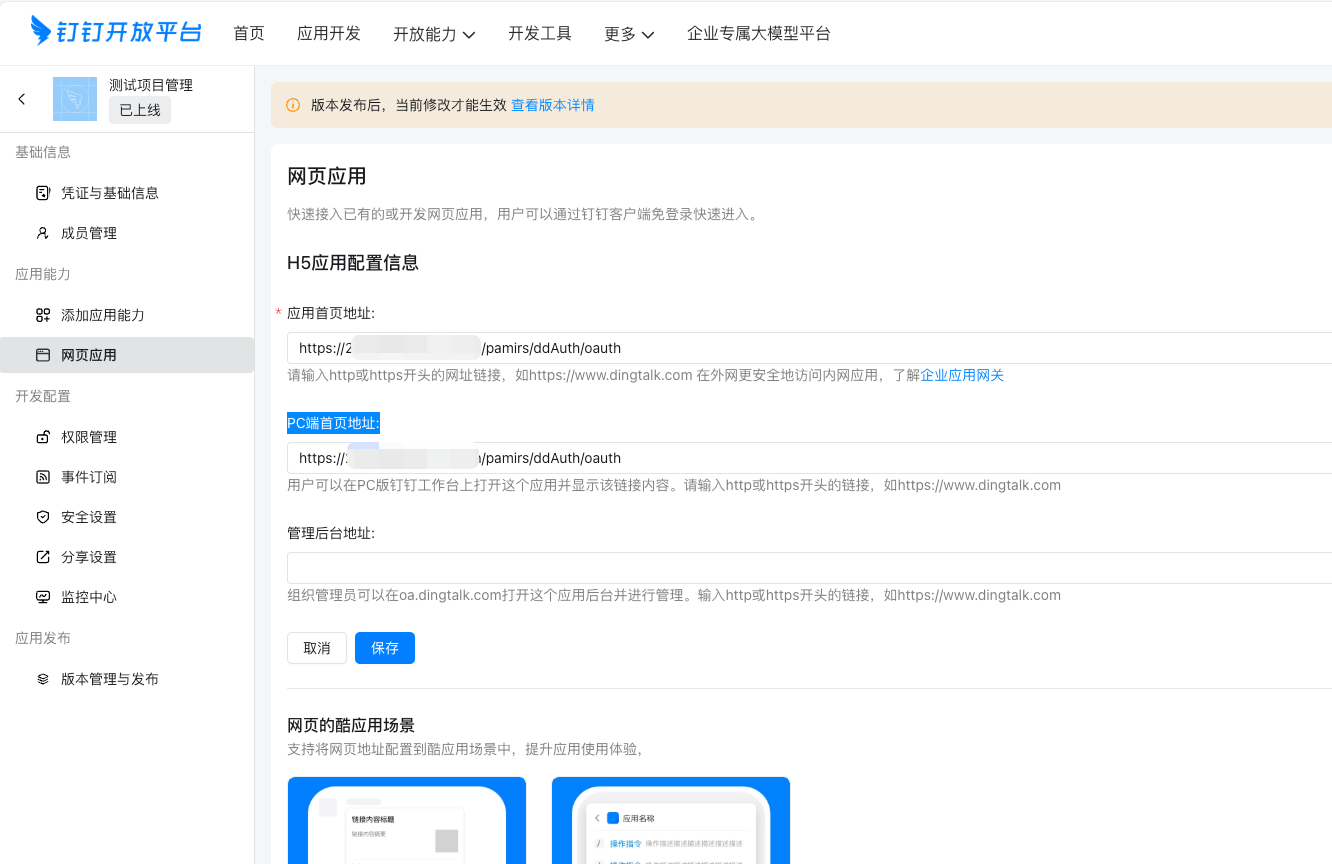
H5 应用配置信息,配置应用的首页地址和 PC 端首页地址。 下图地址中的URL:pamirs/ddAuth/oauth 对应业务代码中钉钉集成 Controller 类中的 RequestMapping 保持一致。
五、三方用户访问系统权限
默认情况下,首次通过第三方免登录方式进入系统的用户,初始状态不具有任何应用的访问权限。为了确保用户能够通过钉钉工作台入口顺利访问应用,可以通过以下两种方式为用户赋予相应的访问权限。
(一)配置第三方用户角色
- 在系统中创建一个特定的角色,用于第三方用户的使用。该角色应具有明确的标识符,例如:
THIRD_PARTY_USER。 - 根据业务需求,为上述角色分配相应的访问权限。
(二)在创建第三方用户时赋权
在对接流程中的第六步:处理用户信息阶段,即根据第三方用户信息创建平台用户(如 PamirsUser)时,可通过调用系统接口,将上述定义好的角色直接分配给该用户,实现权限的静态绑定。
private void bindUserRole(PamirsUser pamirsUser) {
    AuthRole authRole = new AuthRole().setCode(THIRD_PARTY_USER_ROLE_CODE).queryOne();
    if (authRole != null) {
        // 给用户绑定角色
        CommonApiFactory.getApi(UserService.class).bindUserRole(Collections.singletonList(pamirsUser), Collections.singletonList(authRole));
    }
}
(三)运行时动态赋权
若未在用户创建阶段完成角色分配,也可以通过运行时动态权限扩展机制,在用户首次访问系统时,动态地为其分配“第三方用户”角色。
本文示例采用的就是此方案,完整实现请参考附件中的代码文件:ThirdPartyRoleCustom.java
@Override
public Set<Long> get() {
    Set<Long> roleIds = super.get();
    if (CollectionUtils.isEmpty(roleIds)) {
        roleIds = new HashSet<>();
    }
    AuthRole role = fetchTpRole();
    if (role != null) {
        roleIds.add(role.getId());
    }

    return roleIds;
}
六、源代码下载
- 对接钉钉免登示例DingTalkHelper.java
- 初始化 DingTalk Client DingTalkAuthController.java
- 三方用户运行时动态赋权ThirdPartyRoleCustom.java