I. Overview
The Oinone Message Queue module provides unified API interfaces supporting three message middleware: RocketMQ/Kafka/RabbitMQ, decoupling production and consumption through NotifyProducer and NotifyConsumer. Key features:
- Consistent API: One set of interfaces adapts to three message middleware
- Flexible Configuration: Dynamically switch message queue types via YAML configuration
- Message Types: Supports normal/ordered/transactional messages
- Extensibility: Provides send/consume interceptor mechanisms
II. Dependencies and YAML Configuration
(Ⅰ) Maven Dependencies
Add corresponding dependencies as needed based on the message queue used in the actual business.
<!-- RocketMQ -->
<dependency>
  <groupId>pro.shushi.pamirs.framework</groupId>
  <artifactId>pamirs-connectors-event-rocketmq</artifactId>
</dependency>

<!-- Kafka -->
<dependency>
  <groupId>pro.shushi.pamirs.framework</groupId>
  <artifactId>pamirs-connectors-event-kafka</artifactId>
</dependency>

<!-- RabbitMQ -->
<dependency>
  <groupId>pro.shushi.pamirs.framework</groupId>
  <artifactId>pamirs-connectors-event-rabbitmq</artifactId>
</dependency>(Ⅱ) YAML Configuration
Documentation related to this topic can be found in Event Configuration.
1. Basic Configuration
pamirs:
  event:
    enabled: true
    topic-prefix: oinone
    notify-map:
      system: ROCKETMQ  # System message type
      biz: KAFKA       # Business message type
logger: RABBITMQ # Log message type2. Middleware Configuration
# RocketMQ
spring:
  rocketmq:
    name-server: 127.0.0.1:9876
    producer:
      enableMsgTrace: true

# Kafka
spring:
  kafka:
    bootstrap-servers: localhost:9092
    consumer:
      group-id: ${spring.application.name}

# RabbitMQ
spring:
  rabbitmq:
    host: 127.0.0.1
    port: 5672
    username: oinone
password: oinoneIII. Core Interfaces
(Ⅰ) NotifyProducer Interface
public interface NotifyProducer<TEMPLATE> {

    // Send normal message
    <T> NotifySendResult send(String topic, String tag, T msg);

    // Send transactional message (RocketMQ specific)
    <T> NotifySendResult sendTx(String topic, String tag, String txGroup, T msg, Object extArg);

    // Send ordered message
    <T> NotifySendResult sendOrderly(String topic, String tag, T msg, String hashKey);
}Parameter Description:
| Parameter | Type | Required | Description |
|---|---|---|---|
| topic | String | Yes | Message topic |
| tag | String | No | Message tag |
| msg | Object | Yes | Message body (needs to implement Serializable) |
| hashKey | String | Required for ordered messages | Partition key |
Return value NotifySendResult structure:
public class NotifySendResult {
    private boolean success;   // Sending status
    private Object notifyResult;  // Message sending result
    private Throwable error;   // Exception information
}(Ⅱ) NotifyConsumer Interface
@FunctionalInterface
public interface NotifyConsumer<T extends Serializable> {
    void consume(Message<T> event);
}IV. Usage Examples
(Ⅰ) Producer Examples
1. Producer Acquisition Methods
Original Implementation (Hardcoding Approach)
@Autowired
private RocketMQNotifyProducer rocketMQNotifyProducer;
@Autowired
private RabbitMQNotifyProducer rabbitMQNotifyProducer;
@Autowired
private KafkaNotifyProducer kafkaNotifyProducer;

public void sendNormalMessage() {
    OrderMessage msg = new OrderMessage("ORDER_001");
    // Method 1:
    // Problem: The message queue type is hardcoded in the code, resulting in high coupling and lack of extensibility
    // Directly using specific implementation classes requires modifying code logic when changing message middleware
    //NotifySendResult result = rocketMQNotifyProducer.send("oinone-trade", "CREATE", msg);
    //NotifySendResult result = rabbitMQNotifyProducer.send("oinone-trade", "CREATE", msg);
    NotifySendResult result = kafkaNotifyProducer.send("oinone-trade", "CREATE", msg);
}Note: This approach has issues
- Strong Coupling: Message queue implementation classes (RocketMQ/RabbitMQ/Kafka) are directly injected into business code, binding to specific middleware
- Hardcoding: Message queue types are hardcoded through variable names or comments, unable to switch dynamically
- Poor Extensibility: Adding new message middleware requires modifying injection code and sending logic, violating the open-closed principle
Optimized Implementation (Decoupled Dynamic Solution)
public void sendNormalMessage() {
    // Method 2: Dynamically obtain the corresponding producer based on business type (recommended)
    // Obtain the adapted producer instance based on the business key defined in EventConstants
    NotifySendResult result = EventEngine.get(EventConstants.EVENT_SYS_BIZ_KEY).send("oinone-trade", "CREATE", msg);
    // Method 3: Obtain a universal producer through the business context
    // Suitable for scenarios requiring flexible specification of business types
    NotifySendResult result = EventEngine.bizNotifyProducer().send("oinone-trade", "CREATE", msg);
}Core Advantages:
- Middleware Decoupling:
- Eliminates direct dependency on specific
RocketMQNotifyProducer/RabbitMQNotifyProducer - Manages producer instances uniformly through
EventEngine, decoupling business code from middleware
- Eliminates direct dependency on specific
- Dynamic Adaptation:
- Supports dynamic matching of producers through business identifiers like
EventConstants.EVENT_SYS_BIZ_KEY - When adding new middleware, only need to extend
EventEngineconfiguration without modifying business logic
- Supports dynamic matching of producers through business identifiers like
- Unified Interface:
- Provides a unified sending interface
send(String topic, String event, T message) - Hides API differences of different middleware, reducing learning costs
- Provides a unified sending interface
2. Ordered Message Sending
public void sendOrderlyMessage() {
    PaymentMessage payment = new PaymentMessage("PAY_202312");
    producer.sendOrderly("oinone-payment", "PAY", payment, payment.getOrderId());
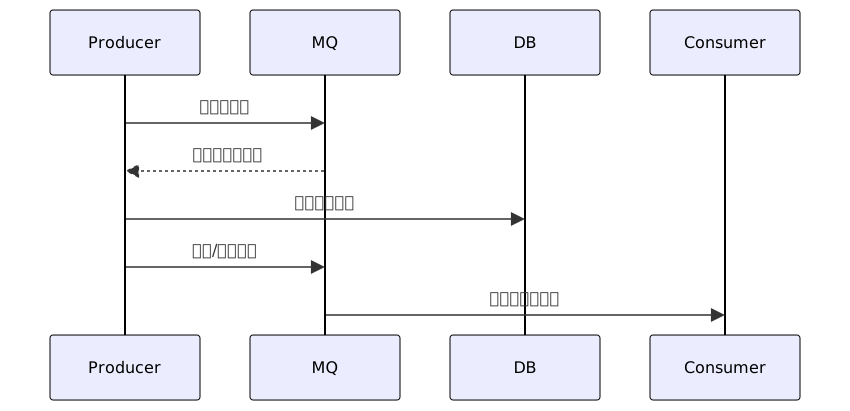
}3. Transactional Message Sending (RocketMQ)
@TransactionListener("txGroup")
public class TransactionListenerImpl implements NotifyTransactionListener {

    @Override
    public void executeLocalTransaction(Message msg, Object arg) {
        // Local transaction execution
    }

    @Override
    public boolean checkLocalTransaction(MessageExt msg) {
        // Transaction status check
    }
}

public void sendTransactionMessage() {
    producer.sendTx("oinone-account", "DEDUCT", "txGroup", accountDTO, null);
}
4. Sending with @Notify Annotation
Annotation Definition
@Target({ElementType.METHOD})
@Retention(RetentionPolicy.RUNTIME)
@Documented
public @interface Notify {
    String notifyBizType() default "biz";  // Business type
    String topic();                        // Message topic
    String tags() default "";              // Message tags
    Class<? extends NotifySendCallback> sendCallback() default NotifySendCallback.class; // Sending callback
    Class<? extends NotifyQueueSelector> querySelector() default NotifyQueueSelector.class; // Queue selector
    Class<? extends NotifyTagsGenerator> tagsGenerator() default NotifyTagsGenerator.class; // Tag generator
}| Attribute | Type | Required | Default Value | Description |
|---|---|---|---|---|
| notifyBizType | String | No | biz | Message business type (system/biz/logger) |
| topic | String | Yes | - | Message topic name |
| tags | String | No | "" | Static message tags |
| sendCallback | Class | No | NotifySendCallback.class | Sending result callback class |
| querySelector | Class | No | NotifyQueueSelector.class | Ordered message queue selector |
| tagsGenerator | Class | No | NotifyTagsGenerator.class | Dynamic tag generator |
Normal Message Sending
// Normal usage
@Notify(
    topic = "order_created",
    tags = "PAYMENT",
    notifyBizType = "biz"
)
public Order createOrder(OrderRequest request) {
    // Order creation business logic
    return orderService.create(request);
}Dynamic Tag Generation
// Custom tag generator
public class OrderTagGenerator implements NotifyTagsGenerator {
    @Override
    public String tagsGenerator(Object result) {
        if (result instanceof Order order) {
            return order.getStatus().name();
        }
        return "UNKNOWN";
    }
}

// Usage example
@Notify(
    topic = "order_status_update",
    tagsGenerator = OrderTagGenerator.class
)
public void updateOrderStatus(String orderId, OrderStatus status) {
    // Status update logic
}Ordered Message Sending
// Custom queue selector
public class OrderQueueSelector implements NotifyQueueSelector {
    @Override
    public String hashing(Object result) {
        if (result instanceof Order order) {
            return order.getUserId();
        }
        return "0";
    }
}

// Usage example
@Notify(
    topic = "order_sequence",
    querySelector = OrderQueueSelector.class
)
public void processOrderSequence(Order order) {
// Ordered processing logic
}(Ⅱ) Consumer Examples
1. @NotifyListener Annotation Definition
@Target({ElementType.TYPE, ElementType.METHOD})
@Retention(RetentionPolicy.RUNTIME)
@Documented
public @interface NotifyListener {
    String topic();                          // Required, listening topic
    String tags() default "*";               // Message tag filtering
    String group() default "";               // Consumer group
    ConsumerType consumerType() default ConsumerType.CONCURRENTLY; // Consumption mode
}| Parameter | Type | Default Value | Description |
|---|---|---|---|
| topic | String | - | Listened Topic name (supports wildcards) |
| tags | String | * | Tag filtering expression (RocketMQ specific) |
| group | String | - | Consumer group ID (Kafka mandatory) |
| consumerType | enum | CONCURRENTLY | Consumption mode: - CONCURRENTLY: Concurrent consumption - ORDERLY: Ordered consumption |
2. Normal Consumption Example
@Bean
@NotifyListener(
    topic = "oinone-trade",
    tags = "CREATE",
    consumerType = ConsumerType.CONCURRENTLY
)
public NotifyConsumer<OrderMessage> orderCreateConsumer() {
    return message -> {
        OrderMessage order = message.getPayload();
        // Process order creation logic
    };
}3. Idempotent Consumption Handling Example
@Bean
@NotifyListener(topic = "oinone-trade",tags = "CREATE")
public NotifyConsumer<OrderMessage> orderCreateConsumer() {
    return message -> {
        String msgId = message.getHeaders().getId().toString();
        if (redis.exists(msgId)) {
            return; // Already processed
        }
        // Business processing
        redis.setex(msgId, 3600);
        OrderMessage order = message.getPayload();
        // Process order creation logic
    };
}V. Advanced Features
(Ⅰ) Message Interceptors
// Pre-sending processing
@Component
public class AuthCheckSendBefore implements NotifySendBefore {
    @Override
    public Message<?> sendBefore(Message<?> message) {
        message.getHeaders().put("auth-token", getToken());
        return message;
    }
}

// Post-consumption processing
@Component
public class MetricsCollector implements NotifyConsumeAfter {
    @Override
    public void consumeAfter(Message<?> message) {
        metrics.increment("msg.processed");
    }
}VI. Differences Handling Among Different Middleware
| Feature | RocketMQ | Kafka | RabbitMQ |
|---|---|---|---|
| Transactional Message | Supported | Not supported | Not supported |
| Ordered Message | Strict order | Partition order | Queue order |
| Message Backtracking | Supported | Time offset | Not supported |
| Performance | High throughput | Extremely high throughput | Medium |
VII. Common Questions
Q: How to switch message middleware?
A: Modify the pamirs.event.notify-map configuration and replace the corresponding dependencies, no need to modify business code.
Q: How to ensure ordered messages?
A: Use the sendOrderly method, messages with the same hashKey will be routed to the same queue.
Q: What is the principle of transactional message implementation?
A: RocketMQ uses two-phase commit, first sending a prepared message, and committing after the local transaction executes successfully.