Ⅰ、Overview
This document mainly introduces the Java annotation classes used for configuring visual interactions in Oinone. Through these annotations, developers can easily configure visual interaction-related functions such as application interface layouts, menus, button behaviors, and view displays.
Tip
Ux-class annotations only affect the default display and interaction logic.
Tip
This document helps you quickly master core concepts and basic logic. In addition to using Ux annotations and XML configuration, it is also recommended to use the designer for auxiliary development. The designer provides a visual operation interface, simplifies the configuration process, reduces coding complexity, helps you complete development tasks more efficiently and accurately, and significantly improves development efficiency and quality.
It is recommended to first establish a preliminary understanding through the family tree and form a basic conceptual framework in your mind to quickly judge the feasibility of requirements.
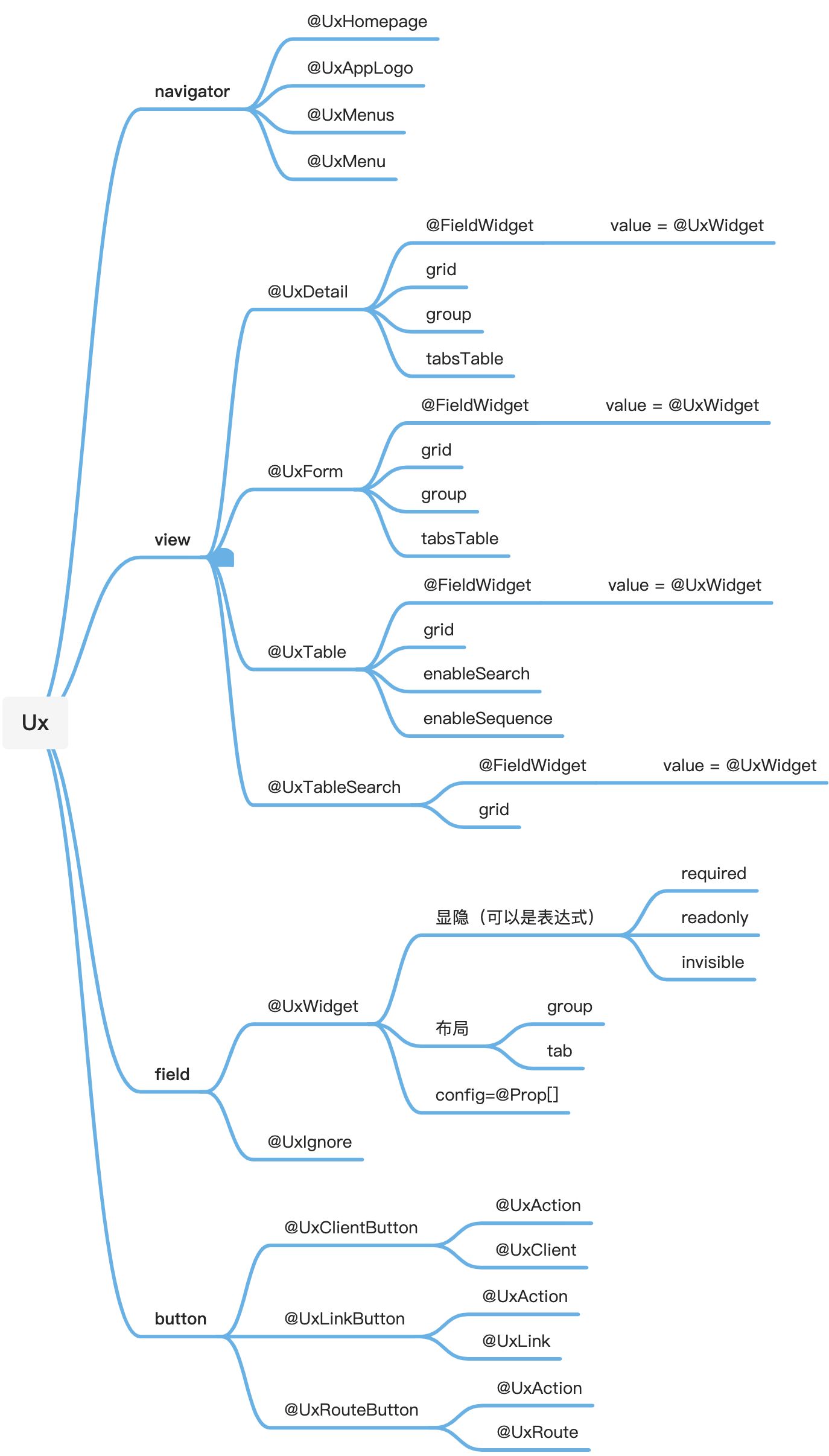
Ⅱ、Detailed Annotation Explanation
(Ⅰ)Application-related
1、UxAppLogo
- Purpose: Used to configure the application's logo.
- Target:
ElementType.TYPE(class) - Attributes:
value: Application logo, alias forlogo, default empty string"".logo: Application logo, alias forvalue, default empty string"".
- Example:
@UxAppLogo(logo = "path/to/your/app/logo.png")
public class YourModuleClass {
    // Class content
}2、UxHomepage
- Purpose: Configures the homepage of a module.
- Target:
ElementType.TYPE(class) - Attributes:
actionName: Reference action name, default empty string""; if empty, redirects to the model's table page.value: Routing configuration, typeUxRoute.
- Example:
@UxHomepage(actionName = "homepageAction", value = @UxRoute(model = TestModel.MODEL_MODEL))
public class YourModuleClass {
    // Class content
}(Ⅱ)Menu-related Annotations
1、UxMenus
- Purpose: Defines a menu collection.
- Target:
ElementType.TYPE(class) - Attributes:
module: Module to which the menu belongs, defaults to the current module, default empty string"".basePriority: Initial menu priority, default 0.
2、UxMenu
- Purpose: Defines a single menu.
- Target:
ElementType.TYPE(class) - Attributes:
value: Menu display name, alias forlabel, default empty string"".label: Menu display name, alias forvalue, default empty string"".summary: Brief menu description, default empty string"".icon: Menu icon, default empty string"".clientTypes: Client types applicable to the menu, default{ClientTypeEnum.PC, ClientTypeEnum.MOBILE}.
- Example:
@UxMenus public class TestModuleMenus implements ViewActionConstants {
    @UxMenu("Basic Data")
    class TestModuleBaseMenu {
        @UxMenu("Test Menu") @UxRoute(TestModel.MODEL_MODEL) class TestModelMenu { }
    }
}Warning
@UxMenu must be used with @UxRoute, @UxLink, and @UxClient.
(Ⅲ)View-related Annotations
1、UxDetail
- Purpose: Configures the detail view.
- Target:
ElementType.TYPE(class) - Attributes:
grid: Number of grids, defaultGridConstants.defaultViewGrid.group: Default group title, default empty string"".tabsTable: Whether to merge all table subviews into tabs at the bottom of the view, defaulttrue.- Inner Annotation
FieldWidget: Used to configure field components.- Target:
ElementType.FIELD(field) - Attributes:
value, typeUxWidget.
- Target:
- Example: No direct usage example currently.
2、UxForm
- Purpose: Configures the form view.
- Target:
ElementType.TYPE(class) - Attributes:
grid: Number of grids, defaultGridConstants.defaultViewGrid.group: Default group title, default empty string"".tabsTable: Whether to merge all table subviews into tabs at the bottom of the view, defaulttrue.- Inner Annotation
FieldWidget: Used to configure field components.- Target:
ElementType.FIELD(field) - Attributes:
value, typeUxWidget.
- Target:
- Inner Annotation
RelationSelect: Used to configure associated relationship drop-down field components.- Target:
ElementType.FIELD(field) - Attributes:
showCreate, defaulttrue.
- Target:
- Inner Annotation
RelationTable: Used to configure associated relationship table field components.- Target:
ElementType.FIELD(field) - Attributes:
showCreate, defaulttrue;showEdit, defaulttrue;showDetail, defaulttrue;showDelete, defaulttrue.
- Target:
- Example:
@Model.model(TestModel.MODEL_MODEL)
@Model(displayName = "TestModel")
@Model.Advanced(unique = {"code"})
public class TestModel extends IdModel {
    public static final String MODEL_MODEL = "test.TestModel";
    @UxForm.FieldWidget(@UxWidget(readonly = "true", hint = "Automatically generated when empty"))
    @Field.String
    @Field(displayName = "Project Code", unique = true)
    @Field.Sequence(sequence = "SEQ", prefix = "C", size = 5, step = 1, initial = 10000)
    private String code;
    // Other fields...
}3、UxTable
- Purpose: Configures the table view.
- Target:
ElementType.TYPE(class) - Attributes:
grid: Number of grids, defaultGridConstants.defaultViewGrid.enableSearch: Whether to enable the search function, defaulttrue.enableSequence: Whether to enable sequence numbers, defaultfalse.- Inner Annotation
FieldWidget: Used to configure field components.- Target:
ElementType.FIELD(field) - Attributes:
value, typeUxWidget.
- Target:
- Example: No direct usage example currently.
4、UxTableSearch
- Purpose: Configures list search.
- Target:
ElementType.TYPE(class) - Attributes:
grid: Number of grids, defaultGridConstants.defaultTableSearchGrid.- Inner Annotation
FieldWidget: Used to configure field components.- Target:
ElementType.FIELD(field) - Attributes:
value, typeUxWidget.
- Target:
- Example:
@Model.model(TestModel.MODEL_MODEL)
@Model(displayName = "TestModel", labelFields = "name")
public class TestModel extends IdModel {
    public static final String MODEL_MODEL = "test.TestModel";

    @UxTableSearch.FieldWidget(@UxWidget())
    @Field(displayName = "Name", required = true)
    private String name;
    // Other fields...
}5、UxIgnore
- Purpose: Specifies that the view ignores this component.
- Target:
ElementType.FIELD(field) - Attributes:
value, an array ofViewTypeEnum, default empty array{}. - Example: No direct usage example currently.
6、UxWidget
- Purpose: Defines a custom component.
- Target:
ElementType.LOCAL_VARIABLE(local variable) - Attributes:
value: Component display name, alias forlabel, default empty string"".label: Component display name, alias forvalue, default empty string"".widget: Component type, default empty string"".config: Component configuration parameters, typeProparray, default empty array{}.mapping: Data transmission mapping DSL, typeProparray, default empty array{}.context: Context, typeProparray, default empty array{}.queryMode: Query method, defaultQueryModeEnum.DOMAIN.span: Number of grids occupied by the block, defaultGridConstants.defaultBlockViewGrid.offset: Number of grid intervals on the left, default 0.placeholder: Placeholder prompt, default empty string"".hint: Explanatory prompt, default empty string"".required: Required expression, default empty string"".readonly: Read-only expression, default empty string"".invisible: Hidden expression, default empty string"".disable: Disabled expression, default empty string"".group: Group, defaultCharacterConstants.SEPARATOR_HYPHEN.tab: Tab page, defaultCharacterConstants.SEPARATOR_HYPHEN.breakTab: Whether to no longer merge into the previous component's tab, defaultfalse.priority: Priority, defaultMetaDefaultConstants.FAKE_PRIORITY_VALUE_INT.
- Example:
@Model.model(TestModel.MODEL_MODEL)
@Model(displayName = "TestModel")
public class TestModel extends IdModel {
    public static final String MODEL_MODEL = "test.TestModel";

    @UxForm.FieldWidget(@UxWidget(config = {@Prop(name = "constructFun",value = "onXxxFiledValueChange")}))
    @Field.Enum
    @Field(displayName = "Test Enum")
    private TestEnum testEnum;
    // Other fields...
}(Ⅳ)Button-related Annotations
1、UxClientButton
- Purpose: Defines a link button associated with a client action.
- Target:
ElementType.TYPE(class) - Attributes:
action: Basic action configuration, typeUxAction.value: Client action configuration, typeUxClient.- Inner Annotation
UxClientButtons: Used to define a button configuration list.- Target:
ElementType.TYPE(class) - Attributes:
value, an array ofUxClientButton.
- Target:
- Example:
@Model.model(TestButtonModel.MODEL_MODEL)
@Model(displayName = "TestButtonModel Model")
@UxClientButton(
        value = @UxClient(ClientActionConstants.TableAddRow.fun),
        action = @UxAction(
                name = ClientActionConstants.TableAddRow.name,
                label = ClientActionConstants.TableAddRow.label,
                contextType = ActionContextTypeEnum.CONTEXT_FREE,
                bindingView = ViewConstants.Name.tableView
        )
)
public class TestButtonModel extends IdModel {
    public static final String MODEL_MODEL="test.TestButtonModel";
    // Other fields...
}2、UxLinkButton
- Purpose: Defines a link button associated with a link action.
- Target:
ElementType.TYPE(class) - Attributes:
action: Basic action configuration, typeUxAction.value: Link action configuration, typeUxLink.- Inner Annotation
UxLinkButtons: Used to define a button configuration list.- Target:
ElementType.TYPE(class) - Attributes:
value, an array ofUxLinkButton.
- Target:
- Example:
@Model.model(TestButtonModel.MODEL_MODEL)
@Model(displayName = "TestButtonModel Model")
@UxLinkButton(
        value =  @UxLink(
                value = "http://www.baidu.com",
                openType= ActionTargetEnum.OPEN_WINDOW
        ),
        action = @UxAction(
                name = "testUrl",
                label = "External Link",
                contextType = ActionContextTypeEnum.SINGLE,
                bindingType = ViewTypeEnum.FORM,
                bindingView = ViewConstants.Name.formView,
                invisible = ExpConstants.idValueNotExist
        )
)
public class TestButtonModel extends IdModel {
    public static final String MODEL_MODEL="test.TestButtonModel";
    // Other fields...
}3、UxRouteButton
- Purpose: Defines a navigation button associated with a window action.
- Target:
ElementType.TYPE(class) - Attributes:
action: Basic action configuration, typeUxAction.value: Window action configuration, typeUxRoute.- Inner Annotation
UxRouteButtons: Used to define a button configuration list.- Target:
ElementType.TYPE(class) - Attributes:
value, an array ofUxRouteButton.
- Target:
- Example:
@Model.model(TestButtonModel.MODEL_MODEL)
@Model(displayName = "TestButtonModel Model")
@UxRouteButton(
        value = @UxRoute(
                model = TestButtonModel.MODEL_MODEL,
                viewType = ViewTypeEnum.TABLE,
                viewName = ViewConstants.Name.tableView
        ),
        action = @UxAction(
                name = "customRedirectTablePage",
                label = "Custom Redirect to Table Page",
                contextType = ActionContextTypeEnum.SINGLE,
                bindingType = ViewTypeEnum.FORM,
                bindingView = ViewConstants.Name.formView,
                invisible = ExpConstants.idValueNotExist
        )
)
public class TestButtonModel extends IdModel {
    public static final String MODEL_MODEL="test.TestButtonModel";
    // Other fields...
}(Ⅴ)Action-related Annotations
1、UxAction
- Purpose: Defines basic action configuration.
- Target:
ElementType.LOCAL_VARIABLE(local variable) - Attributes:
name: Action name, required.displayName: Display name, default empty string"".label: Display text, default empty string"".summary: Description, default empty string"".contextType: Context type, defaultActionContextTypeEnum.SINGLE.bindingType: View types on which the action is bound to the source model, default{ViewTypeEnum.TABLE}.invisible: Client-side visibility expression, default empty string"".rule: Server-side filtering expression, default empty string"".disable: Disabling rule, default empty string"".bindingView: Bound view name, setting the action to appear only in the specified view, default empty string"".priority: Priority, default 99.props: Extended attributes, typeProparray, default empty array{}.
- Example: Illustrated in usage examples of
UxClientButton,UxLinkButton, andUxRouteButton, such as:
@UxClientButton(
        value = @UxClient(ClientActionConstants.TableAddRow.fun),
        action = @UxAction(
                name = ClientActionConstants.TableAddRow.name,
                label = ClientActionConstants.TableAddRow.label,
                contextType = ActionContextTypeEnum.CONTEXT_FREE,
                bindingView = ViewConstants.Name.tableView
        )
)2、UxClient
- Purpose: Defines a link action associated with a client function.
- Target:
ElementType.TYPE(class) - Attributes:
value: Client function code, alias forfun, default empty string"".fun: Client function code, alias forvalue, default empty string"".model: Link calculation function model, default empty string"".compute: Calculation function code, default empty string"".mapping: Data transmission mapping DSL, typeProparray, default empty array{}.context: Context configuration, typeProparray, default empty array{}.
- Example:
@Model.model(TestButtonModel.MODEL_MODEL)
@Model(displayName = "TestButtonModel Model")
@UxClientButton(
        value = @UxClient(ClientActionConstants.TableAddRow.fun),
        action = @UxAction(
                name = ClientActionConstants.TableAddRow.name,
                label = ClientActionConstants.TableAddRow.label,
                contextType = ActionContextTypeEnum.CONTEXT_FREE,
                bindingView = ViewConstants.Name.tableView
        )
)
public class TestButtonModel extends IdModel {
    public static final String MODEL_MODEL="test.TestButtonModel";
    // Other fields...
}For more example explanations, refer to the "Actions API" document's Client Action (ClientAction).
3、UxLink
- Purpose: Defines a link action to configure link-related information.
- Target:
ElementType.TYPE(class) - Attributes:
value: Link expression, alias forurl, default empty string"".url: Link expression, alias forvalue, default empty string"".openType: Opening method, defaultActionTargetEnum.ROUTER.model: Link calculation function model, default empty string"".compute: Link calculation function code, default empty string"".mapping: Data transmission mapping DSL, typeProparray, default empty array{}.context: Context configuration, typeProparray, default empty array{}.
- Example:
@Model.model(TestButtonModel.MODEL_MODEL)
@Model(displayName = "TestButtonModel Model")
@UxLinkButton(
        value =  @UxLink(
                value = "http://www.baidu.com?wd=${activeRecord.name}",
                openType= ActionTargetEnum.OPEN_WINDOW,
                context = {@Prop(name="name",value= "activeRecord.name + 'aaa'")},
                compute="computeSearchUrl"
        ),
        action = @UxAction(
                name = "testComputeSearchUrl",
                label = "Custom External Link",
                contextType = ActionContextTypeEnum.SINGLE,
                bindingType = ViewTypeEnum.FORM,
                bindingView = ViewConstants.Name.formView,
                invisible = ExpConstants.idValueNotExist
        )
)
public class TestButtonModel extends IdModel {
    public static final String MODEL_MODEL="test.TestButtonModel";
    // Other fields...
}Note
- Using context with value adds extra parameters; using context with compute performs parameter conversion.
- URLs support expressions for dynamic parameter concatenation.
- In Oinone, the URL calculation function has higher priority than the value attribute; when a function exists, its return value is used as the URL first.
For more example explanations, refer to the "Actions API" document's Navigation Action (UrlAction).
3、UxRoute
- Purpose: Defines a window action to configure window navigation-related information.
- Target:
ElementType.TYPE(class) - Attributes:
value: Target model code, alias formodel, default empty string"".model: Target model code, alias forvalue, default empty string"".viewName: Specifies the target view, can be omitted to use the default view, default empty string"".viewType: View type, defaultViewTypeEnum.TABLE.openType: Opening method, defaultActionTargetEnum.ROUTER.module: Target module code, default empty string"".title: Page title, default empty string"".theme: Theme, default empty string"".mask: Master page, default empty string"".views: List of view types supporting switching, default empty array{}.load: Data loading function code, default empty string"".context: Data transmission mapping, typeProparray, default empty array{}.domain: Data filtering - client-side, default empty string"".filter: Data filtering - server-side, default empty string"".limit: Initial page data quantity limit, default 20.
- Example:
@Model.model(TestButtonModel.MODEL_MODEL)
@Model(displayName = "TestButtonModel Model")
@UxRouteButton(
        value = @UxRoute(
                model = TestButtonModel.MODEL_MODEL,
                viewType = ViewTypeEnum.TABLE,
                viewName = ViewConstants.Name.tableView,
                load = "newQueryPage",
                domain = "createDate =ge= '${ADD_DAY(NOW_STR(), -7)}' and createDate =lt= '${NOW_STR()}'",
                filter = "name =like= '老'",
                limit = 20,
                context = {},
                title = "test"
        ),
        action = @UxAction(
                name = "customRedirectTablePage",
                label = "Custom Redirect to Table Page",
                contextType = ActionContextTypeEnum.SINGLE,
                bindingType = ViewTypeEnum.FORM,
                bindingView = ViewConstants.Name.formView,
                invisible = ExpConstants.idValueNotExist
        )
)
public class TestButtonModel extends IdModel {
    public static final String MODEL_MODEL="expenses.TestButtonModel";
    // Other fields...
}For more example explanations, refer to the "Actions API" document's Window Action (ViewAction).