Tips
This chapter covers all content related to GraphQL Service in Oinone Kunlun. In addition to this chapter, you can also find content about GraphQL in the following chapters:
- The GraphQL Protocol section in "Mastering the Frontend Framework - Frontend Framework Overview"
- The GraphQL Protocol section in Customize GraphQL Request
The GraphQL protocol is the standard protocol used for frontend-backend interaction in Oinone. Understanding and learning GraphQL syntax, generation rules, and usage methods is of great significance for learning Oinone.
I. GraphQL Protocol
(I) What is GraphQL?
GraphQL is a graph query language represented by structured text. It is not tied to any specific database or storage engine; instead, it is supported by your existing code and data.
For more reference materials:
(II) GQL vs. REST
From the perspective of requests initiated by the browser, a GQL request is essentially a request transmitted in JSON format using the POST method. This is almost identical to how RESTful requests are transmitted in JSON format.
The only differences are:
- GQL requests use fixed-structure requests and flexible responses, where the response structure is defined at the time of the request.
- RESTful requests use arbitrary-structure requests and arbitrary-structure responses, where the response structure is defined on the backend.
For more reference materials:
(III) Why Does Oinone Choose GQL?
Since the development of web frameworks, various frontend-backend architectures have emerged. Oinone has referenced the typical frontend architecture MVVM (Model-View-ViewModel) and combined it with the "metadata-driven" feature. Eventually, it was found that the standardized structure and server-side routing capabilities provided by GQL make it a suitable frontend-backend protocol for Oinone.
1. Everything Revolves Around the Model
In the practice of "Management Information Systems (MIS)", we have found that any list, form, or detail page can be simply abstracted into the corresponding concepts in the MVVM architecture:
- DSL: The model metadata contained in a view, which corresponds to the runtime model and fields (i.e., the first "M" in MVVM).
- View: This concept is easy to understand—any page can consist of a main view, and views can be arranged in parallel, nested, etc. The view is also a key concept for frontend metadata isolation.
- Data Source: In Oinone Kunlun, built-in variables such as
dataSourceandactiveRecordcorrespond to the ViewModel. It adheres to business types but not entirely; the runtime ViewModel can separate actual values and submitted values, enabling diverse display and submission methods.
2. Model Functions
Let’s take a look at the backend definition structure of viewAction#load:
// Model code (model): ViewAction.MODEL_MODEL = base.ViewAction
// Model name (modelName): viewAction
@Model.model(ViewAction.MODEL_MODEL)
public class PageLoadAction {
    /**
     * Obtain page metadata
     *
     * @param request Request parameters; required parameter: id
     * @return Homepage metadata
     */
    @Function(openLevel = FunctionOpenEnum.API)
    @Function.Advanced(type = FunctionTypeEnum.QUERY, displayName = "Load Page")
    public ViewAction load(ViewAction request) {
        // Metadata loading process
        return request;
    }
}Only key content is listed here. As a frontend developer, you only need to understand the corresponding relationships, which are very similar to TypeScript Class.
Secondly, frontend-backend communication is also crucial—if there is a "language barrier", communication efficiency will be greatly reduced.
Finally, let’s compare the viewAction#load request initiated by the browser and understand the meaning of each parameter in the standard format.
(IV) Standard Request Format
In Oinone, all requests are defined in the following standard format, and its rules are completely consistent with the model and function metadata.
${query/mutation} {
  ${modelName}${Query/Mutation} {
    ${functionName} (${arg1Name}: ${arg1Value}) {
      ${responseParameters}
    }
  }
}Any GraphQL request will only be one of two types: Query or Mutation. This depends on how the backend service defines the function. Generally, we require that requests that do not manipulate data use Query, while other operations (create/update/delete, etc.) use Mutation.
Parameter Meanings
- query/mutation: Specifies the GraphQL request type; defaults to
query. - modelName: The name of the model.
- Query/Mutation: Uses different suffixes based on the GraphQL request type.
- functionName: The name of the function.
- arg1Name/arg1Value: Specifies the input parameters of the function; multiple parameters can be used, separated by commas.
- responseParameters: Defines the response parameters. Starting from the current model, the response format of the interface is defined in a "graph" form. Parameters can be separated by line breaks or commas. When a field is an object or array, use "{}" to continue defining fields of the associated model.
(V) Standard Response Format
{
    "data": {
        "${modelName}${Query/Mutation}": {
            "${functionName}": [
                {
                    "id": "1"
                }
            ]
        }
    },
    "errors": [],
    "extensions": {
        "success": true
    }
}In Oinone, any GraphQL request is returned to the frontend in this format.
Parameter Meanings
- data: Fixed key.
- modelName: Model name; consistent with the request parameter.
- Query/Mutation: Uses different suffixes based on the GraphQL request type; consistent with the request parameter.
- functionName: Function name; consistent with the request parameter.
- errors: Possible error information.
- extensions: Extended information.
(VI) Variables
A GraphQL request body consists of two parts: query and variables. The content in the previous section is transmitted using the query parameter, and the other part (variable values) is transmitted via variables.
query
${query/mutation} (${var1Name}: ${var1Type} [?=${var1DefaultValue}]) {
  ${modelName}${Query/Mutation} {
    ${functionName} (${arg1Name}: ${var1Name}) {
      ${responseParameters}
    }
  }
}variables
{
  "var1Name": "var1Value"
}- var1Name/var1Type: Defines the variable name and type.
- var1DefaultValue: Defines the default value of the variable (optional).
- var1Value: The value corresponding to
var1Namedefined invariables.
Example
query
query ($model: String, $name: String, $needCompileView: Boolean = true, $needCompileMask: Boolean = true) {
  viewActionQuery {
    load(
      request: {model: $model, name: $name, needCompileView: $needCompileView, needCompileMask: $needCompileMask}
    ) {
      id
    }
  }
}variables
{
  "model": "resource.ResourceCountryGroup",
  "name": "resource#国家分组"
}Tips
In Oinone, after a GQL request is sent to the backend, it undergoes structural parsing. Generally, we consider that the parsing overhead is far lower than the convenience brought by routing flexibility. To minimize parsing overhead, we cache the GQL parsing results. However, due to parameter variables, cache hits are completely impossible—and using Variables can effectively solve this cache hit issue.
It is worth noting that although using Variables can improve cache hit rates, the number of parameters should not be excessive. Too many parameters will increase later maintenance costs. Generally, we recommend using variables in core requests with few and fixed parameters to improve overall system performance. For example, the viewAction#load interface is a typical use case.
(VII) Fragments
When a GraphQL request is very long or contains repeated definitions, we usually define it as a Fragment so that it can be reused in multiple places. Taking the ViewAction#load interface as an example:
query ($model: String, $name: String, $needCompileView: Boolean = true, $needCompileMask: Boolean = true) {
  viewActionQuery {
    load(
      request: {model: $model, name: $name, needCompileView: $needCompileView, needCompileMask: $needCompileMask}
    ) {
      ...ViewAction
    }
  }
}

fragment ViewAction on ViewAction {
	id
  model
  modelName
  modelDefinition {
    ...Model
  }
  resModel
  resModelDefinition {
    ...Model
  }
}

fragment Model on ModelDefinition {
  id
  model
  name
}Tips
Flexible use of Fragments can make code more concise.
(VIII) Unified Terminology
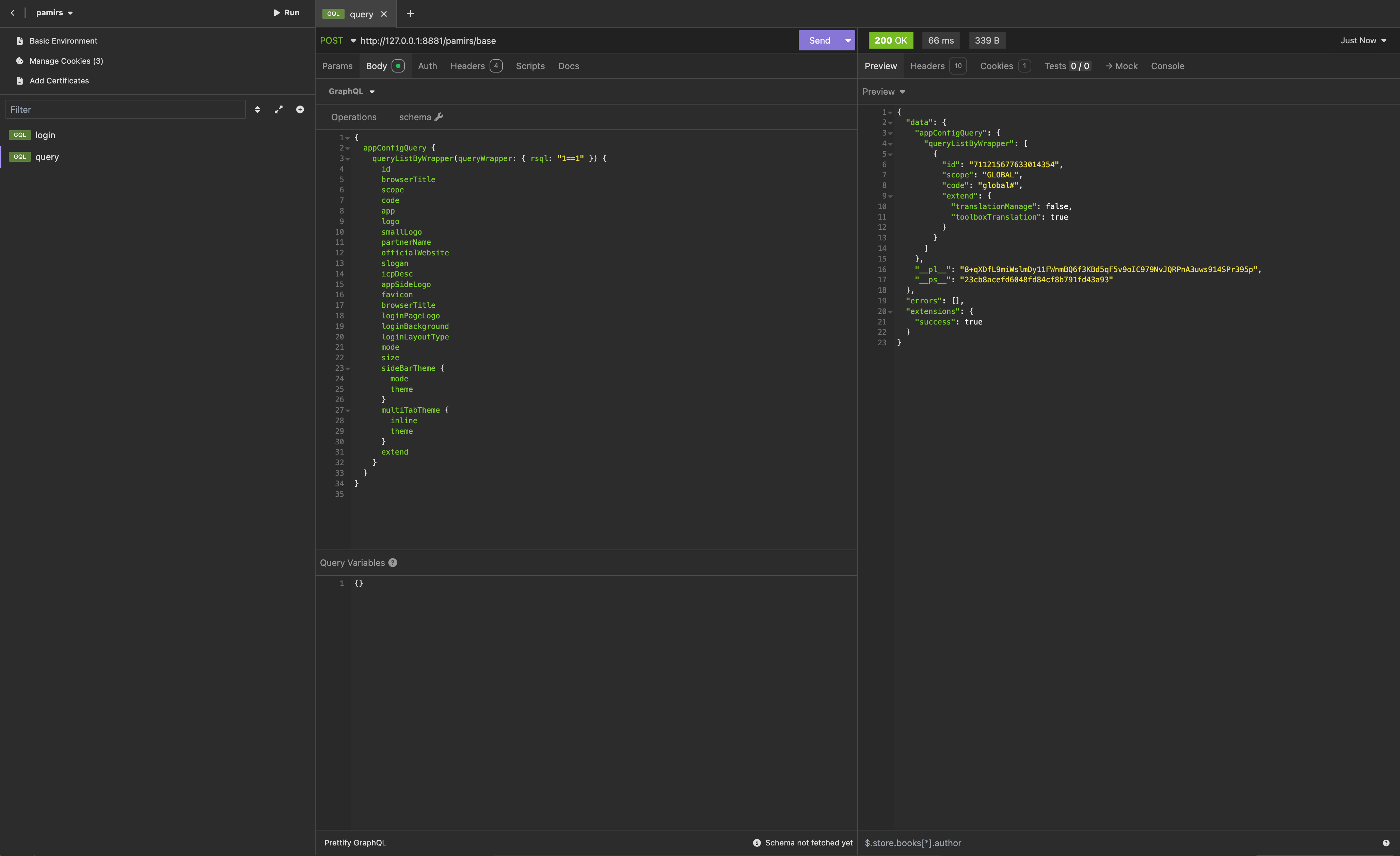
Taking the "Obtain Global Configuration" interface as an example, we use expressions like "appConfig#queryListByWrapper interface" to locate an interface request. Compared with Chinese descriptions, this is more accurate and intuitive.
Let’s get used to this representation method:
- topBarUserBlock#construct: Top Bar - Obtain User Avatar and Actions
- viewAction#load: Load Page Metadata
- model#loadModelField: Obtain Model Field Metadata by Model Code
- module#load: Obtain by Module Code
- resourceCountryGroup#queryPage: Query Country Groups by Pagination
II. Initiating Requests with Visual Tools
Requests for any backend service can be initiated using visual tools. Similar tools include:
- Insomnia: Click to Download
- Postman: Click to Download
You can freely choose any visual tool that supports the GraphQL protocol.
1. Initiating Requests with Insomnia
2. Initiating Requests with Postman
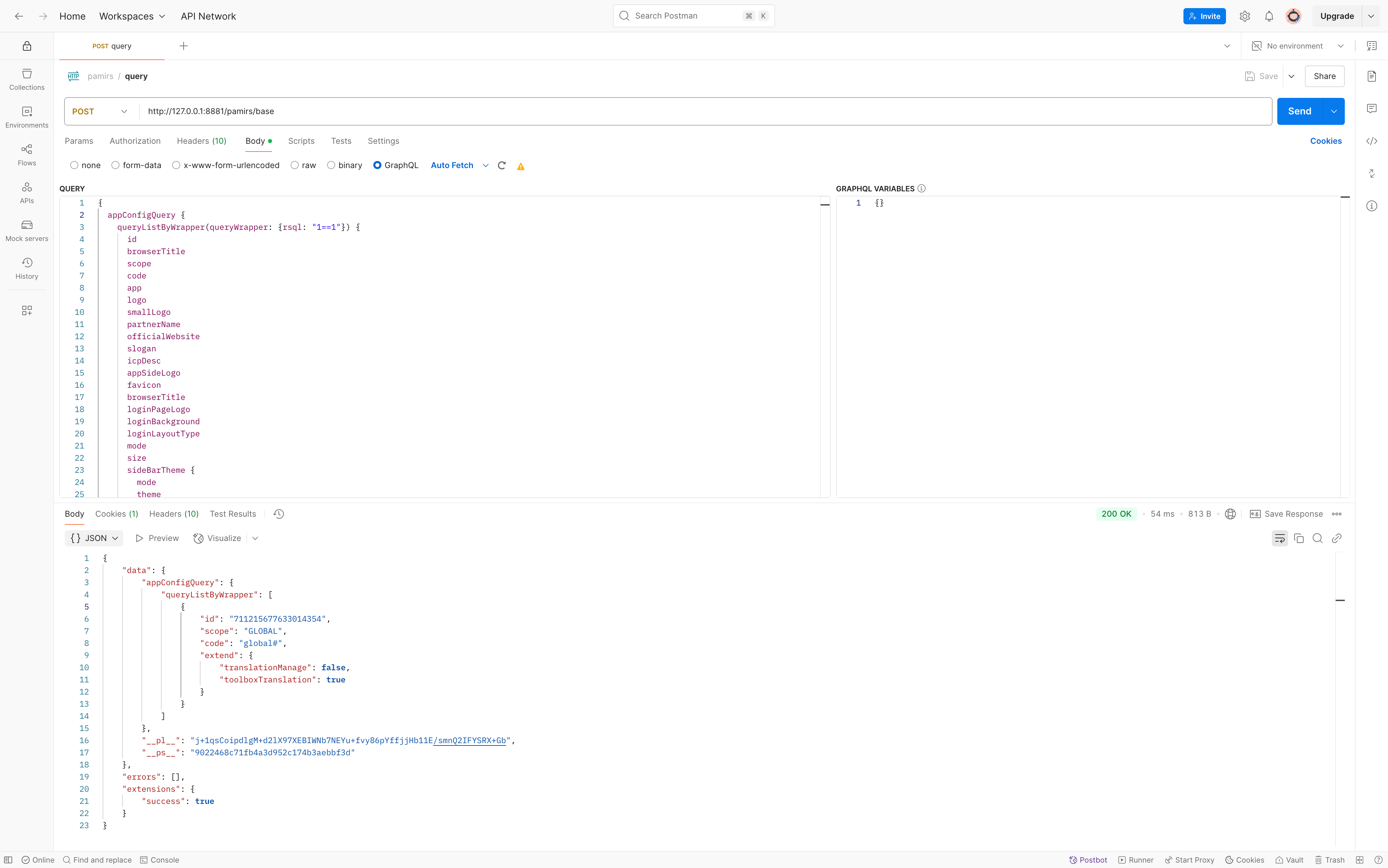
3. Solving Login Issues with Visual Request Tools
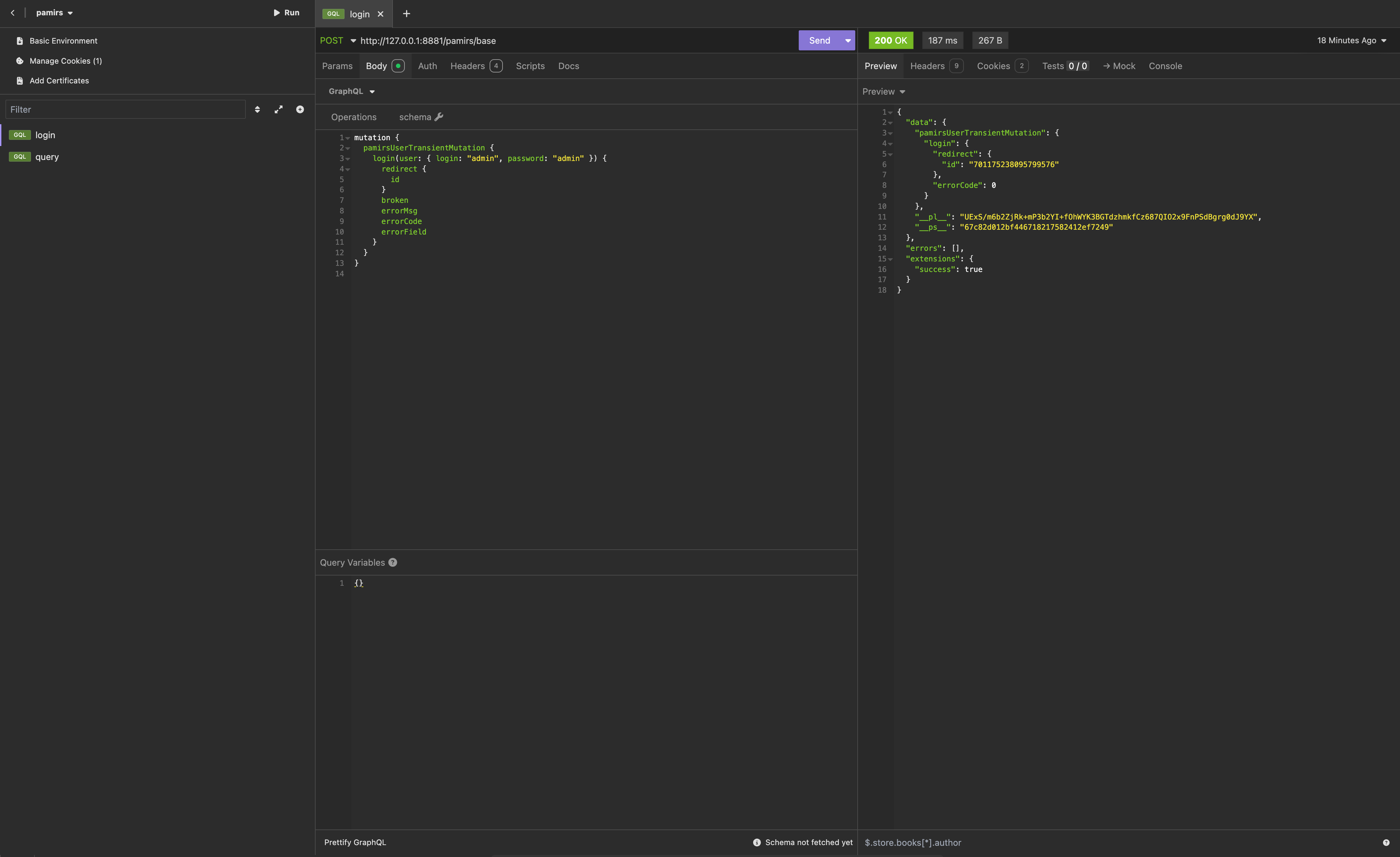
When we initiated the "Obtain Global Configuration" request earlier, we noticed that there was no user login verification. This is because this interface still needs to be used on the login page, so it does not verify whether the user is logged in. However, this is not the case for all other interfaces—you can verify this with other requests in the browser.
So, how to log in? It’s actually very simple: we just need to initiate the login request (sent by the login page) in the request tool, like this:
mutation {
	pamirsUserTransientMutation {
		login(user: { login: "admin", password: "admin" }) {
			redirect {
				id
			}
			broken
			errorMsg
			errorCode
			errorField
		}
	}
}
Tips
The password field of the login interface allows plaintext transmission, which facilitates our debugging. However, on the actual page, the password is transmitted in ciphertext.
Tips
Request URL: Can be obtained from the value of Headers - General - Request URL in the browser.
Request Method: POST (used for most requests).
Obtaining the query parameter: Right-click the query, select "Copy value", and paste it directly into the Query section of the visual request tool.
Obtaining the variables parameter: Right-click the variables, select "Copy object", and paste it directly into the Variables section of the visual request tool.
4. Initiating Batch Requests
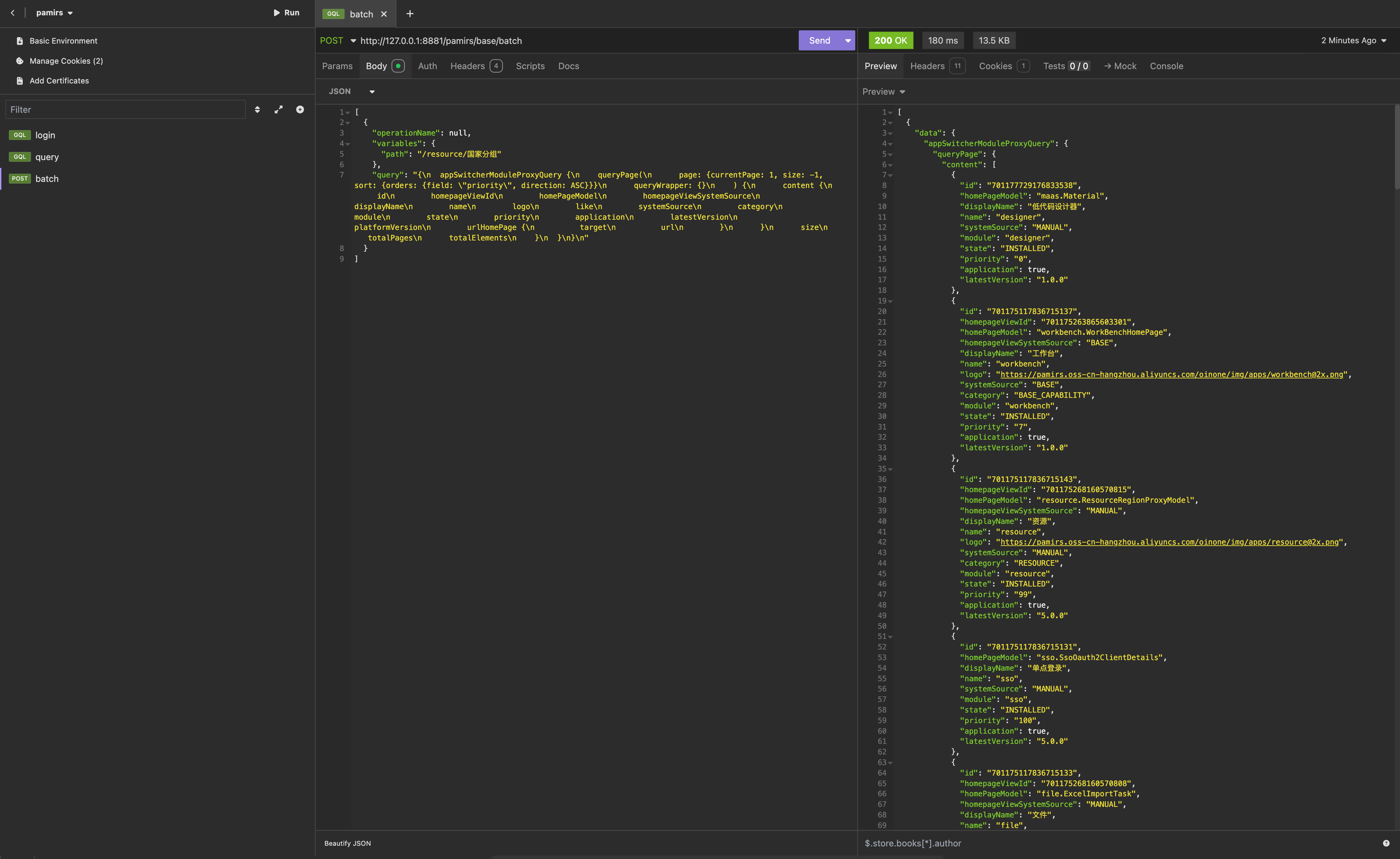
In the browser, we also find a request named "batch", which represents a batch request. It can process a batch of unrelated GraphQL requests at once and return the corresponding results separately.
In the request tool, we can initiate such requests using JSON format.
Tips
Batch requests leverage the automatic batching capability provided by the apollo-client toolkit. When using Promise asynchronously, requests for the same module within the same clock cycle will be merged and automatically combined into such batch requests.
For more content about HTTP Requests, please refer to: HttpClient Service
III. Using GraphQL in Oinone
(I) Starting from the Model
The model is the starting point of all functions. Let’s review the use of models in "Mastering the Frontend Framework" and start with the GanttDemoModel model.
The following is information about the model (GanttDemoModel) used in this chapter: Model Code: demo.gantt.GanttDemoModel Model Name: ganttDemoModel Module Name of the Model: demo Model Fields: (See the table below)
| Name | API Name | Field Type | Multi-value | Length (Single-value Length) |
|---|---|---|---|---|
| Code | code | Text (String) | No | 128 |
| Name | name | Text (String) | No | 128 |
| Task Start Date | taskStartDate | Date (Date) | No | - |
| Task End Date | taskEndDate | Date (Date) | No | - |
Tips
In most cases, the model name is automatically generated from the model code. The generation rule is: split the model code by "." , take the last segment, and convert it to camelCase format—just like the model information shown above.
(II) Built-in Functions
Any model inherited from IdModel has some basic built-in CRUD functions. As a frontend developer, you don’t need to know too much about backend knowledge. To facilitate the description of subsequent content, let’s briefly understand them:
| GQL Type | Function Code (fun) | Function Name (name) | Description |
|---|---|---|---|
| Query | construct | construct | Constructor; initializes the page; |
| queryPage | queryPage | Pagination query; | |
| queryOne | queryOne | Single data query; Entity parameter; | |
| queryListByWrapper | queryListByWrapper | Conditional list query; | |
| queryByWrapper | queryOneByWrapper | Conditional single data query; | |
| countByWrapper | countByWrapper | Count data by conditions; | |
| count | count | Count data; Entity parameter; | |
| Mutation | create | create | Create function; |
| update | update | Update function; | |
| delete | delete | Delete function; |
Tips
Here, we list some commonly used default functions that can be called by the frontend. All functions are ultimately initiated via the Function Name (name). Note a special case here:
queryByWrapperandqueryOneByWrappercall the same function, but theirfunandnameare different.
For more details about function input parameters, output parameters, etc., please refer to: ORM API - Common ORM Methods
(III) GQL Syntax with countByWrapper as an Example
In the chapter "Exploring the Frontend Framework - Building a Dashboard", we initially learned how to initiate backend requests. However, we did not elaborate on the GQL syntax and parameter content corresponding to the built-in countByWrapper function. Let’s take a look at the GQL syntax of this function:
{
  ganttDemoModelQuery {
    countByWrapper(queryWrapper: {rsql: "1==1"})
  }
}In this GQL, the countByWrapper function of the ganttDemoModel model is called. This function only includes one input parameter (an object named queryWrapper), and this object only passes a property named rsql.
In GQL, empty return values and basic data types do not require declaring response parameters. The return value of countByWrapper is a number, so no response parameters are declared in this GQL.
It is worth mentioning that for numeric types, the backend type definitions include Integer, Long, Float, Double, and BigDecimal. When transmitted to the frontend, due to differences in language precision, to prevent precision loss, Long and BigDecimal types are returned to the frontend as string types.
Tips
In the declaration of the countByWrapper function, its return value is of Long type. This means we need to convert it to a number type using the Number() function before returning. Although this processing has certain flaws, in existing scenarios, the maximum integer value returned by countByWrapper generally does not exceed the safe integer value of JavaScript. If the business scenario clearly exceeds the safe value range, tools like bignumber.js (which encapsulate data types) should be used for processing.
For more content about type mapping, please refer to: Data Type Mapping
Theory: Function Definition and GQL Syntax As the first example, let’s first understand the mapping relationship between function definitions and GQL syntax. This will help us better understand the subsequent examples.
The Oinone backend is written in Java, which is very similar to the TypeScript syntax we use. Learning Java syntax may be difficult for frontend developers, so let’s use TypeScript syntax to see what defining such a function would look like:
import { QueryWrapper } from '@oinone/kunlun-dependencies';

/* Built-in data type definition
interface QueryWrapper {
  rsql?: string;
  queryData?: ActiveRecord;
}
*/

export class GanttDemoModelAction {
  public countByWrapper(queryWrapper: QueryWrapper): number {
    // Ignored code
  }
}We have simplified many declaration details here, focusing on key points such as the function name, input parameters, and output parameters. It is obvious that this corresponds one-to-one with GQL syntax.
In Oinone, there are backend-consistent type declarations for the input and output parameters of built-in functions. We can also use these type declarations in practice. In this example, queryWrapper is the input parameter name, QueryWrapper is the input parameter type of the built-in function, and rsql is a property value in the QueryWrapper type.
Tips
For more content about RSQL, please refer to: RSQL Service
(IV) GQL Syntax with queryListByWrapper as an Example
{
  ganttDemoModelQuery {
    queryListByWrapper(queryWrapper: {rsql: "1==1"}) {
      id
      code
      name
      taskStartDate
      taskEndDate
    }
  }
}In this GQL, the queryListByWrapper function of the ganttDemoModel is called. This function includes only one input parameter (an object named queryWrapper), and this object only passes a property named rsql.
In the response, we declare that we need to retrieve five fields of the ganttDemoModel for return. It is worth noting that whether the response data is a single object or an array, GQL response parameters are always flattened—there is no need to distinguish between specific data types.
The corresponding function definition is as follows:
import { QueryWrapper } from '@oinone/kunlun-dependencies';

export interface GanttDemoModel {
  id: string;
  code: string;
  name: string;
  taskStartDate: string;
  taskEndDate: string;
}

export class GanttDemoModelAction {
  public queryListByWrapper(queryWrapper: QueryWrapper): GanttDemoModel[] {
    // Ignored code
  }
}Unlike the previous example, the return value here is no longer a primitive type, but an array of model objects. Therefore, the response parameters we declare in GQL correspond one-to-one with the model fields.
Notably, for datetime types, the backend transmits data to the frontend as standard-format datetime strings. Thus, the taskStartDate and taskEndDate properties declared in our type definition are of string type, not Date type.
Tips
Functions are defined by the backend. As the caller, the frontend uses GQL to specify the model, function, input parameters, and output parameters for the call.
For more content about RSQL, please refer to: RSQL Service
For more content about type mapping, please refer to: Data Type Mapping
(V) GQL Syntax with queryPage as an Example
In the previous example, we introduced GQL syntax for functions with a single parameter. Below, we use queryPage to explain multiple input parameters and return value structures.
{
  ganttDemoModelQuery {
    queryPage(page: {currentPage: 1, size: 15}, queryWrapper: {rsql: "1==1"}) {
      content {
        id
        code
        name
        taskStartDate
        taskEndDate
      }
      totalPages
      totalElements
    }
  }
}The corresponding function definition is as follows:
import { QueryPageResult, QueryPagination, QueryWrapper } from '@oinone/kunlun-dependencies';

export interface GanttDemoModel {
  id: string;
  code: string;
  name: string;
  taskStartDate: string;
  taskEndDate: string;
}

/* Built-in data type definition
interface QueryPagination {
  currentPage: number;
  size: number;
  sort?: { orders: QuerySort[] };
  groupBy?: string;

  totalPages?: number;
  totalElements?: number;
}

interface QueryPageResult<T> {
  content: T[];  // Paginated data list
  totalPages: number;  // Total number of pages
  totalElements: number;  // Total number of data entries
}
*/

export class GanttDemoModelAction {
  public queryPage(page: QueryPagination, queryWrapper: QueryWrapper): QueryPageResult<GanttDemoModel> {
    // Ignored code
  }
}GQL syntax maps parameters by parameter name, not by parameter order:
- If the name of the
queryWrapperinput parameter changes, thequeryWrapperin the corresponding GQL syntax must also be renamed to the same name for the request to work properly. - If the order of
pageandqueryWrapperis swapped, the request result remains identical.
Tips
For more content about RSQL, please refer to: RSQL Service
(VI) GQL Syntax with create as an Example
All previous examples use Query-type GQL syntax, and we omitted the query keyword by default. In this example, we will look at Mutation-type GQL syntax.
mutation {
  ganttDemoModelMutation {
    create(data: {code: "test", name: "test"}) {
      id
      code
      name
      taskStartDate
      taskEndDate
    }
  }
}The corresponding function definition is as follows:
export interface GanttDemoModel {
  id: string;
  code: string;
  name: string;
  taskStartDate: string;
  taskEndDate: string;
}

export class GanttDemoModelAction {
  public create(data: Partial<GanttDemoModel>): GanttDemoModel {
    // Ignored code
  }
}

/*
Partial<GanttDemoModel> is equivalent to:
{
  id?: string;  // Optional property
  code?: string;
  name?: string;
  taskStartDate?: string;
  taskEndDate?: string;
}
*/During creation, we are allowed to pass an object without the primary key (id). The primary key (id) is returned in the response to verify that the data was created successfully.
Tips
Partial is a TypeScript utility type that converts all properties of an object type into optional properties.
(VII) GQL Syntax with update as an Example
The syntax is nearly identical to the create function, but it is important to emphasize that the primary key (id) must be passed for a successful update. In this example, we can use template syntax to pass the incoming primary key (id) into the GQL input parameters and update the name to newName.
const gql = `mutation {
  ganttDemoModelMutation {
    update(data: {id: "${id}", name: "newName"}) {
      id
      code
      name
      taskStartDate
      taskEndDate
    }
  }
}`The corresponding function definition is as follows:
import { IdModel } from '@oinone/kunlun-dependencies';

export interface GanttDemoModel {
  id: string;
  code: string;
  name: string;
  taskStartDate: string;
  taskEndDate: string;
}

/* Built-in data type definition
interface IdModel {
  id?: string;
}
*/

export class GanttDemoModelAction {
  public update(data: Partial<GanttDemoModel> & Required<IdModel>): GanttDemoModel {
    // Ignored code
  }
}

/*
Required<IdModel> is equivalent to:
{
  id: string;  // Mandatory property
}
*/Tips
The rule "the primary key (id) must be passed for a successful update" is the update logic provided by the default data manager function. It can be adjusted based on actual business scenarios.
Required is a TypeScript utility type that converts all properties of an object type into mandatory (non-nullable) properties. Alternatively, an anonymous type like { id: string } can be used directly here.
Update logic of the default data manager function:
- Update condition: Update the object using the primary key.
- Update data: Passed values determine the updated content; unpassed values remain unchanged.
- Associated object creation/update:
- Many-to-one: Associated fields must be flattened in the main model; passing objects is meaningless.
- One-to-many: Must be passed as an array of objects; the primary key (id) is mandatory; unpassed values remain unchanged.
- Many-to-many: Must be passed as an array of objects; the primary key (id) is mandatory; other passed values are meaningless.
For more content about association types, please refer to: ORM API - Relationship Types
(VIII) GQL Syntax with delete as an Example
Earlier, we introduced GQL syntax for functions with object-type input parameters. The delete function supports single or multiple data deletion and accepts an array of objects as input. By default, only the primary key (id) needs to be passed to complete the deletion.
GQL Syntax for Deleting a Single Object
const gql = `mutation {
  ganttDemoModelMutation {
    delete(dataList: [{id: "${id}"}]) {
      id
      code
      name
      taskStartDate
      taskEndDate
    }
  }
}`GQL Syntax for Deleting Multiple Objects
const ids: string[] = []; // Array of primary keys to delete

const gql = `mutation {
  ganttDemoModelMutation {
    delete(dataList: [${ids.map((id) => `{id: "${id}"}`).join(', ')}]) {
      id
      code
      name
      taskStartDate
      taskEndDate
    }
  }
}`As shown, deleting multiple objects simply repeats the structure of each object in the array, and finally joins them with commas to form an object array.
The corresponding function definition is as follows:
export interface GanttDemoModel {
  id: string;
  code: string;
  name: string;
  taskStartDate: string;
  taskEndDate: string;
}

export class GanttDemoModelAction {
  public delete(dataList: Required<IdModel>[]): GanttDemoModel[] {
    // Ignored code
  }
}Here, we do not use the full model for the input parameter, but instead use the IdModel type (which only contains the id field). This type declaration enables static type checking for the caller when passing data, preventing parameter errors and reflecting the backend function definition.
Tips
The input parameter name of the delete function is dataList (an array of objects), which differs from the create and update functions.
The use of IdModel assumes that the backend defines the GanttDemoModel by inheriting IdModel.
Both the frontend and backend have IdModel and CodeModel, with identical inheritance relationships and field definitions.
(IX) Data Type Mapping
In Oinone, there are clear standards and specifications for handling different business field types in GQL syntax, input parameters, and return values. This is also a key part of the frontend-backend interaction boundary. Understanding these data type relationships is crucial for using Oinone.
1. Basic Data Types
The table below shows the mapping between business field types, backend Java types, frontend TypeScript types, and GQL input syntax (excluding multi-value types, composite types, and relationship types):
| Business Field Type | Java Type | TypeScript Type | GQL Input Syntax | Description |
|---|---|---|---|---|
| Integer | Integer | number | data: 123 | No double quotes |
| Long | string | data: "123" | With double quotes (prevents precision loss) | |
| Float | Float | number | data: 123.12 | No double quotes |
| Double | string | data: "123.12" | With double quotes (prevents precision loss) | |
| Amount | BigDecimal | string | data: "123.12" | Returned as a text type with 6 decimal places |
| Boolean | Boolean | boolean | data: true/false | No double quotes; only `true` or `false` are allowed |
| Text | String | string | data: "test" | With double quotes |
| Mobile Phone | String | string | data: "11111111111" | Same as Text type |
| String | string | data: "admin@shushi.pro" | Same as Text type | |
| Multi-line Text | String | string | data: "test" | Same as Text type |
| Rich Text | String | string | data: "test" | Same as Text type (stores HTML strings) |
| Datetime | Date | string | data: "2019-04-09 13:00:00" | Formatted as "YYYY-MM-DD HH:mm:ss" |
| Date | Date | string | data: "2019-04-09" | Formatted as "YYYY-MM-DD" |
| Time | Date | string | data: "13:00:00" | Formatted as "HH:mm:ss" |
| Year | Date | string | data: "2019" | Formatted as "YYYY" |
2. Enum Types (Data Dictionaries)
Enums are a special data type in Oinone, containing four properties: name (logical identifier), value (storage value), displayName (user-facing name), and help (tooltip text).
Let’s take an enum with different name and value as an example (base.Active):
| Name | Value | DisplayName | Help |
|---|---|---|---|
| ACTIVE | true | Active | Active status |
| INACTIVE | false | Inactive | Inactive status |
In GQL, frontend-backend interaction uniformly uses name for both input and output.
For example, if we add a status field to the GanttDemoModel and set its type to ActiveEnum, the corresponding GQL syntax would be status: ACTIVE—using the name as the value without double quotes.
The TypeScript type definition for this scenario is:
import { ActiveEnum } from '@oinone/kunlun-dependencies';

export interface GanttDemoModel {
  id: string;
  code: string;
  name: string;
  taskStartDate: string;
  taskEndDate: string;
  status: ActiveEnum; // Enum type
}

/* Built-in data type definition
enum ActiveEnum {
  ACTIVE = 'ACTIVE', // Name and value are consistent (common practice)
  INACTIVE = 'INACTIVE'
}
*/Tips
In TypeScript, enum definitions corresponding to Oinone enums usually use consistent name and value to simplify data transmission.
As a frontend developer, you do not need to care about how the value is used in the backend. However:
displayNameis the user-facing option shown in UI components (e.g., dropdowns).helpis typically used as tooltip text when the user hovers over the option.
These two preset values may behave differently in different components.
3. Map Data Type (Key-Value Pairs)
Key-value pairs are usually stored in JSON format. During frontend-backend interaction, GraphqlHelper#serializableObject (for JSON objects) or GraphqlHelper#serializableObjectArray (for JSON object arrays) must be used for processing.
When passing data to GQL, we can serialize objects using template syntax:
import { GraphqlHelper } from '@oinone/kunlun-dependencies';

const jsonData = {
  "key1": "value1",
  "key2": "value2"
}

const gql = `mutation {
  ganttDemoModelMutation {
    update(
      data: {
        id: "${id}",
        jsonData: "${GraphqlHelper.serializableObject(jsonData)}",
        jsonArrayData: "${GraphqlHelper.serializableObjectArray([jsonData, jsonData])}"
      }
    ) {
      id
      code
      name
      taskStartDate
      taskEndDate
      jsonData
      jsonArrayData
    }
  }
}`4. Multi-Value Types for Basic Data Types
To pass multi-value data, simply convert any single-value type into an array format. The format of each single value in the array is identical to that of the basic data type.
Array format: [${value1}, ${value2}, ${value3}...]
| Business Field Type | Java Type | TypeScript Type | GQL Input Syntax |
|---|---|---|---|
| Integer | List<Integer> | number[] | data: [1, 2, 3] |
List<Long> | string[] | data: ["1", "2", "3"] | |
| Float | List<Float> | number[] | data: [1.12, 2.12, 3.12] |
List<Double> | string[] | data: ["1.12", "2.12", "3.12"] | |
| Text | List<String> | string[] | data: ["test1", "test2", "test3"] |
(X) Data Submission for Relationship Types
1. Many-to-One (M2O)
Field Definition
Assume the GanttDemoModel has a task field that establishes a many-to-one relationship with the GanttTask model. (Here, we only need to know that GanttTask contains an id field to establish the relationship between the two models.)
| Name | API Name | Field Type | Related Model (references) | Relation Field (relationFields) | Reference Field (referenceFields) |
|---|---|---|---|---|---|
| Task | task | Many-to-One (M2O) | GanttTask | taskId | id |
| Task ID | taskId | Integer |
Update Relationship via Relation Field taskId
const gql = `mutation {
  ganttDemoModelMutation {
    update(data: {id: "${id}", taskId: "${taskId}"}) {
      id
      code
      name
      task {
        id
        code
        name
      }
    }
  }
}`Since many-to-one relationships are established by storing a relation field in the main model, we can directly update the relationship by modifying the taskId field.
Update Relationship via Reference Field task
export interface GanttDemoModel {
  id: string;
  code: string;
  name: string;
  taskStartDate: string;
  taskEndDate: string;
  taskId?: string;
  task?: Partial<GanttTask>; // Note: M2O returns a single object, not an array
}

export interface GanttTask {
  id: string;
  code: string;
  name: string;
}

const gql = `mutation {
  ganttDemoModelMutation {
    update(data: {id: "${id}", task: {id: "${taskId}"}}) {
      id
      code
      name
      task {
        id
        code
        name
      }
    }
  }
}`Although we do not directly pass taskId to the backend, the backend will automatically assign the id value from the task object to the taskId field of the main model (as M2O relationships rely on relation fields) and save it. This also updates the relationship between the two models.
Tips
If both taskId and task.id are provided, task.id takes precedence. In actual business use, we recommend using only one method to update relationships to avoid misunderstandings caused by conflicting rules.
2. One-to-Many (O2M)
Field Definition
Assume the GanttDemoModel has a children field that establishes a one-to-many relationship with the GanttDemoModel (self-reference).
| Name | API Name | Field Type | Related Model (references) | Relation Field (relationFields) | Reference Field (referenceFields) |
|---|---|---|---|---|---|
| Children Tasks | children | One-to-Many (O2M) | GanttDemoModel | id | parentId |
| Parent Task ID | parentId | Integer |
Update Relationship via Reference Field children
const gql = `mutation {
  ganttDemoModelMutation {
    update(
      data: {
        id: "${id}",
        children: [
          {code: "c1", name: "c1"},
          {code: "c2", name: "c2"}
        ]
      }
    ) {
      id
      code
      name
      taskStartDate
      taskEndDate
      children {
        id
        parentId
        code
        name
      }
    }
  }
}`Since no primary key (id) is passed for the children objects, the backend will create new records for these objects and bind the relationship via the parentId field when the main model is updated.
For repeated updates:
- First query the original values of the
childrenarray. - Modify the specific content and submit with the primary key (
id) of the child objects.
Failure to include theidwill result in duplicate data errors.
A common way to dynamically splice GQL for both create and update scenarios is shown below:
export interface GanttDemoModel {
  id: string;
  code: string;
  name: string;
  taskStartDate: string;
  taskEndDate: string;
  parentId?: string;
  children?: Partial<GanttDemoModel>[];
}

const data: Partial<GanttDemoModel> & Required<IdModel>; // Data with main model ID

const gql = `mutation {
  ganttDemoModelMutation {
    update(data: {
      id: "${data.id}",
      children: [
        ${
          data.children?.map((child) =>
            `{
              code: "${child.code}",
              name: "${child.name}"
              ${child.id ? `, id: "${child.id}"` : ''} // Add ID only if it exists
            }`
          ).join(', ') || ''
        }
      ]
    }) {
      id
      code
      name
      taskStartDate
      taskEndDate
      children {
        id
        parentId
        code
        name
      }
    }
  }
}`This uses template syntax to split the children array into individual object snippets. The id is appended dynamically (if present) and joined with commas to form a valid object array string.
Tips
While template syntax is convenient for splicing GQL for objects/arrays, complex splicing logic can become confusing.
Don’t worry—later in the tutorial, we will introduce GQL utility classes to simplify this dynamic construction process, making it clearer and more concise.
Default Update Logic for O2M Relationship Fields
- If no primary key (
id) exists in the reference field: Create new related objects and bind the relationship. - If a primary key (
id) exists in the reference field: Update the existing related objects and refresh the relationship. - If an existing object is missing from the reference field: Unbind the relationship (the child object itself is not deleted unless configured otherwise).
3. Many-to-Many (M2M)
Field Definition
Assume the GanttDemoModel has a tasks field that establishes a many-to-many relationship with the GanttTask model via an intermediate table. (We only need to know GanttTask contains an id field to establish the relationship.)
| Name | API Name | Field Type | Related Model (references) | Intermediate Model (through) | Relation Field (relationFields) | Intermediate Relation Field (throughRelationFields) | Reference Field (referenceFields) | Intermediate Reference Field (throughReferenceFields) |
|---|---|---|---|---|---|---|---|---|
| Task Set | tasks | Many-to-Many (M2M) | GanttTask | GanttDemoModelRelGanttTask | id | ganttId | id | taskId |
Intermediate Model (GanttDemoModelRelGanttTask)
| Name | API Name | Field Type |
|---|---|---|
| Gantt ID | ganttId | Integer |
| Task ID | taskId | Integer |
Update Relationship via Reference Field tasks
The syntax is nearly identical to one-to-many. A common dynamic GQL splicing example is shown below:
export interface GanttDemoModel {
  id: string;
  code: string;
  name: string;
  taskStartDate: string;
  taskEndDate: string;
  tasks?: Partial<GanttTask>[];
}

export interface GanttTask {
  id: string;
  code: string;
  name: string;
}

const data: Partial<GanttDemoModel> & Required<IdModel>; // Data with main model ID

const gql = `mutation {
  ganttDemoModelMutation {
    update(data: {
      id: "${data.id}",
      tasks: [
        ${
          data.tasks?.map((task) =>
            `{
              code: "${task.code}",
              name: "${task.name}"
              ${task.id ? `, id: "${task.id}"` : ''} // Add ID only if it exists
            }`
          ).join(', ') || ''
        }
      ]
    }) {
      id
      code
      name
      taskStartDate
      taskEndDate
      tasks {
        id
        code
        name
      }
    }
  }
}`Default Update Logic for M2M Relationship Fields
- If no primary key (
id) exists in the reference field: Create new related objects and insert association records into the intermediate table. - If a primary key (
id) exists in the reference field: Update the existing related objects and refresh the intermediate table records. - If only the primary key (
id) is passed: Skip updating the related object itself and only refresh the intermediate table association. - If an existing object is missing from the reference field: Delete the corresponding association record from the intermediate table (unbind the relationship, but do not delete the related object).
IV. Usage of GQL Utility Classes
In Oinone, while using the native HttpClient allows direct request initiation, its low-level capabilities are not very user-friendly without encapsulation. To address this, we provide utility classes to simplify GQL request workflows.
(I) GQLBuilder
Taking ganttDemoModel#queryListByWrapper as an example:
const MODULE_NAME = 'demo';
const MODEL_NAME = 'ganttDemoModel';

public static queryListByWrapperByGQLBuilder(): Promise<GanttDemoModel[]> {
  return GQL.query(MODEL_NAME, 'queryListByWrapper') // Initialize Query-type GQL
    .buildRequest((builder) => { // Build request parameters
      builder.buildObjectParameter('queryWrapper', (builder) => {
        builder.stringParameter('rsql', '1==1'); // Add string parameter "rsql"
      });
    })
    .buildResponse((builder) => { // Build response parameters
      builder.parameter('id', 'code', 'name', 'taskStartDate', 'taskEndDate');
    })
    .request(MODULE_NAME); // Initiate request with module name
}When using raw GQL, string splicing for complex types (e.g., objects/arrays) can be error-prone. GQLBuilder handles these types natively, eliminating the need to manually manage splicing logic. This is the closest approach to using HttpClient directly while remaining user-friendly.
1. GQLBuilder API
GQL.query
- Description: Starts building a Query-type GQL request.
- Type:
(modelName: string, name: string, fragments?: GQLFragment[]) => QueryGQL - Parameters:
modelName: Name of the target model.name: Name of the target function.
- Return Value: A
GQLBuilderinstance for Query-type requests.
GQL.mutation
- Description: Starts building a Mutation-type GQL request.
- Type:
(modelName: string, name: string, fragments?: GQLFragment[]) => MutationGQL - Parameters:
modelName: Name of the target model.name: Name of the target function.
- Return Value: A
GQLBuilderinstance for Mutation-type requests.
GQL.fragment
- Description: Starts building a GQL Fragment (reusable field set).
- Type:
(name: string, definition: string) => GQLResponseParameterBuilder - Parameters:
name: Name of the fragment.definition: Target model/type for the fragment.
- Return Value: A
GQLBuilderinstance for Fragment construction.
buildRequest (Request Parameter Construction)
| Method | Description | Supported Types |
|---|---|---|
stringParameter | Adds string-type parameters (supports single values/arrays). | `string |
numberParameter | Adds number-type parameters (supports single values/arrays). | `number |
booleanParameter | Adds boolean-type parameters (supports single values/arrays). | `boolean |
enumerationParameter | Adds enum-type parameters (uses enum name; supports single values/arrays). | `string |
mapParameter | Adds Map/JSON-type parameters (auto-serializes; supports single values/arrays). | `object |
objectParameter | Adds arbitrary object parameters (manual structure handling). | Custom objects |
buildObjectParameter | Starts building a nested object parameter (chainable). | Nested objects |
buildArrayParameter | Starts building an array parameter (chainable for array items). | Arrays of objects/primitives |
nullParameter | Adds a null value parameter. | null |
nullArrayParameter | Adds an empty array parameter. | [] |
Tips
For methods supporting single values/arrays:
null: Includes the parameter in GQL with anullvalue.undefined: Omits the parameter from the GQL entirely.
buildResponse (Response Parameter Construction)
| Method | Description |
|---|---|
parameter | Quickly builds response parameters (supports nested objects via arrays). |
buildParameters | Builds nested object response parameters (chainable). |
fragmentParameter | References a pre-defined Fragment in the response. |
responseFragmentParameter
- Description: Uses a Fragment as the entire response (avoids repeating field definitions). Must be used with
buildFragment/mountFragment.
buildFragment
- Description: Builds a Fragment for the current request (uses the same syntax as
buildResponse). For static Fragments, usemountFragmentinstead.
mountFragment
- Description: Attaches a pre-defined Fragment to the current request (for reusability).
request
- Description: Initiates the GQL request to the backend.
- Parameters:
moduleName(name of the backend module to target). - Return Value: A
Promiseresolving to the response data.
toString
- Description: Generates the raw GQL string (for debugging or custom request workflows).
- Return Value: Raw GQL text.
2. Usage Example: queryPage
const MODULE_NAME = 'demo';
const MODEL_NAME = 'ganttDemoModel';

public static async queryPage(): Promise<QueryPageResult<GanttDemoModel>> {
  return GQL.query(MODEL_NAME, 'queryPage')
    .buildRequest((builder) => {
      // Build "page" parameter (pagination config)
      builder.buildObjectParameter('page', (pageBuilder) => {
        pageBuilder.numberParameter('currentPage', 1) // Page 1
                   .numberParameter('size', 15);      // 15 items per page
      });
      // Build "queryWrapper" parameter (filter conditions)
      builder.buildObjectParameter('queryWrapper', (wrapperBuilder) => {
        wrapperBuilder.stringParameter('rsql', '1==1'); // No filter (match all)
      });
    })
    .buildResponse((builder) => {
      // Build response parameters (supports nested objects via [field, [subfields]])
      builder.parameter(
        ['content', ['id', 'code', 'name', 'taskStartDate', 'taskEndDate']], // Nested "content" object
        'totalPages', // Total pages
        'totalElements' // Total items
      );
    })
    .request(MODULE_NAME);
}For nested response objects (e.g., content containing task), use nested arrays to define subfields:
builder.parameter(
  [
    'content',
    [
      'id', 'code', 'name',
      ['task', ['id', 'code', 'name']] // Nested "task" object under "content"
    ]
  ],
  'totalPages',
  'totalElements'
);3. Usage Example: create
const MODULE_NAME = 'demo';
const MODEL_NAME = 'ganttDemoModel';

public static async create(): Promise<GanttDemoModel> {
  return GQL.mutation(MODEL_NAME, 'create') // Initialize Mutation-type GQL
    .buildRequest((builder) => {
      builder.buildObjectParameter('data', (dataBuilder) => {
        dataBuilder.stringParameter('code', 'test') // Set "code"
                   .stringParameter('name', 'test'); // Set "name"
      });
    })
    .buildResponse((builder) => {
      builder.parameter('id', 'code', 'name', 'taskStartDate', 'taskEndDate');
    })
    .request(MODULE_NAME);
}4. Usage Example: update
const MODULE_NAME = 'demo';
const MODEL_NAME = 'ganttDemoModel';

public static async update(id: string): Promise<GanttDemoModel> {
  return GQL.mutation(MODEL_NAME, 'update')
    .buildRequest((builder) => {
      builder.buildObjectParameter('data', (dataBuilder) => {
        dataBuilder.stringParameter('id', id) // Mandatory: main model ID
                   .stringParameter('name', 'newName'); // Update "name"
      });
    })
    .buildResponse((builder) => {
      builder.parameter('id', 'code', 'name', 'taskStartDate', 'taskEndDate');
    })
    .request(MODULE_NAME);
}5. Usage Example: delete
const MODULE_NAME = 'demo';
const MODEL_NAME = 'ganttDemoModel';

public static async delete(ids: string[]): Promise<GanttDemoModel[]> {
  return GQL.mutation(MODEL_NAME, 'delete')
    .buildRequest((builder) => {
      // Build "dataList" array (convert ID array to object array)
      builder.buildArrayParameter('dataList', ids, (itemBuilder, id) => {
        itemBuilder.stringParameter('id', id); // Each item only needs "id"
      });
    })
    .buildResponse((builder) => {
      builder.parameter('id', 'code', 'name', 'taskStartDate', 'taskEndDate');
    })
    .request(MODULE_NAME);
}The buildArrayParameter method converts a simple ID array (string[]) into an array of objects (each with an id field). The second parameter is the source array, and the third parameter defines how to map each array item to a GQL object.
6. Usage of Enums (Data Dictionaries)
const MODULE_NAME = 'demo';
const MODEL_NAME = 'ganttDemoModel';

public static async update(id: string): Promise<GanttDemoModel> {
  return GQL.mutation(MODEL_NAME, 'update')
    .buildRequest((builder) => {
      builder.buildObjectParameter('data', (builder) => {
        builder.stringParameter('id', id).enumerationParameter('status', ActiveEnum.ACTIVE);
      });
    })
    .buildResponse((builder) => {
      builder.parameter('id', 'code', 'name', 'taskStartDate', 'taskEndDate');
    })
    .request(MODULE_NAME);
}Note
When the enum value does not match the enum name required by the backend, it must be passed as a string.
7. Usage of Maps (Key-Value Pairs)
const MODULE_NAME = 'demo';
const MODEL_NAME = 'ganttDemoModel';

const jsonData = {
  "key1": "value1",
  "key2": "value2"
}

public static async update(id: string): Promise<GanttDemoModel> {
  return GQL.mutation(MODEL_NAME, 'update')
    .buildRequest((builder) => {
      builder.buildObjectParameter('data', (builder) => {
        builder
          .stringParameter('id', id)
          .mapParameter('jsonData', jsonData)
          .mapParameter('jsonArrayData', [jsonData, jsonData]);
      });
    })
    .buildResponse((builder) => {
      builder.parameter('id', 'code', 'name', 'taskStartDate', 'taskEndDate');
    })
    .request(MODULE_NAME);
}For fields of Map data type, use the mapParameter method to pass values. It will automatically select one of the previously used serialization methods (GraphqlHelper#serializableObject or GraphqlHelper#serializableObjectArray) based on the input parameter type.
Note
The mapParameter method requires upgrading @oinone/kunlun-request to version 6.2.7 or higher. Users on lower versions can use stringParameter with the corresponding serialization method instead.
Example:
stringParameter('jsonData', GraphqlHelper.serializableObject(jsonData))
8. Usage of Primitive Type Arrays
All request parameter construction methods for primitive types support passing parameters in array format. When you need to pass an ids array as a request parameter, you can send the request as follows:
const MODULE_NAME = 'demo';
const MODEL_NAME = 'ganttDemoModel';

public static async update(id: string, ids: string[]): Promise<GanttDemoModel> {
  return GQL.mutation(MODEL_NAME, 'update')
    .buildRequest((builder) => {
      builder.buildObjectParameter('data', (builder) => {
        builder.stringParameter('id', id).stringParameter('ids', ids);
      });
    })
    .buildResponse((builder) => {
      builder.parameter('id', 'code', 'name', 'ids');
    })
    .request(MODULE_NAME);
}9. Usage of Object Types
const MODULE_NAME = 'demo';
const MODEL_NAME = 'ganttDemoModel';

public static async update(id: string, taskId: string): Promise<GanttDemoModel> {
  return GQL.mutation(MODEL_NAME, 'update')
    .buildRequest((builder) => {
      builder.buildObjectParameter('data', (builder) => {
        builder.stringParameter('id', id)
          .buildObjectParameter('task', (builder) => {
            builder.stringParameter('id', taskId);
          });
      });
    })
    .buildResponse((builder) => {
      builder.parameter('id', 'code', 'name', ['task', ['id', 'code', 'name']]);
    })
    .request(MODULE_NAME);
}For fields of object type, use the buildObjectParameter method to start constructing each parameter within the object.
10. Usage of Object Array Types
const MODULE_NAME = 'demo';
const MODEL_NAME = 'ganttDemoModel';

public static async update(data: Partial<GanttDemoModel> & Required<IdModel>): Promise<GanttDemoModel> {
  return GQL.mutation(MODEL_NAME, 'update')
    .buildRequest((builder) => {
      builder.buildObjectParameter('data', (builder) => {
        builder.stringParameter('id', data.id)
          .buildArrayParameter('children', data.children, (builder, child) => {
            builder
              .stringParameter('id', child.id)
              .stringParameter('code', child.code)
              .stringParameter('name', child.name);
          });
      });
    })
    .buildResponse((builder) => {
      builder.parameter('id', 'code', 'name', 'taskStartDate', 'taskEndDate', [
        'children',
        ['id', 'parentId', 'code', 'name']
      ]);
    })
    .request(MODULE_NAME);
}For fields of object array type, use the buildArrayParameter method. The second parameter of this method is the value of each item in the array. Subsequent usage is identical to constructing a single object.
(II) GenericFunctionService
In practice, we found that initiating requests with GQL is more cumbersome compared to Ajax/Axios. Is there a way to initiate requests like we do with Ajax/Axios?
Let’s use GenericFunctionService to send GQL requests in an Ajax/Axios-like manner:
public static queryListByWrapper(): Promise<GanttDemoModel[] | undefined> {
  return GenericFunctionService.INSTANCE.simpleExecuteByName(MODEL_MODEL, 'queryListByWrapper', {
    rsql: '1==1'
  });
}A standard Ajax/Axios request includes a request path (URL), request method (HttpMethod), and request body (Body). Similar to initiating an Ajax/Axios request, simpleExecuteByName accepts two or more parameters:
- The first two parameters are the namespace and function name, which correspond to the
request path (URL). - Any number of subsequent parameters correspond to the
request body (Body). - The
request method (HttpMethod)is fixed toPOSTand does not need to be explicitly specified.
1. GenericFunctionService API
execute
- Function Description: Executes any function.
- Type:
<T>(functionDefinition: RuntimeFunctionDefinition, options: GenericFunctionOptions, ...args: unknown[]) => Promise<T | undefined> - Parameters:
functionDefinition: Specifies the function definition, obtained viaFunctionCache.options: Optional configurations for function execution....args: Variable-length input parameters, passed in the order defined by the function.
- Return Value: The function request result.
executeByFun
- Function Description: Executes a function by specifying the namespace and function code.
- Type:
<T>(namespace: string, fun: string, options: GenericFunctionOptions, ...args: unknown[]) => Promise<T | undefined> - Parameters:
namespace: Specifies the namespace of the function to execute.fun: Specifies the code of the function to execute.options: Optional configurations for function execution....args: Variable-length input parameters, passed in the order defined by the function.
- Return Value: The function request result.
executeByName
- Function Description: Executes a function by specifying the namespace and function name.
- Type:
<T>(namespace: string, name: string, options: GenericFunctionOptions, ...args: unknown[]) => Promise<T | undefined> - Parameters:
namespace: Specifies the namespace of the function to execute.fun: Specifies the code of the function to execute.options: Optional configurations for function execution....args: Variable-length input parameters, passed in the order defined by the function.
- Return Value: The function request result.
simpleExecute
- Function Description: Executes any function using default execution options.
- Type:
<T>(functionDefinition: RuntimeFunctionDefinition, ...args: unknown[]) => Promise<T | undefined> - Parameters:
functionDefinition: Specifies the function definition, obtained viaFunctionCache....args: Variable-length input parameters, passed in the order defined by the function.
- Return Value: The function request result.
simpleExecuteByFun
- Function Description: Executes a function by specifying the namespace and function code, using default execution options.
- Type:
<T>(namespace: string, fun: string, ...args: unknown[]) => Promise<T | undefined> - Parameters:
namespace: Specifies the namespace of the function to execute.fun: Specifies the code of the function to execute....args: Variable-length input parameters, passed in the order defined by the function.
- Return Value: The function request result.
simpleExecuteByName
- Function Description: Executes a function by specifying the namespace and function name, using default execution options.
- Type:
<T>(namespace: string, name: string, ...args: unknown[]) => Promise<T | undefined> - Parameters:
namespace: Specifies the namespace of the function to execute.fun: Specifies the code of the function to execute....args: Variable-length input parameters, passed in the order defined by the function.
- Return Value: The function request result.
Below, we will explain how to use GenericFunctionService to initiate GQL requests for all the GQL syntax examples covered in Chapter 1.
2. Usage Example with queryPage
const MODEL_MODEL = 'demo.gantt.GanttDemoModel';

public static async queryPage(): Promise<QueryPageResult<GanttDemoModel[]> | undefined> {
  return GenericFunctionService.INSTANCE.simpleExecuteByName(
    MODEL_MODEL,
    'queryPage',
    {
      currentPage: 1,
      size: 15
    },
    {
      rsql: '1==1'
    }
  );
}From our previous GQL syntax learning, we know that the queryPage function has two input parameters, in order: QueryPagination and QueryWrapper. In the example above, we use the simpleExecuteByName method to initiate the call and pass the corresponding parameters in order.
The methods of the Generic Function Service use generic return types. In TypeScript type inference, as long as we define the type declaration for the function's return value, automatic inference is possible. We recommend that the call methods of individual services also declare the types of their input and output parameters whenever possible.
Note
To avoid request exceptions caused by changes in parameter names, the Generic Function Service matches function input parameter names by the order of variable-length parameters. This is the optimal solution we can achieve given the constraints.
Although each input parameter is marked with the corresponding model code in the function's metadata definition, JavaScript itself has no concept of types—this is therefore the best approach available to us.
3. Usage Example with create
const MODEL_MODEL = 'demo.gantt.GanttDemoModel';

public static async create(): Promise<GanttDemoModel | undefined> {
  return GenericFunctionService.INSTANCE.simpleExecuteByName(MODEL_MODEL, 'create', {
    code: 'test',
    name: 'test'
  });
}In this example, we represent the structure of the create function's input parameters by flattening them. The following examples follow the same pattern.
Typically, you need to use function input parameters to construct the object to be created.
4. Usage Example with update
const MODEL_MODEL = 'demo.gantt.GanttDemoModel';

public static async update(id: string): Promise<GanttDemoModel | undefined> {
  return GenericFunctionService.INSTANCE.simpleExecuteByName(MODEL_MODEL, 'update', {
    id,
    name: 'newName'
  });
}5. Usage Example with delete
const MODEL_MODEL = 'demo.gantt.GanttDemoModel';

public static async delete(ids: string[]): Promise<GanttDemoModel[] | undefined> {
  return GenericFunctionService.INSTANCE.simpleExecuteByName(
    MODEL_MODEL,
    'delete',
    ids.map((id) => ({ id }))
  );
}From our previous GQL syntax learning, we know that the delete function is called by passing an array of dataList objects. Therefore, when using the Generic Function Service, we also need to follow the corresponding data type requirements.
When passing a string array of ids, we need to convert it into an object array and pass it as the first parameter of the delete function.
6. Usage of Enums (Data Dictionaries)
const MODEL_MODEL = 'demo.gantt.GanttDemoModel';

public static async update(id: string): Promise<GanttDemoModel | undefined> {
  return GenericFunctionService.INSTANCE.simpleExecuteByName(MODEL_MODEL, 'update', {
    id,
    status: ActiveEnum.ACTIVE
  });
}When using the Generic Function Service, you no longer need to worry about data type conversion—enums can be passed directly according to their declared types.
Note
When the enum value does not match the enum name required by the backend, it must be passed as a string.
7. Usage of Maps (Key-Value Pairs)
const MODEL_MODEL = 'demo.gantt.GanttDemoModel';

const jsonData = {
  "key1": "value1",
  "key2": "value2"
}

public static async update(id: string): Promise<GanttDemoModel | undefined> {
  return GenericFunctionService.INSTANCE.simpleExecuteByName(MODEL_MODEL, 'update', {
    id,
    jsonData,
    jsonArrayData: [jsonData, jsonData]
  });
}When using the Generic Function Service, you no longer need to worry about data type conversion—Map data types can also be passed easily without needing to care about whether serialization methods are required.
8. Multi-Level Nesting
const MODEL_MODEL = 'demo.gantt.GanttDemoModel';

public static async create(): Promise<GanttDemoModel | undefined> {
  return GenericFunctionService.INSTANCE.executeByName(
    MODEL_MODEL,
    'create',
    { deep: 2 },
    {
      code: 'test',
      name: 'test',
      children: [
        { code: 'c1', name: 'c1' },
        {
          code: 'c2',
          name: 'c2',
          children: [
            {
              code: 'c2-1',
              name: 'c2-1'
            },
            {
              code: 'c2-2',
              name: 'c2-2'
            }
          ]
        }
      ]
    }
  );
}When the nesting depth of the passed object exceeds 1 level, the request can still be sent completely, but the response body cannot be fully constructed based on the request object. If we continue to use the previous simpleExecuteByName method to initiate this request, we will find that the children parameter of the c2 object is missing in the return result.
Therefore, to fully retrieve the response body object with deeper nesting levels, use the executeByName method and pass the deep property set to 2—this will return a more complete response body object.
Note
The deep parameter is used to automatically retrieve the hierarchy of response fields. Its default value is 1, meaning only one level of association is queried starting from the current model (sufficient for most cases). When you need to retrieve response body objects with deeper levels, be cautious of performance overhead caused by the deep parameter—this is especially noticeable in models with many associated fields.