Ⅰ、Download Installation Package
Tip
When downloading, please note to select the version that matches your operating system and CPU instruction set architecture (such as x64, arm64). The following installation process takes the version with version number 20.16.0 and architecture arm64 as an example for explanation.
Attention
When configuring environment variables, the configuration path in the script needs to be replaced with the corresponding Shell's profile file path:
- For Zsh, please use
${HOME}/.zshrc - For Bash, please use
${HOME}/.bashrc
Node.js download address:
https://nodejs.org/dist/v20.16.0/
Ⅱ、Installation
(Ⅰ)Install Node.js on Linux/macOS
1、Unzip
Use a visualization tool or the following command to unzip
# Unzip command
# tar.gz package
tar zxvf node-v20.16.0-darwin-arm64.tar.gz -C ./installation directory

# tar.xz package
tar Jxvf node-v20.16.0-darwin-arm64.tar.gz -C ./installation directory2、Configure Environment Variables
# Configure environment variables
cat >> replace the specific Shell configuration file << EOF
export NODE_PATH="installation directory"
export PATH=\$NODE_PATH/bin:\$PATH
EOF3、Verification
Enter node --version in the terminal to verify
# Verify environment variables
node --version
v20.16.0(Ⅱ)Install Node.js on Windows
1、Unzip
Use a visualization tool or the Windows built-in zip tool (select the file with the mouse, right-click "Extract All"), and extract the contents of the compressed file
2、Configure Environment Variables
Press Win + R on the keyboard to bring up the following interface
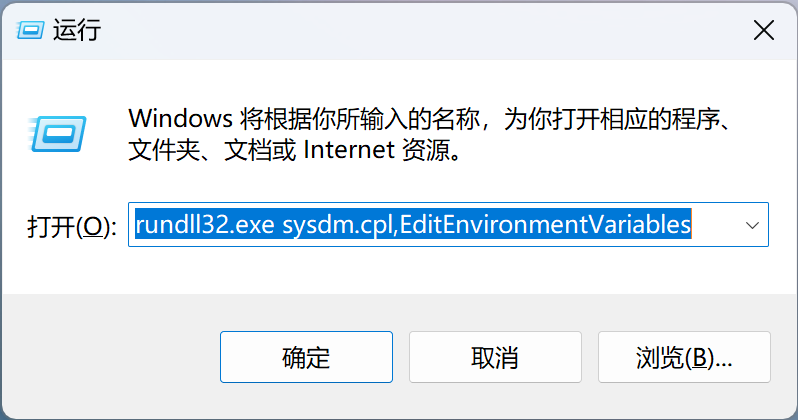
Enter the following code and click OK
# Call up the environment variable configuration interface
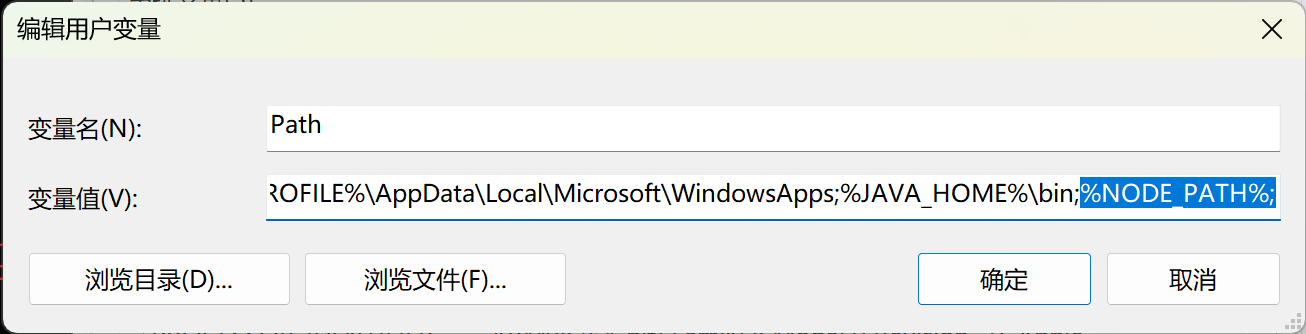
rundll32.exe sysdm.cpl,EditEnvironmentVariablesConfigure NODE_PATH as the installation directory of node, and add the variable %NODE_PATH% to Path

3、Verification
Enter node --version in the Windows terminal to verify
# Verify environment variables
node --version
v20.16.0Ⅲ、Advanced
Use nvm to manage different versions of Node.js. For installation and usage methods, please refer to the nvm official website: https://github.com/nvm-sh/nvm
The development tool for Vue.js is Vue CLI. For installation and usage methods, please refer to the Vue CLI official documentation: https://cli.vuejs.org/zh/