To better meet the diverse configuration needs of users in real-world scenarios, the Oinone platform provides custom expression functionality in multiple places. When users find that the platform's default settings cannot meet their specific requirements, they can use these custom expressions for flexible adjustments to achieve configurations that better fit their business logic.
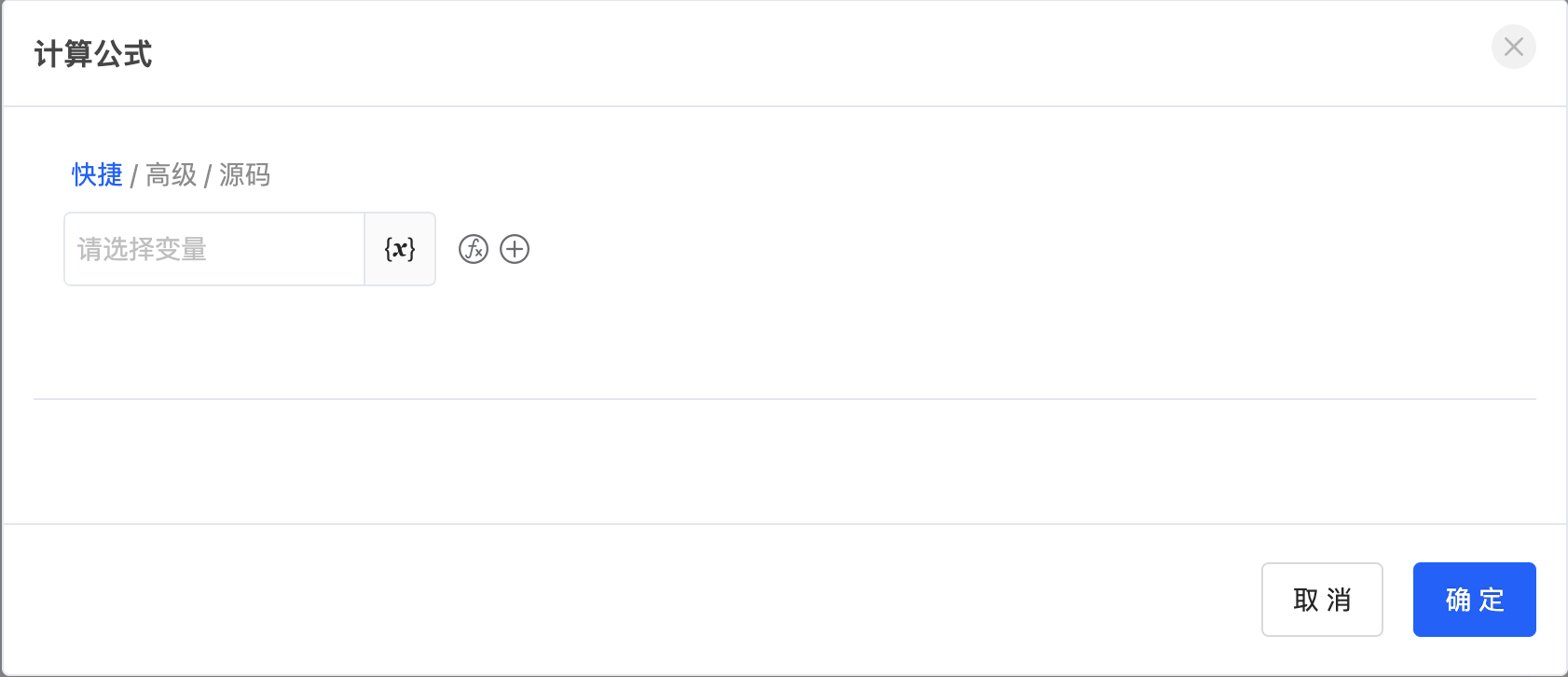
Custom expressions offer users three modes to choose from: Quick, Advanced, and Source Code.
- Quick Mode: Suitable for simple variable configurations, with convenient operations to quickly meet basic needs.
- Advanced Mode: Provides more advanced configuration options to meet users' complex business logic requirements.
- Source Code Mode: Allows users to directly edit the expression source code, achieving the highest level of customization and flexibility.
Custom expressions play a wide and important role in the platform. For example, in the interface designer, calculation formulas for component properties, data validation, and other aspects support the use of custom expressions to achieve more flexible and precise configurations. Or in the process designer, some expressions required by nodes can also be customized to meet different business logic needs. The extensive application of custom expressions greatly enhances the platform's flexibility and scalability.
I. Quick Mode
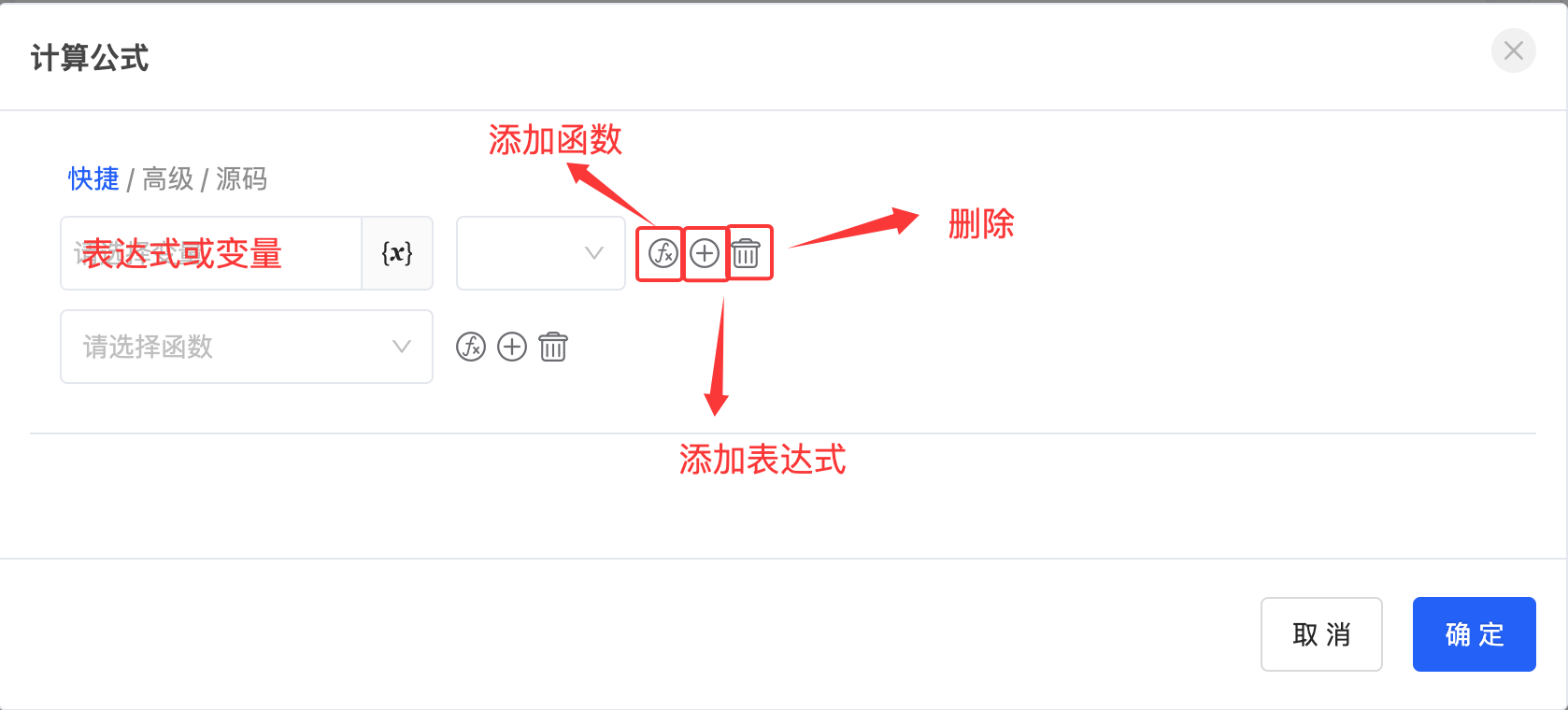
Quick mode is suitable for simple variable configurations and can quickly meet basic needs. In quick mode, you can select currently available data variables and add various functions or expressions to them.
- Functions: The platform has a rich built-in function library, covering nine types such as mathematical functions, text processing functions, regular expression functions, and time and date functions, providing users with powerful data processing and operation capabilities.
- Expressions: Support custom data or the use of data variables available in the current system.
In addition, the system also supports configuring various calculation effects between functions or expressions, including more than ten operation methods such as addition, subtraction, multiplication, and division, fully meeting users' calculation needs in different scenarios.
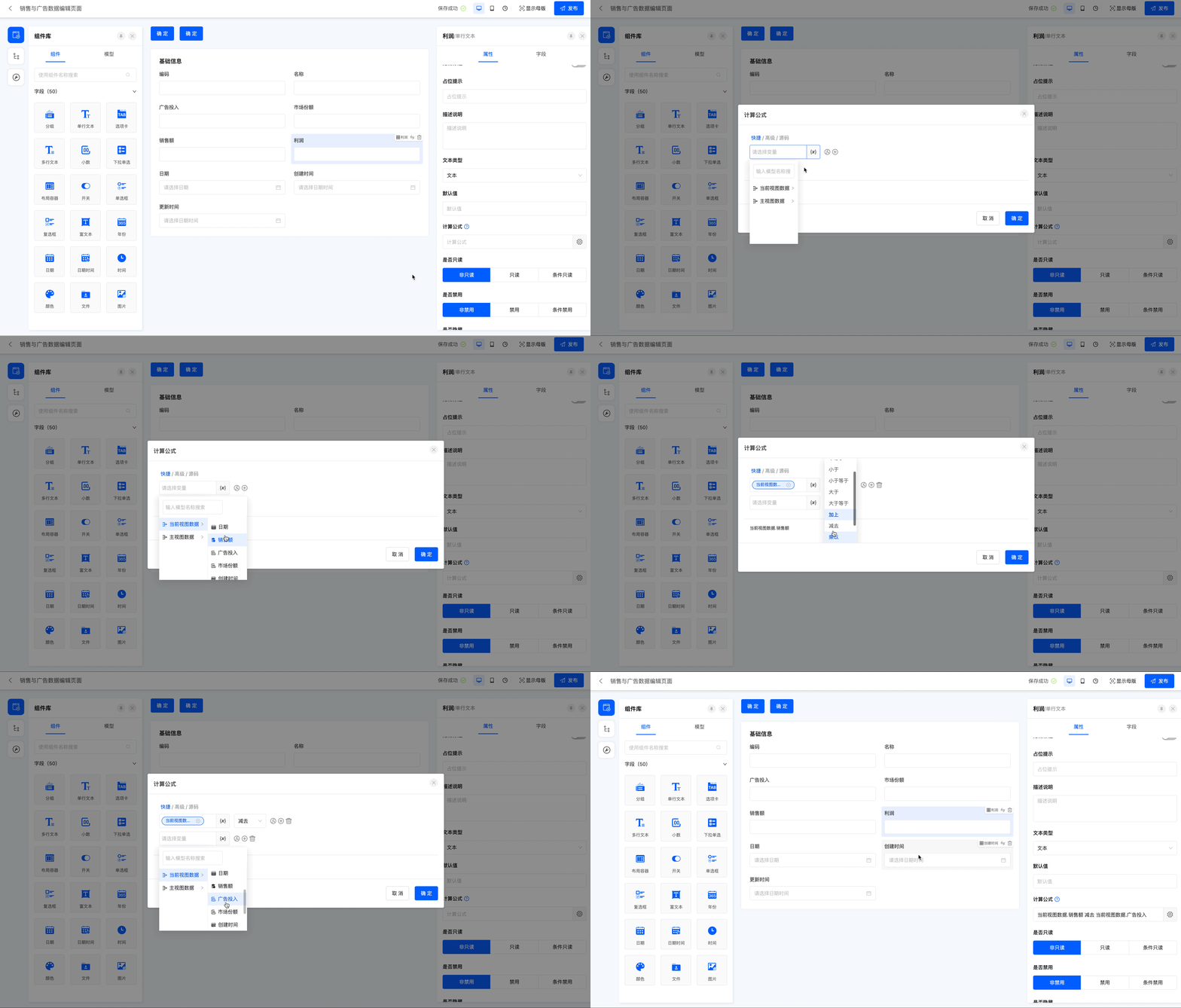
Example
Taking the calculation formula in the interface designer as an example, on the current page, profit = sales - advertising investment. So select the "Profit" field and configure the calculation formula for it.
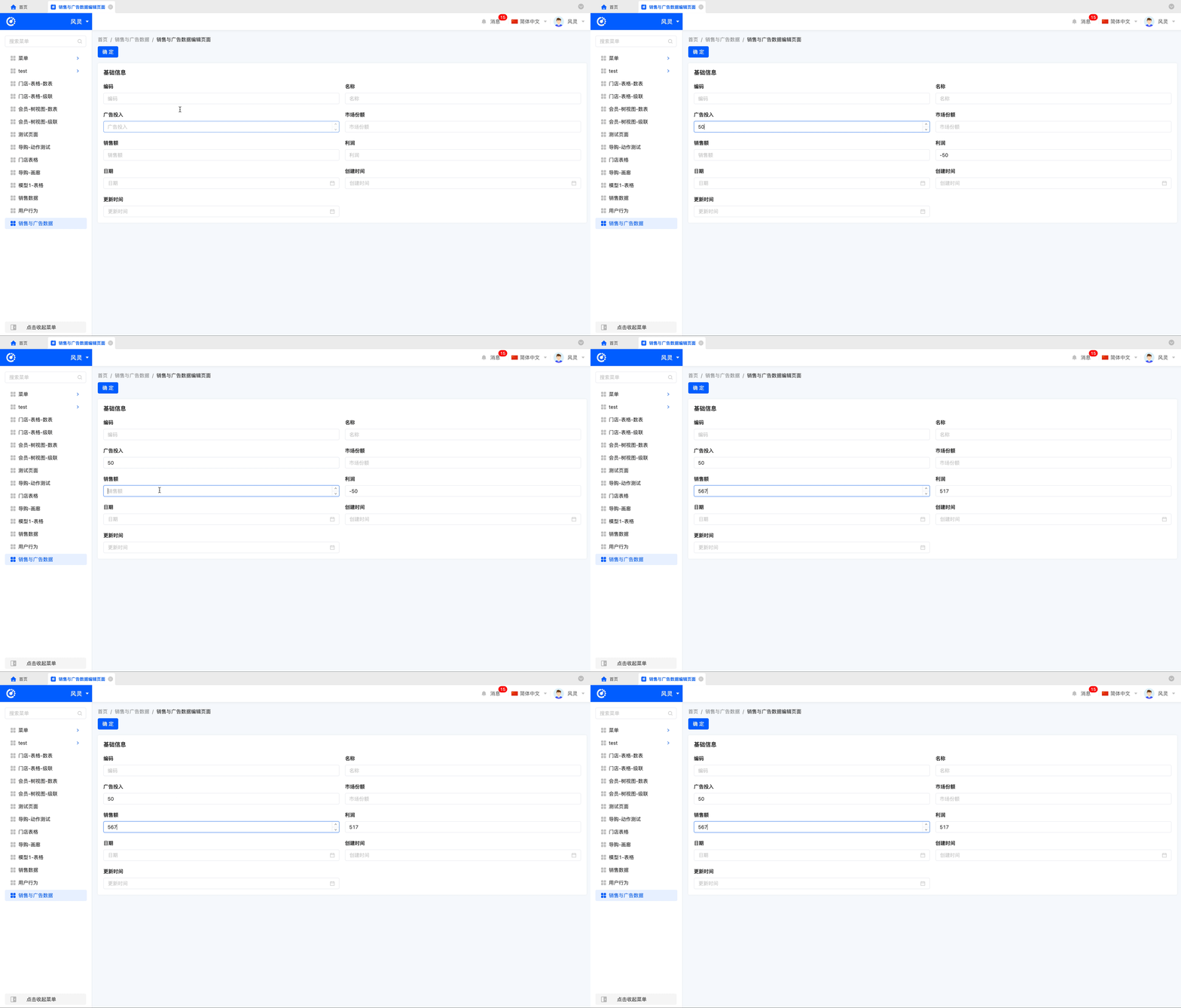
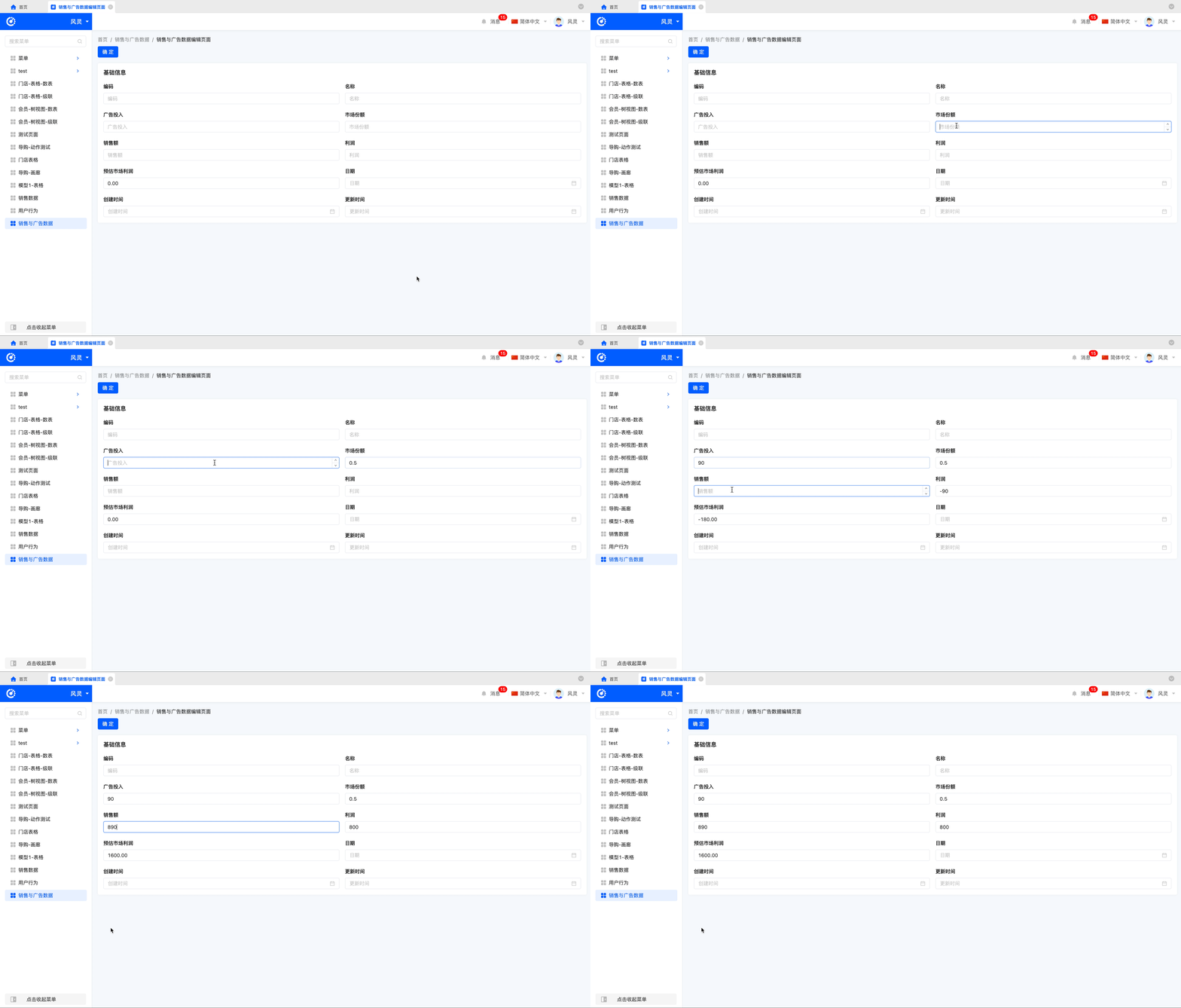
View the effect after publishing the current page.
II. Advanced Mode
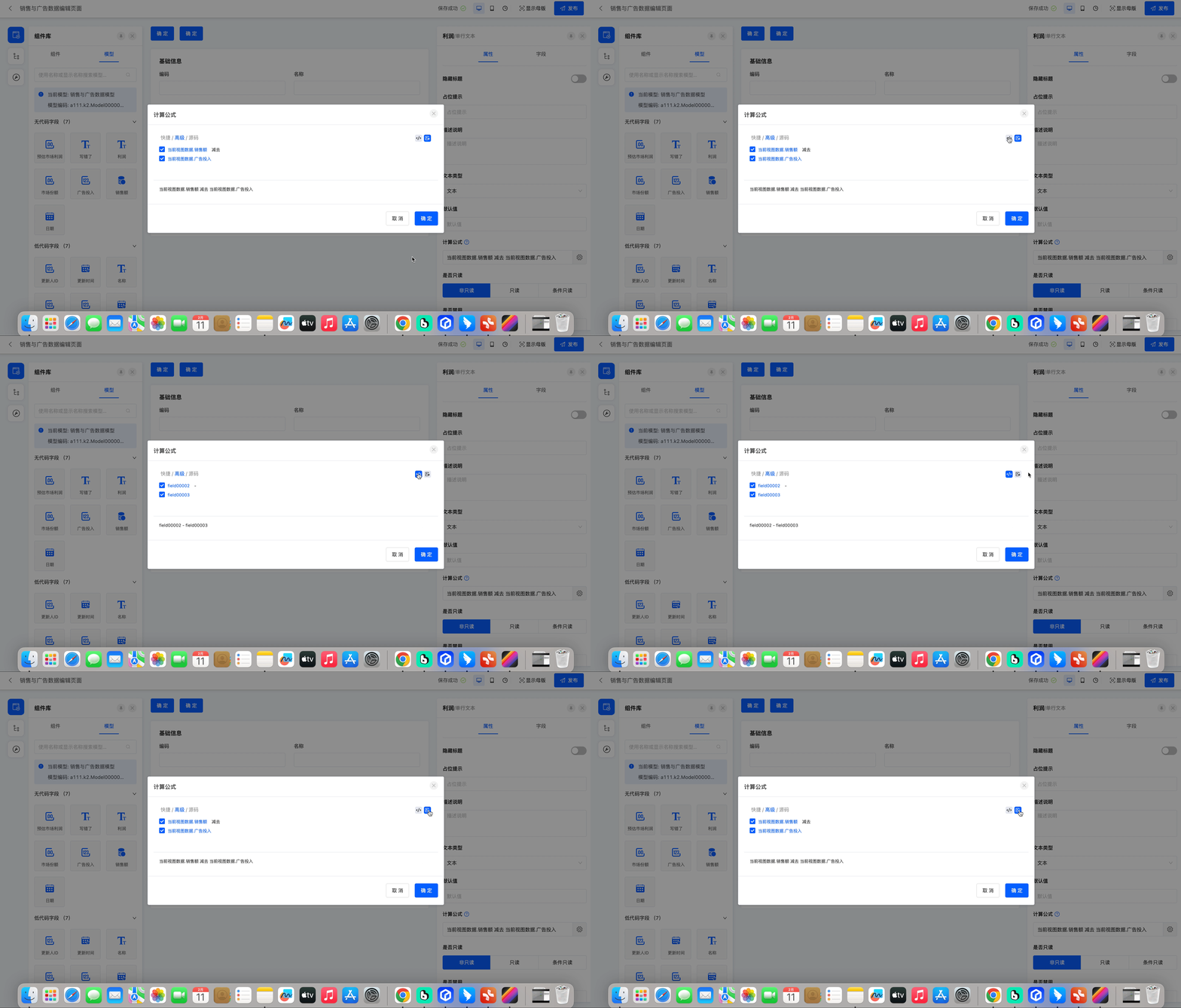
Advanced mode builds on quick mode and provides more advanced configuration options to meet users' complex business logic requirements. It offers two configuration modes: Code Mode and Text Mode.
- Code Mode: Displays the code field names of functions or expressions.
- Text Mode: Displays the text names of functions or expressions, similar to quick mode.
Note
Advanced mode provides a function to select effective rows. Users can choose the rows where the configurations they need to take effect are located. If a row of configuration is not selected, even if it is configured, it will not actually take effect. Users can more flexibly control the application scope of configurations to meet complex business needs.
Example
Taking the calculation formula in the interface designer as an example, on the current page, estimated market profit = (sales - advertising investment) ÷ market share. So select the "Estimated Market Profit" field and configure the calculation formula for it.
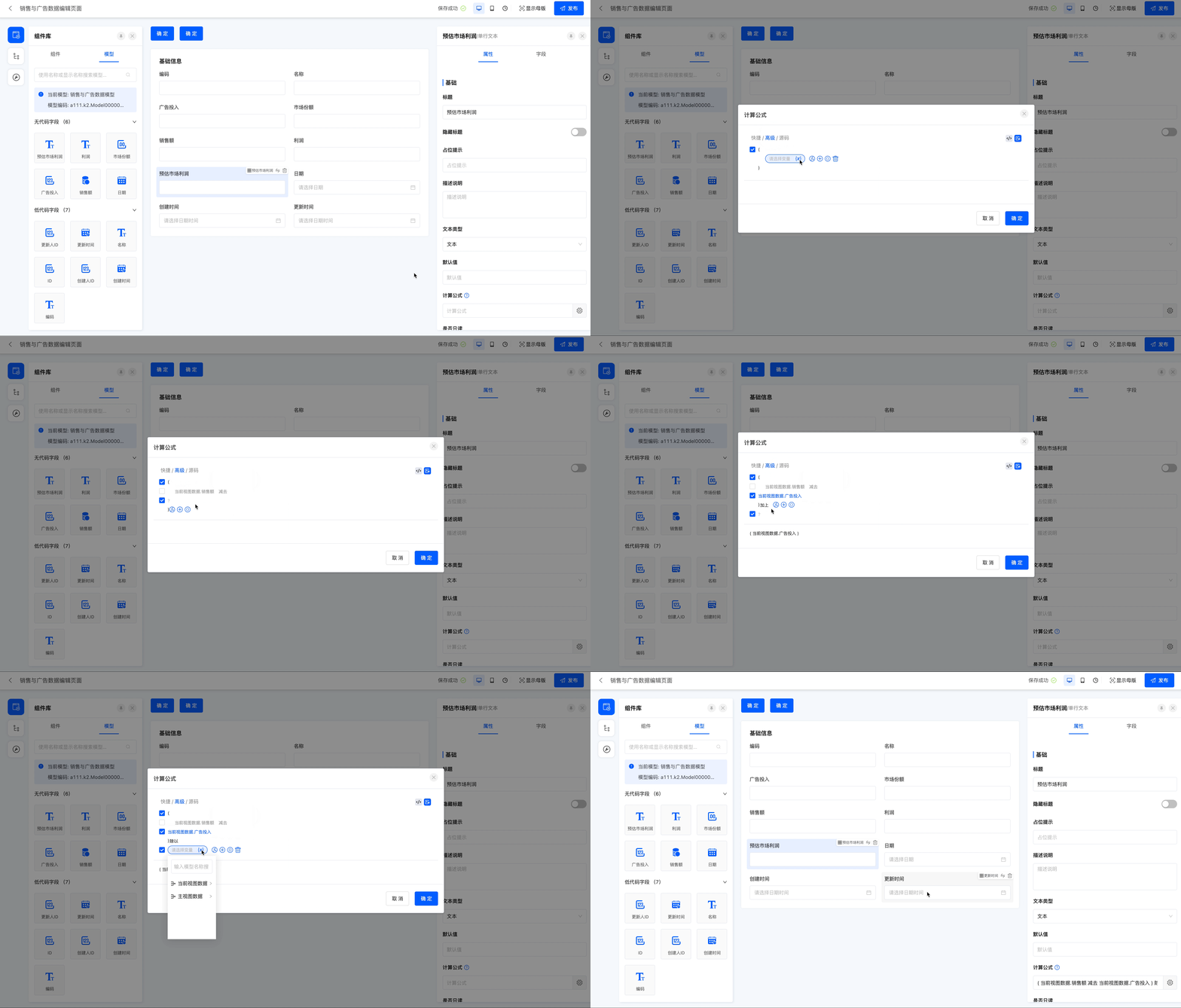
View the effect after publishing the current page.
III. Source Code Mode
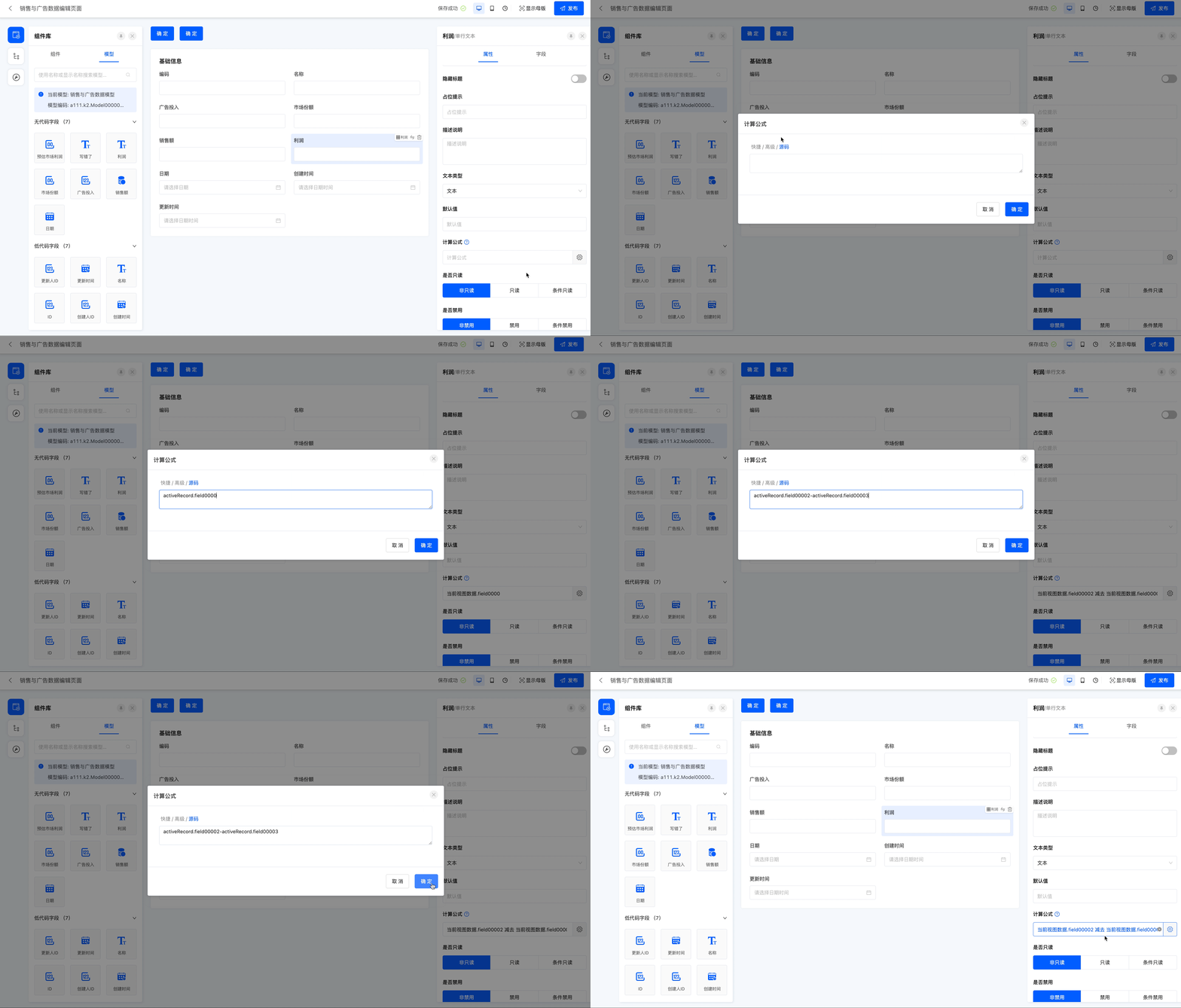
Source code mode allows users to directly edit the expression source code, achieving the highest level of customization and flexibility.
Tip
Field codes can be viewed in the model designer.
Example
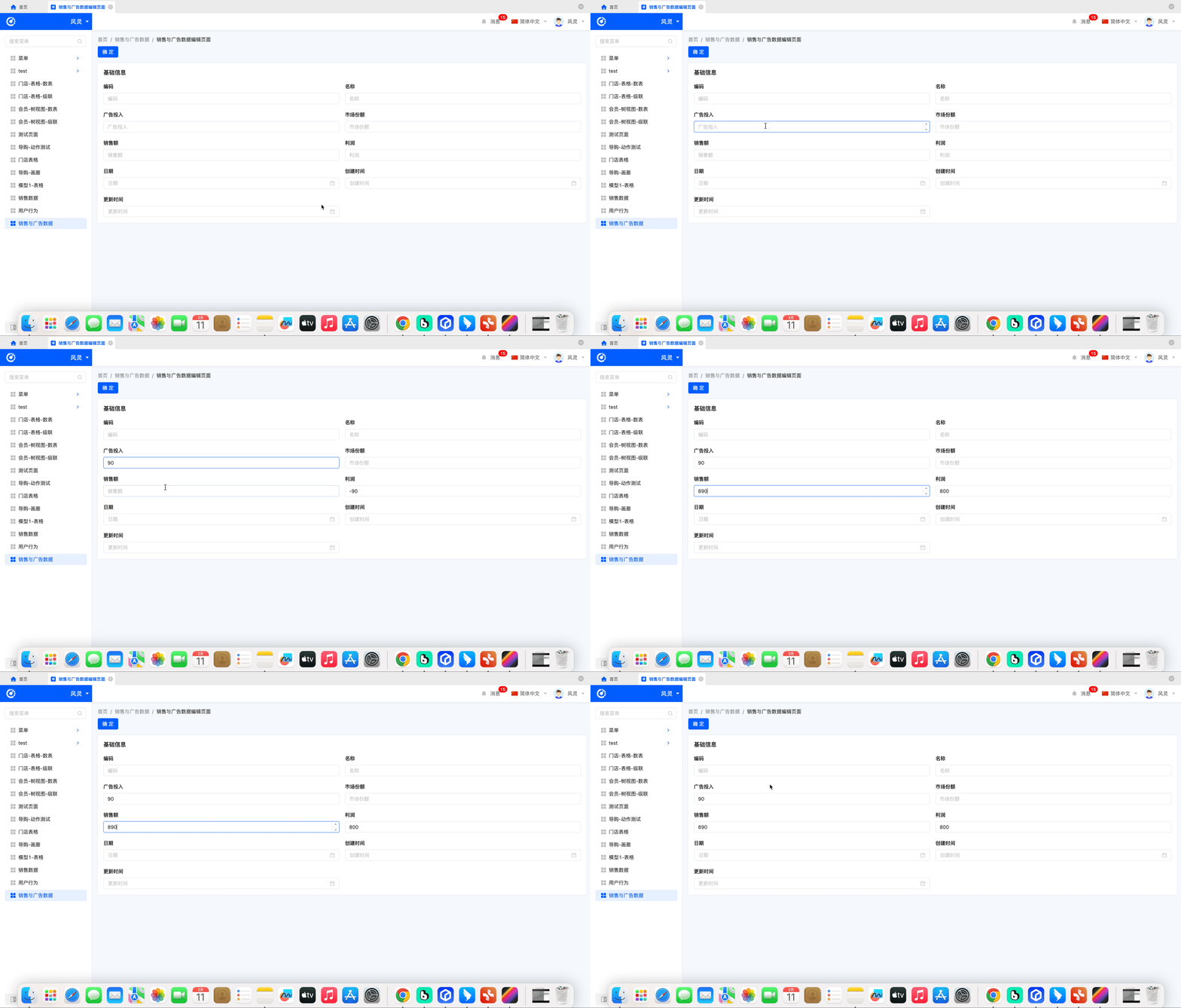
Taking the calculation formula in the interface designer as an example, on the current page, profit = sales - advertising investment. Write the code in the source code.
View the effect after publishing the current page.
IV. Function Introduction
Custom expressions provide nine types of functions, namely mathematical functions, text functions, regular functions, time functions, collection functions, key-value pair functions, object functions, context functions, and logical functions.
(I) Mathematical Functions
| Function | Description |
|---|---|
| Non-negative Difference of Subtraction | Function example: NNZ_SUBTRACT(A,B) Function description: The absolute value of the subtraction of B from A |
| Ceiling | Function example: CEIL(number) Function description: Round the number up |
| Floor | Function example: FLOOR(number) Function description: Round the number down |
| Average | Function example: AVG(collection) Function description: Return the average of the collection. The parameter collection is a collection or an array. |
| Multiplication | Function example: MULTIPLY(A,B) Function description: Multiply A by B |
| Addition | Function example: ADD(A,B) Function description: Add A and B |
| Absolute Value | Function example: ABS(number) Function description: Get the absolute value of the number |
| Round | Function example: ROUND(number) Function description: Round the number to the nearest integer |
| Subtraction | Function example: SUBTRACT(A,B) Function description: Subtract B from A |
| Uppercase Amount | Function example: UPPER_MONEY(number) Function description: Return the uppercase form of the amount. The parameter number is a numeric value or a numeric string. |
| Cosine | Function example: COS(number) Function description: Calculate the cosine of the number |
| Pi | Function example: PI() Function description: The value of pi |
| Count | Function example: COUNT(collection) Function description: Return the total number of elements in the collection. The parameter collection is a collection or an array. |
| Modulo | Function example: MOD(A,B) Function description: Calculate the remainder of A divided by B |
| Maximum | Function example: MAX(collection) Function description: Return the maximum value in the collection. The parameter collection is a collection or an array. |
| Minimum | Function example: MIN(collection) Function description: Return the minimum value in the collection. The parameter collection is a collection or an array. |
| Division | Function example: DIVIDE(A,B) Function description: Divide A by B |
| Square Root | Function example: SQRT(number) Function description: Calculate the square root of the number |
| Sine | Function example: SIN(number) Function description: Calculate the sine of the number |
| Sum | Function example: SUM(collection) Function description: Return the sum of the elements in the collection. The parameter collection is a collection or an array. |
| Power Operation | Function Example: POW(number1, number2) Function Description: Returns the result of raising number1 to the power of number2 |
| Logarithmic Operation | Function Example: LOG(number1, number2) Function Description: Returns the logarithm of number2 with base number1 |
(II) Text Functions
| Function | Description |
|---|---|
| Parse JSON String | Function example: PARSE(text) Function description: Deserialize the JSON text string text into a collection or a map |
| Replace String | Function example: REPLACE(text,oldtext,newtext) Function description: Replace the text string oldtext in the text string text with the text string newtext |
| Lowercase | Function example: LOWER(text) Function description: Convert the text string text to lowercase. If the text is empty, treat it as an empty string. |
| Contains | Function example: CONTAINS(text,subtext) Function description: Check if the text string text contains the text string subtext. If the text text is empty, treat it as an empty string. |
| Uppercase | Function example: UPPER(text) Function description: Convert the text string text to uppercase. If the text is empty, treat it as an empty string. |
| Ends With | Function example: ENDS_WITH(text,end) Function description: Check if the text string text ends with the text string end. If the text is empty, treat it as an empty string. |
| String Length | Function example: LEN(text) Function description: Get the length of the text string text. If the text is empty, treat it as an empty string. |
| Join Strings | Function example: JOIN(text,join) Function description: Concatenate the text string text with the text string join. If the text is empty, treat it as an empty string. |
| Starts With | Function example: STARTS_WITH(text,start) Function description: Check if the text string text starts with the text string start. If the text is empty, treat it as an empty string. |
| Is Blank | Function example: IS_BLANK(text) Function description: Check if the text string text is empty |
| Serialize to JSON String | Function example: JSON(object) Function description: Serialize the record object into a JSON string |
| Trim | Function example: TRIM(text) Function description: Remove the leading and trailing spaces from the text string text. If the text is empty, return an empty string. |
| Not Contain | Function Example: NOT_CONTAINS(text, subtext) Function Description: Determines whether the text string "text" does not contain the text string "subtext". When "text" is empty, it is treated as an empty string |
| Extract Substring from Specified Position | Function Example: SUBSTRING(text, begin, end) Function Description: Extracts a substring from the specified position and returns the substring from the "begin" to "end" positions in "text" |
| Split String into Collection by Separator | Function Example: SPLIT(text, subtext) Function Description: Returns a collection obtained by splitting "text" with "subtext" |
| Return Position of First Occurrence of Substring | Function Example: INDEXOF(text, subtext) Function Description: Returns the position where "subtext" first appears in "text" |
(III) Regular Functions
| Function | Description |
|---|---|
| Check Chinese Format | Function example: CHECK_CHINESE(text) Function description: Check if the text is in Chinese |
| Check Two Decimal Places | Function example: CHECK_TWO_DIG(text) Function description: Check if the text is a number with two decimal places |
| Strong Password Check | Function example: CHECK_PWD(text) Function description: Check if the password meets the strength requirements |
| Check User Name | Function example: CHECK_USER_NAME(text) Function description: Check if the user name is valid |
| Check URL Format | Function example: CHECK_URL(text) Function description: Check if the URL is valid |
| Check Email Format | Function example: CHECK_EMAIL(text) Function description: Check if the email is valid |
| Check Character Range | Function example: CHECK_SIZE_RANGE(text, min,max) Function description: Check if the length of the text is within the specified range |
| Check Phone Number | Function example: CHECK_PHONE(text) Function description: Check if the phone number is valid |
| Check Character Range | Function example: CHECK_SIZE(text, length) Function description: Check if the length of the text is equal to the specified length |
| IP Address Check | Function example: CHECK_IP(text) Function description: Check if the IP address is valid |
| Check Character Range | Function example: CHECK_MIN_SIZE(text,n) Function description: Check if the text has at least n characters |
| Check Chinese ID Card Format | Function example: CHECK_ID_CARD(text) Function description: Check if the ID card number is valid |
| Check Number Format | Function example: CHECK_NUMBER(text) Function description: Check if the text is a pure number |
| Check Format | Function example: CHECK_ENG_NUM(text) Function description: Check if the text contains only English letters and numbers |
| Regular Match | Function example: MATCHES(text,regex) Function description: Check if the string matches the regular expression. For example, regex can be [a-zA-Z][a-zA-Z0-9]*$ to check if text matches. |
| Check if Contains Chinese | Function example: CHECK_CONTAINS_CHINESE(text) Function description: Check if the text contains Chinese characters |
| Check Code | Function example: CHECK_CODE(text) Function description: Check if the text consists only of English letters, numbers, and underscores |
| Check Integer Format | Function example: CHECK_INTEGER(text) Function description: Check if the text is an integer |
| Check Character Range | Function example: CHECK_MAX_SIZE(text,n) Function description: Check if the text has at most n characters |
(IV) Time Functions
| Function | Description |
|---|---|
| Subtract Times (Get Seconds) | Function example: SUB_DATETIME_TO_SECOND(datetime1,datetime2) Function description: Subtract two times and return the result in seconds |
| Subtract Times (Get: DD Days HH Hours MM Minutes SS Seconds) | Function example: SUB_DATETIME_TO_DDHHMMSS(datetime1,datetime2) Function description: Subtract two times and return the result in the format of DD days HH hours MM minutes SS seconds |
| Count Days Between Dates | Function example: COUNT_DAY(date1,date2) Function description: Return the number of days between two dates |
| Add/Subtract Working Days (Skip Weekends) | Function example: ADD_WORK_DAY(date,days) Function description: Add or subtract the specified number of working days (skipping weekends) to/from the specified date. date is the specified date, and days is the specified number of days. If days is negative, subtract this number of days from date. |
| Less Than or Equal To | Function example: LESS_EQUA(datetime1,datetime2) Function description: Check if datetime1 is less than or equal to datetime2 and return a boolean value |
| Greater Than or Equal To | Function example: GREATER_EQUAL(datetime1,datetime2) Function description: Check if datetime1 is greater than or equal to datetime2 and return a boolean value |
| Convert to Date | Function example: TO_DATE(date,pattern) Function description: Convert the date string to a date according to the specified format |
| Add/Subtract Months | Function example: ADD_MONTH(date,months) Function description: Add or subtract the specified number of months to/from the specified date. date is the specified date, and months is the specified number of months. If months is negative, subtract this number of months from date. |
| Add/Subtract Years | Function example: ADD_YEAR(date,years) Function description: Add or subtract the specified number of years to/from the specified date. date is the specified date, and years is the specified number of years. If years is negative, subtract this number of years from date. |
| Today's Date String | Function example: TODAY_STR() Function description: Return today's date string, accurate to the day, in the format of yyyy-MM-dd |
| Equal To | Function example: DATE_EQUALS(datetime1,datetime2) Function description: Check if datetime1 is equal to datetime2 and return a boolean value |
| Less Than | Function example: LESS_THAN(datetime1,datetime2) Function description: Check if datetime1 is less than datetime2 and return a boolean value |
| Current Time | Function example: NOW() Function description: Return the current time |
| Greater Than | Function example: GREATER_THAN(datetime1,datetime2) Function description: Check if datetime1 is greater than datetime2 and return a boolean value |
| Add/Subtract Days | Function example: ADD_DAY(date,days) Function description: Add or subtract the specified number of days to/from the specified date. date is the specified date, and days is the specified number of days. If days is negative, subtract this number of days from date. |
| Current Time String | Function example: NOW_STR() Function description: Return the current time string, accurate to hours, minutes, and seconds, in the format of yyyy-MM-dd hh:mm:ss |
| Extract Year | Function Example: YEAR(date) Function Description: Returns the year part of the current date |
| Extract Month | Function Example: MONTH(date) Function Description: Returns the month part of the current date |
| Extract Day | Function Example: DAY(date) Function Description: Returns the day part of the current date |
(V) Collection Functions
| Function | Description |
|---|---|
| Remove Element from Collection (or Array) | Function example: LIST_REMOVE(list,item) Function description: Remove the element item from the collection list |
| Logical OR of Boolean Collection | Function example: LIST_OR(list) Function description: Perform a logical OR operation on a boolean collection and return a boolean value |
| Add Element to Collection (or Array) | Function example: LIST_ADD(list,item) Function description: Add the element item to the collection list |
| Check if Collection (or Array) Contains Element | Function example: LIST_CONTAINS(list,item) Function description: Check if the collection list contains the element item |
| Check if Attribute Value in Object Collection (or Array) is Not in Specified Collection (or Array) | Function example: LIST_FIELD_NOT_IN(list,model,field,list) Function description: Check if the attribute value in the object collection (or array) is not in the specified collection (or array) and return a boolean collection |
| Get Collection (or Array) Element Count | Function example: LIST_COUNT(list) Function description: Pass in an object collection and get the number of elements in the collection |
| Get All IDs in Collection | Function example: LIST_IDS(list) Function description: Pass in an object collection and get a list of all IDs in the collection |
| Get Collection (or Array) Element | Function example: LIST_GET(list,index) Function description: Get the element at the specified index in the collection list |
| Logical AND of Boolean Collection | Function example: LIST_AND(list) Function description: Perform a logical AND operation on a boolean collection and return a boolean value |
| Convert Object Collection to Attribute Collection | Function example: LIST_FIELD_VALUES(list,model,field) Function description: Pass in an object collection, the model of the object, and the attribute field, and return a collection of attribute values |
| Check Attribute Value Matching in Object Collection (or Array) | Function example: LIST_FIELD_EQUALS(list,model,field,value) Function description: Check the matching situation of the attribute value in the object collection (or array) and return a boolean collection |
| Add Element to Collection (or Array) at Specified Position | Function example: LIST_ADD_BY_INDEX(list,index,item) Function description: Add the element item to the collection list at the specified index |
| Check Attribute Value Mismatch in Object Collection (or Array) | Function example: LIST_FIELD_NOT_EQUALS(list,model,field,value) Function description: Check the mismatch situation of the attribute value in the object collection (or array) and return a boolean collection |
| Check if Attribute Value in Object Collection (or Array) is in Specified Collection (or Array) | Function example: LIST_FIELD_IN(list,model,field,list) Function description: Check if the attribute value in the object collection (or array) is in the specified collection (or array) and return a boolean collection |
| Check if Collection (or Array) is Empty | Function example: LIST_IS_EMPTY(list) Function description: Pass in an object collection and check if it is empty |
(VI) Key-Value Pair Functions
| Function | Description |
|---|---|
Get Value by Key from Key-Value Pair | Function example: MAP_GET(map,key) Function description: Get the value corresponding to the key from the key-value pair |
| Remove Element from Key-Value Pair | Function example: MAP_REMOVE(map,key) Function description: Remove the key from the key-value pair map |
| Check if Key-Value Pair is Empty | Function example: MAP_IS_EMPTY(map) Function description: Check if the key-value pair map is empty |
| Check if Key-Value Pair Contains Key | Function example: MAP_CONTAINS_KEY(map,key) Function description: Check if the key-value pair contains the key |
| Get Key-Value Count | Function example: MAP_COUNT(map) Function description: Get the number of key-value pairs in the key-value pair map |
| Add Key-Value to Key-Value Pair | Function example: MAP_PUT(map,key,value) Function description: Add the key-value pair to the key-value pair map |
(VII) Object Functions
| Function | Description |
|---|---|
| Get Object Attribute Value | Function example: GET(object, path) Function description: Get the value according to the specified field path |
| Get Object Attribute by Field Code | Function example: FIELD_GET(object, model, path) Function description: Get the value according to the specified field path |
| Check if Null | Function example: IS_NULL(text or control) Function description: Check if the object is null. If it is null, return true; otherwise, return false. Can be used to check specific values or controls. |
| Check if Equal | Function example: EQUALS(A,B) Function description: Check if A and B are equal |
(VIII) Context Functions
| Function | Description |
|---|---|
Get Current User's Department | Function example: CURRENT_DEPARTMENT() Function description: Get the current user's department |
| Get Current User's Department Code | Function example: CURRENT_DEPARTMENT_CODE() Function description: Get the current user's department code |
| Get Current User's Partner ID | Function example: CURRENT_PARTNER_ID() Function description: Get the current user's partner ID |
| Get Current User's Company ID | Function example: CURRENT_CORP_ID() Function description: Get the current user's company ID |
| Get Current User's Company | Function example: CURRENT_CORP() Function description: Get the current user's company |
| Get Current User's Name | Function example: CURRENT_USER_NAME() Function description: Get the current user's name |
| Get Current User's ID | Function example: CURRENT_UID() Function description: Get the current user's ID |
| Get Current User's Shop | Function example: CURRENT_SHOP() Function description: Get the current user's shop |
| Get Current User's Role ID List | Function example: CURRENT_ROLE_IDS() Function description: Get the current user's role ID list |
| Get Current User's Shop ID | Function example: CURRENT_SHOP_ID() Function description: Get the current user's shop ID |
| Get Current User's Role List | Function example: CURRENT_ROLES() Function description: Get the current user's role list |
| Get Current User | Function example: CURRENT_USER() Function description: Get the current user |
| Get Current User's Partner | Function example: CURRENT_PARTNER() Function description: Get the current user's partner |
(IX) Logical Functions
| Function | Description |
|---|---|
Logical AND | Function example: AND(A,B) Function description: Return the result of the logical AND operation between condition A and condition B |
| Conditional Function | Function example: IF(A,B,C) Function description: If condition A is met, return B; otherwise, return C. Supports nested IF functions. |
| Logical OR | Function example: OR(A,B) Function description: Return the result of the logical OR operation between condition A and condition B |
| Logical NOT | Function example: NOT(A) Function description: Return the logical negation of condition A |