一、准备工作
- 获取企业版许可证
- 获取私有 Maven/NPM 仓库地址及帐号(仅开发人员)
二、升级 Oinone 设计器到企业版
升级参考步骤:
- 在
docker-compose.yml同级目录下创建pks目录,并放入企业版许可证。 - 使用
volumes将许可证挂载进pks目录。 - 修改
.env文件配置许可证信息。 - 重新启动
Oinone设计器。
(一)修改 docker-compose.yml 挂载许可证
yaml
services:
  backend:
    container_name: oinone-backend
    volumes:
- ./pks:/opt/pamirs/pks(二)修改 .env 文件配置许可证信息
shell
# 输入你的主体名称
LIC_SUBJECT=<subject>
# 输入你的许可证文件名
LIC_FILE=pks/<license.lic>提示:
更多关于 .env 文件的信息,可参考:Oinone 设计器配置指南
(三)重启 Oinone 设计器
shell
# MacOS/Linux
docker compose down -v
docker compose up -d

# Windows
docker compose -p oinone down -v
docker compose -p oinone up -d三、升级业务应用到企业版
(一)业务应用新增企业版依赖
移除社区版依赖管理
xml
<properties>
  <!-- oinone -->
  <oinone-pamirs.version>7.2.0</oinone-pamirs.version>

  <!-- distribution -->
  <pamirs.distribution.version>7.2.0</pamirs.distribution.version>
</properties>

<dependencyManagement>
  <dependencies>
    <dependency>
        <groupId>pro.shushi.pamirs</groupId>
        <artifactId>pamirs-k2</artifactId>
        <version>${oinone-pamirs.version}</version>
        <type>pom</type>
        <scope>import</scope>
    </dependency>
    <dependency>
        <groupId>pro.shushi.pamirs</groupId>
        <artifactId>pamirs-framework</artifactId>
        <version>${oinone-pamirs.version}</version>
        <type>pom</type>
        <scope>import</scope>
    </dependency>
    <dependency>
        <groupId>pro.shushi.pamirs.boot</groupId>
        <artifactId>pamirs-boot-dependencies</artifactId>
        <version>${oinone-pamirs.version}</version>
        <type>pom</type>
        <scope>import</scope>
    </dependency>
    <dependency>
        <groupId>pro.shushi.pamirs.core</groupId>
        <artifactId>pamirs-core-dependencies</artifactId>
        <version>${oinone-pamirs.version}</version>
        <type>pom</type>
        <scope>import</scope>
    </dependency>
    <dependency>
        <groupId>pro.shushi.pamirs.middleware</groupId>
        <artifactId>pamirs-middleware-dependencies</artifactId>
        <version>${oinone-pamirs.version}</version>
        <type>pom</type>
        <scope>import</scope>
    </dependency>
    <dependency>
        <groupId>pro.shushi.pamirs</groupId>
        <artifactId>pamirs-distribution</artifactId>
        <version>${pamirs.distribution.version}</version>
        <type>pom</type>
        <scope>import</scope>
    </dependency>
  </dependencies>
</dependencyManagement>新增企业版依赖管理
最新版本可点击查看:Oinone 版本更新日志
xml
<properties>
  <!-- oinone -->
  <oinone-bom.version>7.2.0</oinone-bom.version>
</properties>

<dependencyManagement>
  <dependency>
    <groupId>pro.shushi</groupId>
    <artifactId>oinone-bom</artifactId>
    <version>${oinone-bom.version}</version>
    <type>pom</type>
    <scope>import</scope>
  </dependency>
</dependencyManagement>启动工程新增企业版依赖
种子版可用依赖
xml
<dependencies>
  <!-- seed version -->
  <dependency>
    <groupId>pro.shushi.pamirs.framework</groupId>
    <artifactId>pamirs-framework-turbo-ee</artifactId>
  </dependency>

  <!-- sys_setting enterprise version -->
  <dependency>
    <groupId>pro.shushi.pamirs.core</groupId>
    <artifactId>pamirs-sys-setting-ee</artifactId>
  </dependency>
</dependencies>标准版可用依赖
xml
<dependencies>
  <!-- seed version -->
  <dependency>
    <groupId>pro.shushi.pamirs.framework</groupId>
    <artifactId>pamirs-framework-turbo-ee</artifactId>
  </dependency>

  <!-- sys_setting enterprise version -->
  <dependency>
    <groupId>pro.shushi.pamirs.core</groupId>
    <artifactId>pamirs-sys-setting-ee</artifactId>
  </dependency>

  <!-- standard version -->
  <!-- auth -->
  <dependency>
      <groupId>pro.shushi.pamirs.core</groupId>
      <artifactId>pamirs-auth3-ee-core</artifactId>
  </dependency>
  <dependency>
      <groupId>pro.shushi.pamirs.core</groupId>
      <artifactId>pamirs-auth3-ee-view</artifactId>
  </dependency>
  <dependency>
      <groupId>pro.shushi.pamirs.core</groupId>
      <artifactId>pamirs-auth3-ee-rbac-core</artifactId>
  </dependency>
  <dependency>
      <groupId>pro.shushi.pamirs.core</groupId>
      <artifactId>pamirs-auth3-ee-rbac-view</artifactId>
  </dependency>

  <!-- apps enterprise version -->
  <dependency>
      <groupId>pro.shushi.pamirs.core</groupId>
      <artifactId>pamirs-apps-ee</artifactId>
  </dependency>

  <!-- designer_metadata -->
  <dependency>
      <groupId>pro.shushi.pamirs.designer</groupId>
      <artifactId>pamirs-designer-metadata-core</artifactId>
  </dependency>
</dependencies>专业版可用依赖
PS:可使用 种子版 和 标准版 全部依赖。
xml
<dependencies>
  <!-- seed version -->
  <dependency>
    <groupId>pro.shushi.pamirs.framework</groupId>
    <artifactId>pamirs-framework-turbo-ee</artifactId>
  </dependency>

  <!-- sys_setting enterprise version -->
  <dependency>
    <groupId>pro.shushi.pamirs.core</groupId>
    <artifactId>pamirs-sys-setting-ee</artifactId>
  </dependency>

  <!-- standard version -->
  <!-- auth -->
  <dependency>
      <groupId>pro.shushi.pamirs.core</groupId>
      <artifactId>pamirs-auth3-ee-core</artifactId>
  </dependency>
  <dependency>
      <groupId>pro.shushi.pamirs.core</groupId>
      <artifactId>pamirs-auth3-ee-view</artifactId>
  </dependency>
  <dependency>
      <groupId>pro.shushi.pamirs.core</groupId>
      <artifactId>pamirs-auth3-ee-rbac-core</artifactId>
  </dependency>
  <dependency>
      <groupId>pro.shushi.pamirs.core</groupId>
      <artifactId>pamirs-auth3-ee-rbac-view</artifactId>
  </dependency>

  <!-- apps enterprise version -->
  <dependency>
      <groupId>pro.shushi.pamirs.core</groupId>
      <artifactId>pamirs-apps-ee</artifactId>
  </dependency>

  <!-- designer_metadata -->
  <dependency>
      <groupId>pro.shushi.pamirs.designer</groupId>
      <artifactId>pamirs-designer-metadata-core</artifactId>
  </dependency>

  <!-- professional version -->
  <dependency>
    <groupId>pro.shushi.pamirs.framework</groupId>
    <artifactId>pamirs-framework-meta-virtual</artifactId>
  </dependency>

  <!-- data_audit -->
  <dependency>
    <groupId>pro.shushi.pamirs.core</groupId>
    <artifactId>pamirs-data-audit-core</artifactId>
  </dependency>

  <!-- print -->
  <dependency>
    <groupId>pro.shushi.pamirs.core</groupId>
    <artifactId>pamirs-print-core</artifactId>
  </dependency>
  <dependency>
    <groupId>pro.shushi.pamirs.core</groupId>
    <artifactId>pamirs-print-view</artifactId>
  </dependency>
</dependencies>企业版可用依赖
PS:可使用 种子版 、标准版 以及 专业版 全部依赖。
xml
<dependencies>
  <!-- seed version -->
  <dependency>
    <groupId>pro.shushi.pamirs.framework</groupId>
    <artifactId>pamirs-framework-turbo-ee</artifactId>
  </dependency>

  <!-- sys_setting enterprise version -->
  <dependency>
    <groupId>pro.shushi.pamirs.core</groupId>
    <artifactId>pamirs-sys-setting-ee</artifactId>
  </dependency>

  <!-- standard version -->
  <!-- auth -->
  <dependency>
      <groupId>pro.shushi.pamirs.core</groupId>
      <artifactId>pamirs-auth3-ee-core</artifactId>
  </dependency>
  <dependency>
      <groupId>pro.shushi.pamirs.core</groupId>
      <artifactId>pamirs-auth3-ee-view</artifactId>
  </dependency>
  <dependency>
      <groupId>pro.shushi.pamirs.core</groupId>
      <artifactId>pamirs-auth3-ee-rbac-core</artifactId>
  </dependency>
  <dependency>
      <groupId>pro.shushi.pamirs.core</groupId>
      <artifactId>pamirs-auth3-ee-rbac-view</artifactId>
  </dependency>

  <!-- apps enterprise version -->
  <dependency>
      <groupId>pro.shushi.pamirs.core</groupId>
      <artifactId>pamirs-apps-ee</artifactId>
  </dependency>

  <!-- designer_metadata -->
  <dependency>
      <groupId>pro.shushi.pamirs.designer</groupId>
      <artifactId>pamirs-designer-metadata-core</artifactId>
  </dependency>

  <!-- professional version -->
  <dependency>
    <groupId>pro.shushi.pamirs.framework</groupId>
    <artifactId>pamirs-framework-meta-virtual</artifactId>
  </dependency>

  <!-- data_audit -->
  <dependency>
    <groupId>pro.shushi.pamirs.core</groupId>
    <artifactId>pamirs-data-audit-core</artifactId>
  </dependency>

  <!-- print -->
  <dependency>
    <groupId>pro.shushi.pamirs.core</groupId>
    <artifactId>pamirs-print-core</artifactId>
  </dependency>
  <dependency>
    <groupId>pro.shushi.pamirs.core</groupId>
    <artifactId>pamirs-print-view</artifactId>
  </dependency>

  <!-- enterprise version -->
  <!-- fusion -->
  <dependency>
    <groupId>pro.shushi.pamirs.fusion</groupId>
    <artifactId>pamirs-fusion-lite-core</artifactId>
  </dependency>
  <dependency>
    <groupId>pro.shushi.pamirs.fusion</groupId>
    <artifactId>pamirs-fusion-view</artifactId>
  </dependency>
  <dependency>
    <groupId>pro.shushi.pamirs.fusion</groupId>
    <artifactId>pamirs-fusion-orm-client</artifactId>
  </dependency>

  <!-- sso -->
  <dependency>
    <groupId>pro.shushi.pamirs.core</groupId>
    <artifactId>pamirs-sso-server</artifactId>
  </dependency>
  <dependency>
    <groupId>pro.shushi.pamirs.core</groupId>
    <artifactId>pamirs-sso-client</artifactId>
  </dependency>
</dependencies>(二)修改 application.yml 配置
将许可证放在项目根目录下
以教程中提供的 oinone-backend-tutorials 为例,其目录结构如下所示:
shell
.
├── docker
│   └── docker-compose.yml
├── oinone-tutorials-boot
│   ├── pom.xml
│   └── src
│       └── main
│           ├── java
│           └── resources
│               ├── application.yml
│               └── config
│                   └── application-dev.yml
├── pom.xml
├── pks
│   └── license.lic
├── LICENSE.txt
└── README.md配置许可证信息
在 application.yml 中配置许可证信息:
提示:
此处修改的是 application.yml 而不是 application-dev.yml 配置。
yaml
pamirs:
  license:
    # 输入你的主体名称
    subject: <subject>
    # 输入你的许可证文件名
path: pks/<license.lic>更多许可证配置可参考:Oinone License 许可证使用常见问题
提示:
若出现由于目录层级或相对位置导致无法正确读取许可证文件的情况,建议使用绝对路径指定你的许可证。
配置启动模块
在 application.yml 中根据许可证版本添加对应依赖的对应模块。下面是不同版本可以使用的模块配置,需要结合你新增的依赖进行配置。
提示:
此处修改的是 application.yml 而不是 application-dev.yml 配置。
标准版新增可用模块
yaml
pamirs:
  boot:
    modules:
      # other modules
      # ...
      # standard version modules
- designer_metadata专业版新增可用模块
yaml
pamirs:
  boot:
    modules:
      # other modules
      # ...
      # standard version modules
      - designer_metadata
      # professional version modules
      - data_audit
- print企业版可用模块
yaml
pamirs:
  boot:
    modules:
      # other modules
      # ...
      # standard version modules
      - designer_metadata
      # professional version modules
      - data_audit
      - print
      # enterprise version modules
      - fusion
- sso四、IDEA开发验证
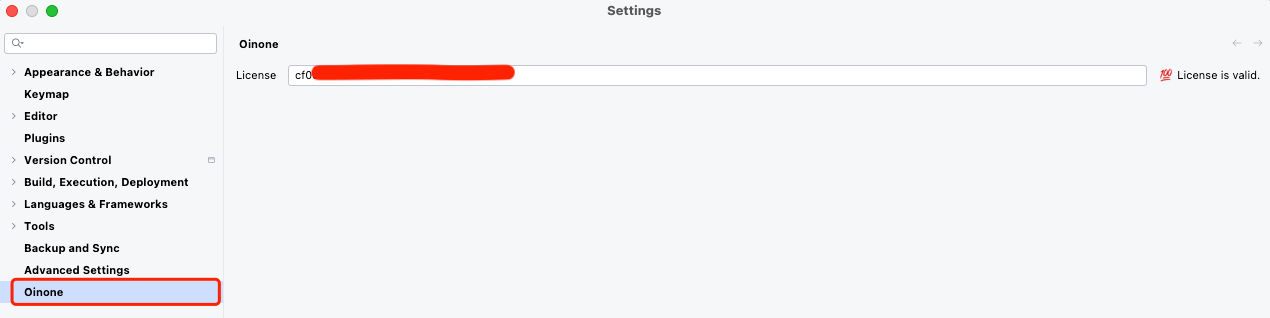
依次点击:Settings -> Oinone 输入许可证编码即可。
提示:
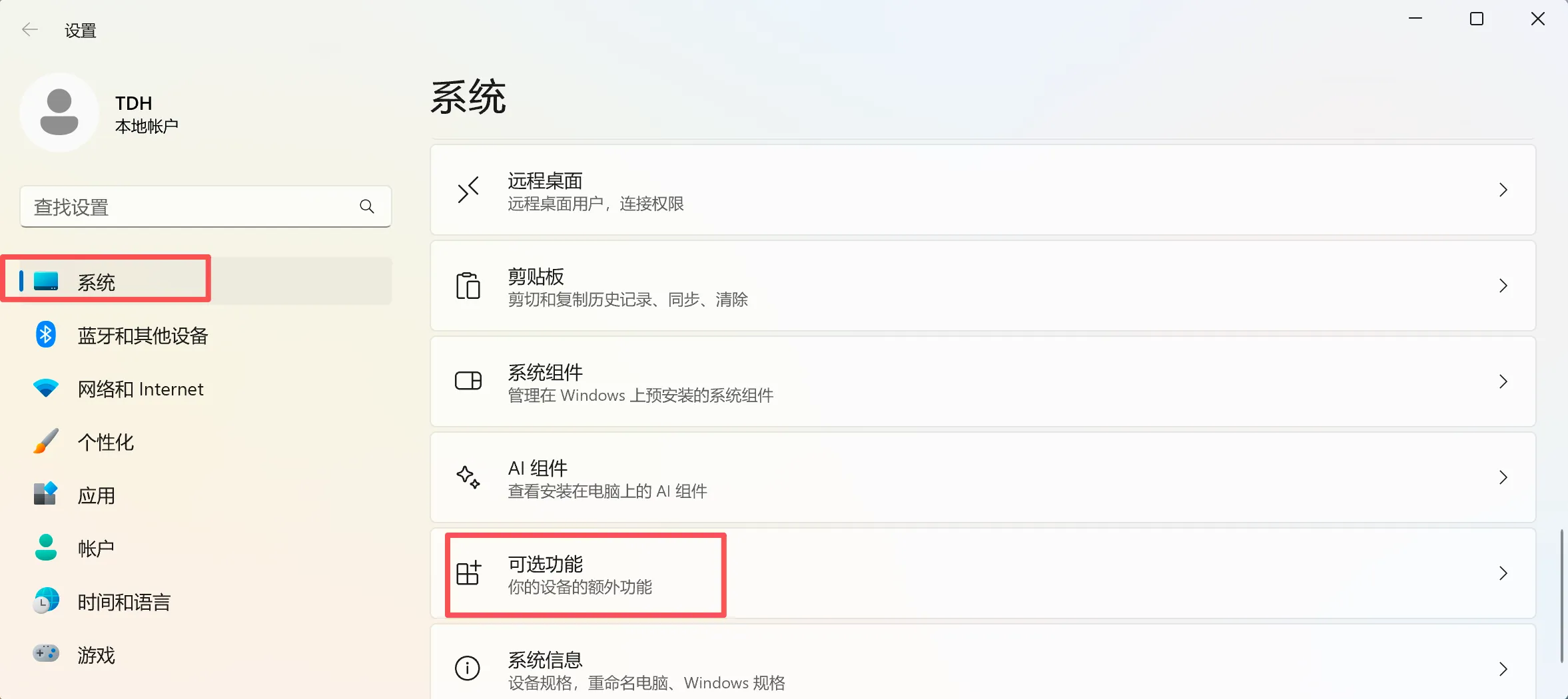
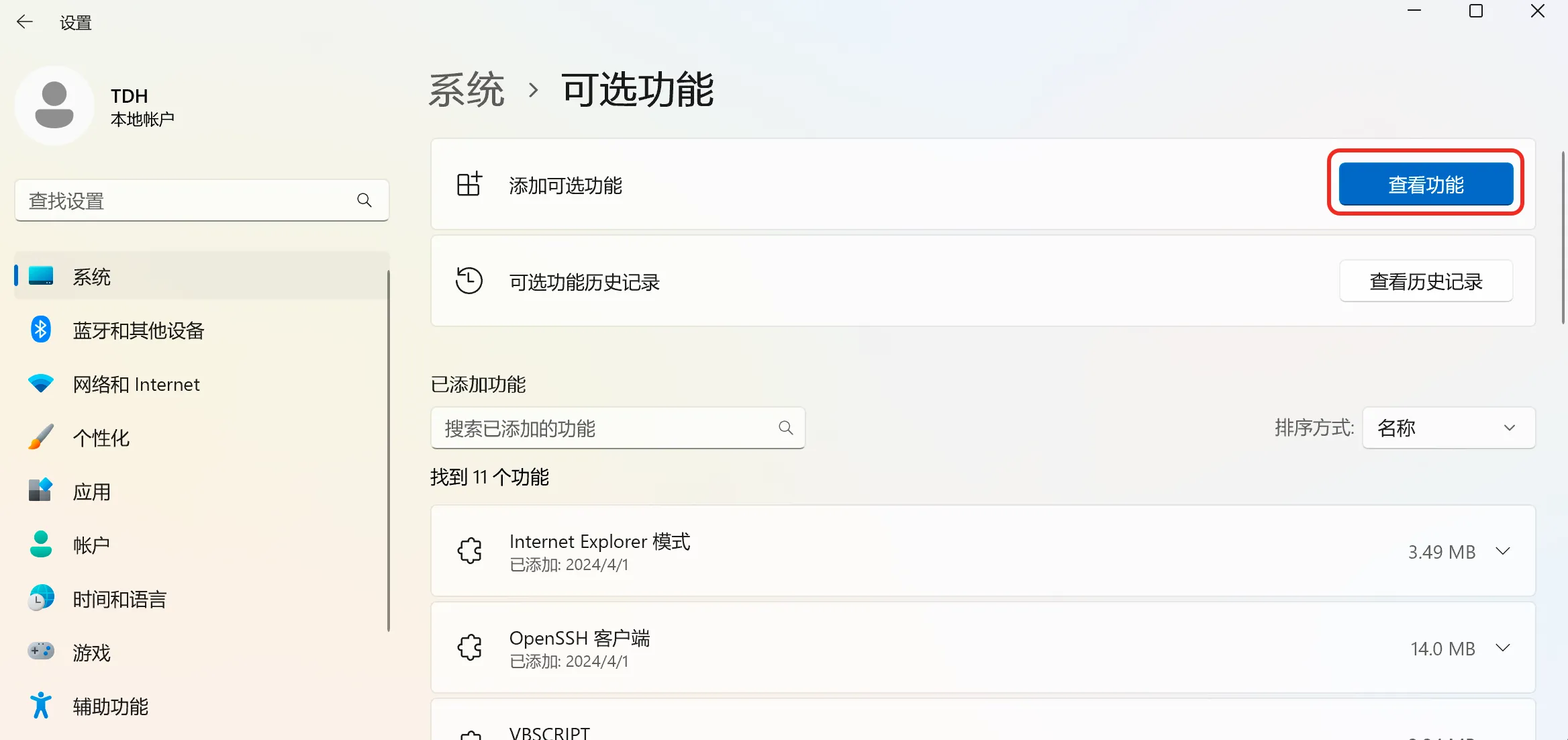
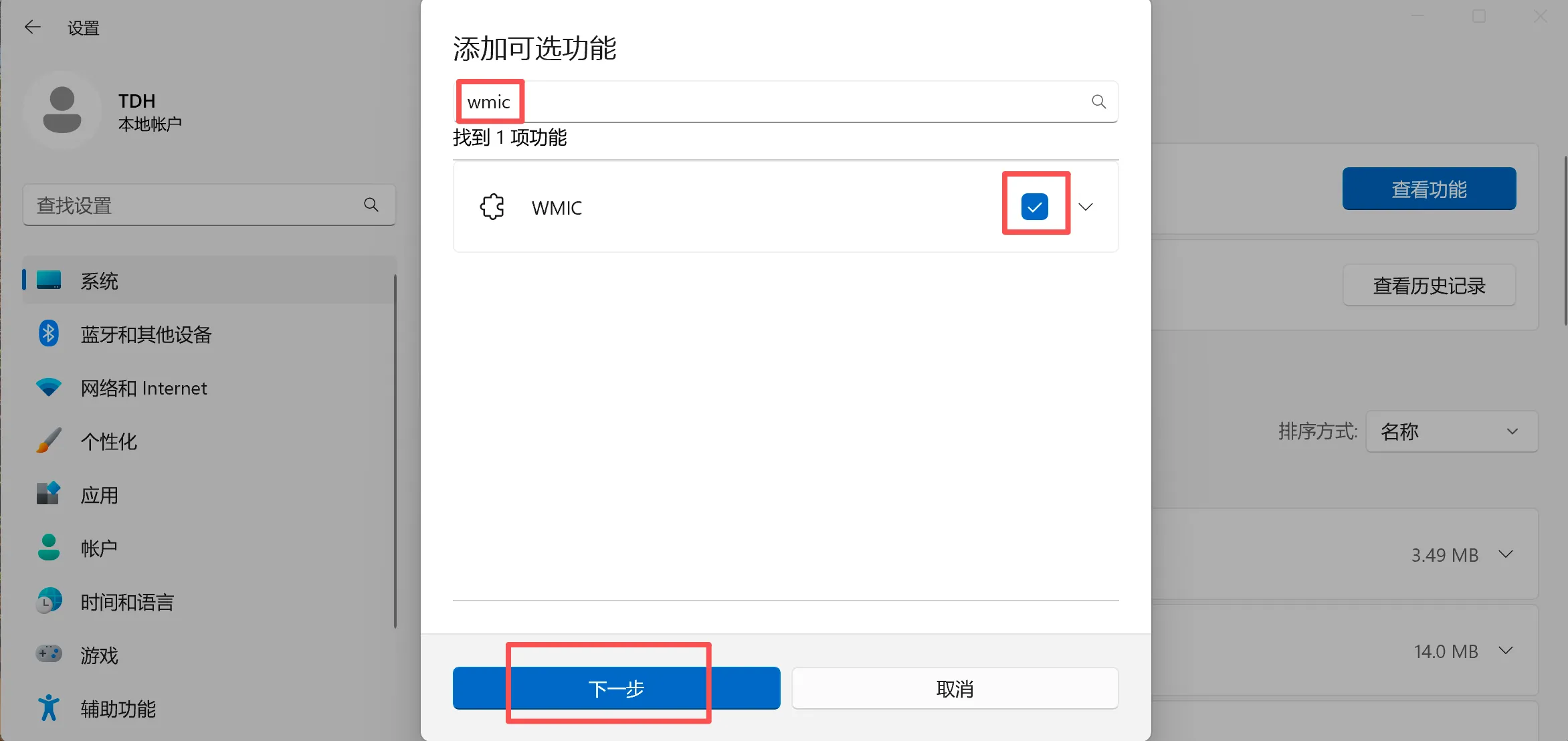
Windows操作系统下IDEA插件若激活失败(包括点击激活无反应),可以预先判断下wmic是否激活;若未激活可参照下面图中说明进行wmic的安装和激活。