In Oinone Kunlun, metadata is the most important part of the system operation. We have gained a preliminary understanding of the concept of metadata in "Mastering the Frontend Framework - Frontend Framework Overview". In this chapter, we will further explore the specific presentation of metadata in Oinone from the perspective of the frontend framework.
Ⅰ. Metadata Diagram
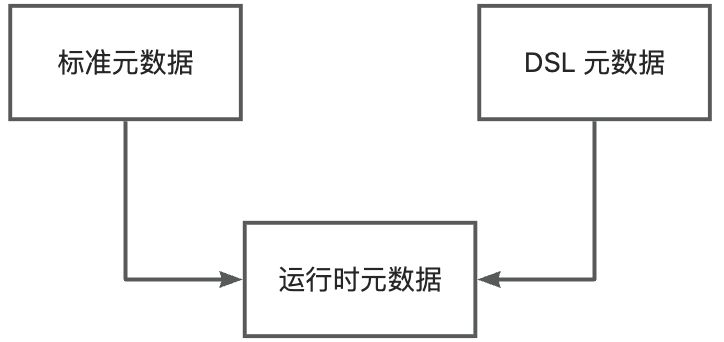
In Oinone Kunlun, metadata is divided into three categories:
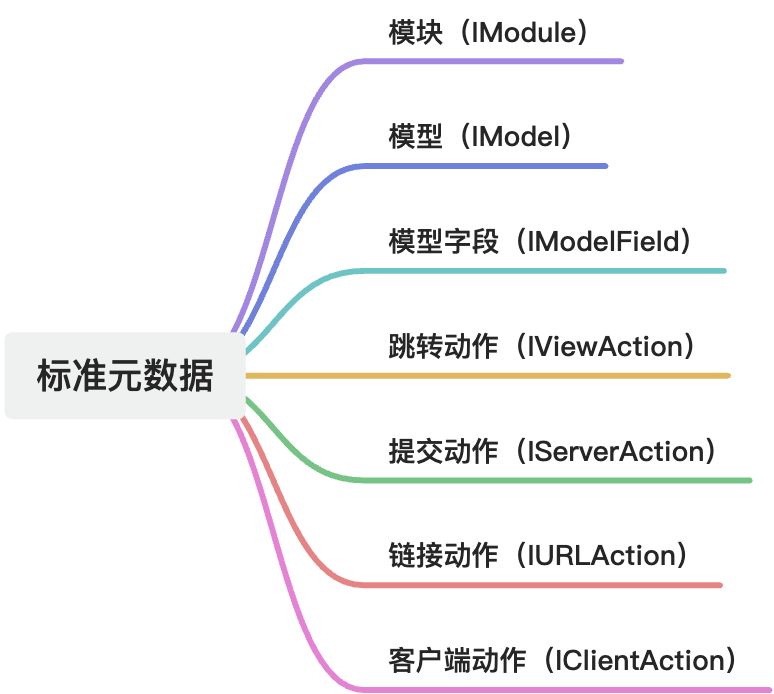
- Standard Metadata: One-to-one correspondence with backend models.
- DSL Metadata: DSL metadata obtained through the
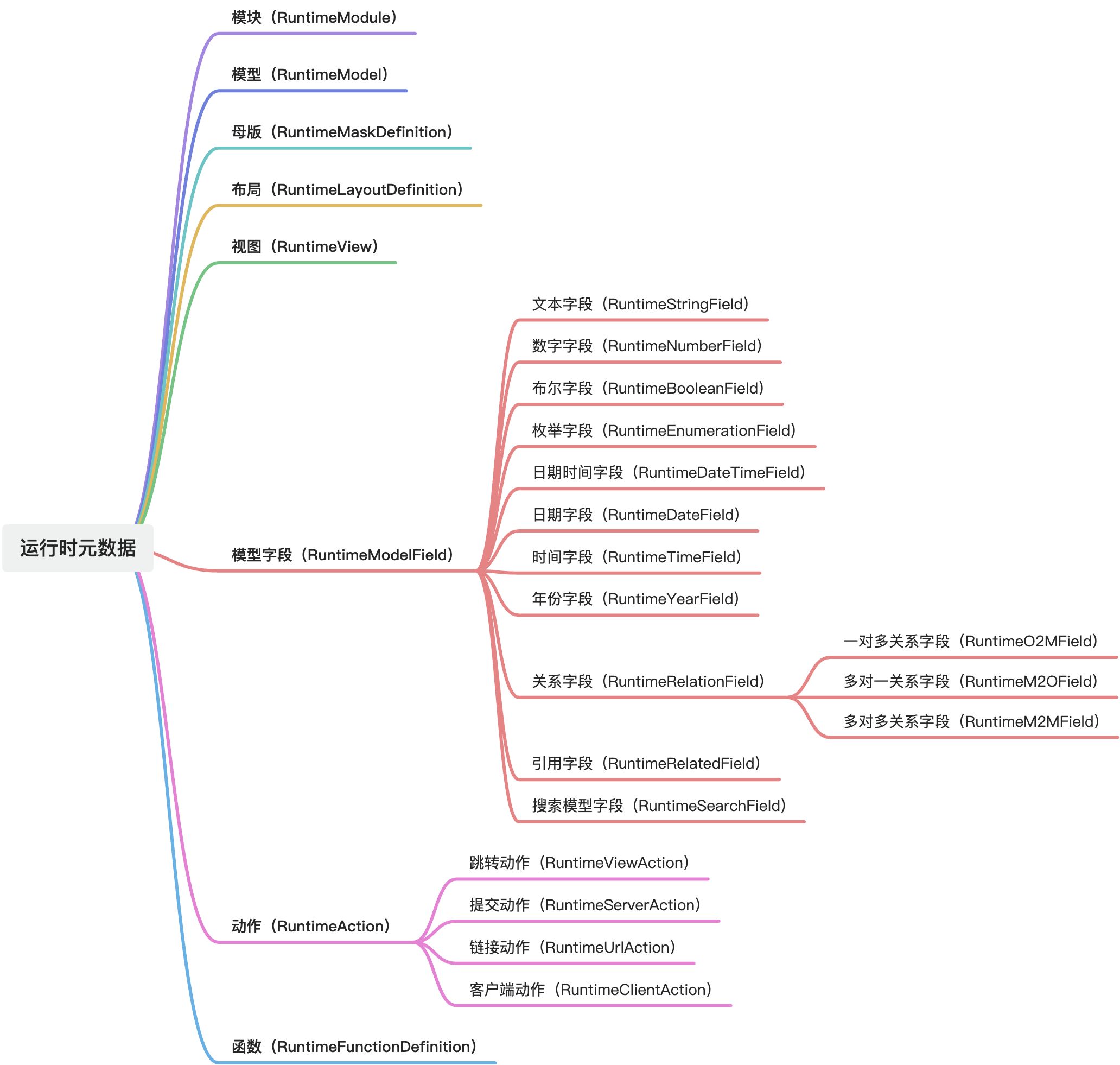
viewAction#loadinterface. - Runtime Metadata: A unified metadata type converted from standard metadata or DSL metadata.
Tip:
In business systems, our acquisition and operation of metadata should revolve around runtime metadata, so that metadata from any source can be processed through a single set of logic.
1. Standard Metadata Map
2. Runtime Metadata Map
Ⅱ. How to Obtain Runtime Metadata
(Ⅰ) Obtaining Metadata Using RuntimeContext
In components with RuntimeContext, we can obtain the runtime metadata of the corresponding model using rootRuntimeContext or metadataRuntimeContext according to the page structure.
(Ⅱ) Obtaining Model Metadata Using ModelCache
// Get the metadata of the country group model
const model = await ModelCache.get('resource.ResourceCountryGroup');Tip:
For more information about methods to obtain runtime metadata, please refer to: API
Ⅲ. Reference List
(Ⅰ) Standard Metadata
1. Module (IModule)
Properties:
- id: Unique identifier of the module. (
string) - name: API name of the module. (
string) - module: Technical name of the module. (
string) - displayName: Display name of the module, used for UI presentation. (
string) - logo: URL of the module's icon. (
string) - homePage: Homepage view configuration of the module. (
IViewAction) - allMenus: All menu configurations of the module. (
IMenu[]) - priority: Display priority of the module. (
number) - application: Identifies whether it is an independent application. (
boolean) - like: Identifies whether it is a user favorite. (
boolean) - urlHomePage: URL homepage configuration of the module. (
IURLAction)
2. Model (IModel)
Properties:
- id: Unique identifier of the model. (
string) - pk: List of primary key fields. (
string[]) - model: Technical name of the model. (
string) - name: Internal name of the model. (
string) - type: Type of the model. (
ModelType) - module: Identifier of the affiliated module. (
string) - moduleName: Name of the affiliated module. (
string) - modelFields: List of model field definitions. (
IModelField[]) - displayName: Display name of the model. (
string) - labelFields: List of fields used for displaying labels. (
string[]) - label: Label expression of the model. (
string) - progressField: Name of the progress field. (
string) - masterFieldStr: Master field string. (
string) - progressFieldStr: Progress field string. (
string) - viewActionList: List of view actions. (
IViewAction[]) - serverActionList: List of server actions. (
IServerAction[]) - urlActionList: List of URL actions. (
IURLAction[]) - clientActionList: List of client actions. (
IClientAction[]) - functions: List of model functions. (
IModelFunc[]) - modelActions: Collection of model actions. (
(IClientAction | IURLAction | IServerAction | IViewAction)[]) - viewList: List of view definitions. (
IView[]) - uniqueList: List of unique constraint definitions. (
{ fieldList: IModelField[]; fields: string }[]) - uniques: List of unique constraint fields. (
string[]) - indexes: List of index fields. (
string[]) - indexList: List of index definitions. (
{ fieldList: IModelField[]; fields: string[] }[]) - ordering: Sorting rule. (
string) - attributes: Model attribute configuration. (
object)- requiredCondition: Required condition expression. (
string) - invisibleCondition: Invisibility condition expression. (
string) - readonlyCondition: Readonly condition expression. (
string) - layoutGrid: Layout grid size. (
number) - layoutGroup: Layout group name. (
string)
- requiredCondition: Required condition expression. (
3. Model Field (IModelField)
Properties:
- id: Unique identifier of the field. (
string) - data: Data identifier for compatible v3 new version fields. (
string) - name: API name of the field. (
string) - limit: Quantity limit for association relationships, optional quantity constraint for xxx2many fields. (
number) - load: Data loading function. (
string) - ttype: Model field type enumeration. (
ModelFieldType) - model: Name of the associated model. (
string) - displayName: Display name of the field. (
string) - max: Maximum value limit for numeric fields. (
string) - min: Minimum value limit for numeric fields. (
string) - sys: Identifies whether it is a system field. (
boolean) - systemSource: System source enumeration. (
SystemSource) - size: Length of the numeric field. (
number) - decimal: Precision of the numeric field. (
number) - options: List of options for enumeration types. (
IModelFieldOption[]) - index: Identifies whether it is an index field. (
boolean) - unique: Identifies whether it is a unique index field. (
boolean) - translate: Identifies whether translation is needed. (
boolean) - label: Temporary label of the field. (
string) - references: Associated target model (original relation). (
string) - through: Intermediate model for m2m association relationships. (
string) - relationFields: Associated fields of the own model. (
string[]) - referenceFields: Associated fields of the associated model. (
string[]) - throughRelationFields: Associated fields of the current model in the intermediate model. (
string[]) - throughReferenceFields: Associated fields of the associated model in the intermediate model. (
string[]) - invisible: Default visibility (boolean or expression). (
boolean | string) - priority: Field sorting priority. (
BIGINT) - compute: Computation expression. (
string) - relatedTtype: Type of the associated field. (
ModelFieldType) - widget: Type of component used by the field. (
string) - field: Name of the property associated with the field. (
string) - sortable: Whether it is sortable (XML configuration field, not a backend model field). (
boolean) - hint: Field prompt information (XML configuration field, not a backend model field). (
string) - patternType: Regular validation type (XML configuration field, not a backend model field). (
string) - pattern: Regular validation expression. (
string) - validation: Expression validation rule. (
string) - tips: Prompt message for validation failure. (
string) - independentlyEditable: Whether to enable inline editing. (
boolean) - related: List of associated fields. (
string[]) - store: Whether the field value needs to be stored. (
boolean) - relationStore: Whether the association relationship is stored. (
boolean) - storeSerialize: Storage serialization function type (NON/JSON/COMMA/DOT). (
ModelFieldSerializeType) - domain: Field value range. (
string) - isUnique: Whether it is globally unique (default false). (
boolean) - required: Whether it is required (default false, supports expressions). (
boolean | string) - requiredTips: Prompt text for required validation. (
string) - domainSize: Pagination quantity for backend alternatives. (
string) - readonly: Whether it is read-only (editable when adding, not editable when modifying, default false). (
boolean) - multi: Whether the field return value is an array. (
boolean) - format: Field format rule. (
string) - defaultValue: Default value of the field. (
string) - attributes: Field attribute configuration. (
object)- requiredCondition: Required condition expression. (
string) - invisibleCondition: Invisibility condition expression. (
string) - readonlyCondition: Readonly condition expression. (
string) - layoutGrid: Layout grid size. (
number) - layoutGroup: Layout group name. (
string) - layoutTab: Layout tab page. (
string) - layoutTabs: List of layout tab pages. (
string)
- requiredCondition: Required condition expression. (
4. IBaseAbstractAction
Properties:
- title: Action title. (
string) - displayName: Action display name. (
string) - label: Action label. (
string) - model: Associated model name. (
string) - rule: Filter rule (obsolete). (
string) - invisible: Button visibility (boolean or expression). (
string)
5. IBaseAction
Properties:
- id: Unique identifier of the action. (
string) - name: Action name. (
string) - model: Associated model name. (
string) - modelDefinition: Model definition object. (
IModel) - bindingType: List of view types that the action is bound to. (
string[]) - bindingViewName: Specified view name where the action is only displayed. (
string) - actionType: Action type enumeration. (
ActionType) - contextType: Action context type enumeration. (
ActionContextType) - usageDesc: Action usage description. (
string) - groups: Groups that the action belongs to. (
any[]) - builtIn: Whether it is a built-in action. (
boolean) - skipCheck: Whether to skip action policy filtering (temporary solution). (
boolean) - config: Action configuration parameters. (
Record<string, unknown>) - confirm: Confirmation prompt information. (
string) - priority: Action priority. (
number) - sessionPath: Session path. (
string)
6. Navigation Action (IViewAction)
Inheritance: IBaseAction
Properties:
- actionType: Fixed as view action type. (
ActionType.View) - target: Target window type. (
ViewActionTarget) - resModel: Target model name. (
string) - resModelDefinition: Target model definition object. (
IModel) - resViewName: Target view name. (
string) - bindingViewName: Bound XML view name. (
string) - queryType: Query type. (
QueryType) - apiProtocol: API protocol type. (
ApiProtocol) - viewMode: List of switchable view types (separated by commas). (
string) - viewType: Default view type to open. (
ViewType) - dataType: View data classification. (
DataType) - domain: Query conditions attached to the list view (visible to users). (
string) - filter: Query conditions attached to the list view (invisible to users). (
string) - load: Data loading method. (
string) - loadFunction: Data loading function. (
IModelFunc) - context: Context variables. (
Record<string, unknown>) - moduleName: Module short identifier (for frontend). (
string) - page: View action page configuration. (
ViewActionPage) - resView: Target view object. (
IView) - module: Module identifier. (
string) - resModule: Target module identifier. (
string) - resModuleName: Target module name. (
string) - resModuleDefinition: Target module definition object. (
IModule) - moduleDefinition: Module definition object. (
IModule) - maskDefinition: Mask layer definition. (
{ name: string; template: string; }) - theme: Theme style. (
string)
7. Sharing Navigation Action (ISharedViewAction)
Inheritance: IViewAction
Properties:
- sharedCode: Sharing code. (
string) - authorizationCode: Authorization code. (
string) - sharedParameters: Sharing parameters. (
string) - browserTitle: Browser title. (
string) - language: Language. (
string) - languageIsoCode: Language ISO code. (
string)
8. Submission Action (IServerAction)
Inheritance: IBaseAction
Properties:
- actionType: Fixed as submission action type. (
ActionType.Server) - functionDefinition: Model function definition object. (
IModelFunc) - function: Model function object. (
IModelFunc) - module: Module identifier. (
string)
9. Link Action (IURLAction)
Inheritance: IBaseAction
Properties:
- url: Target URL address. (
string) - compute: URL computation expression. (
string) - target: Target window type. (
ViewActionTarget) - confirm: Confirmation prompt information. (
string) - module: Module identifier. (
string) - context: Context variables. (
Record<string, unknown>)
10. Client Action (IClientAction)
Inheritance: IBaseAbstractAction
Properties:
- actionType: Fixed as client action type. (
ActionType.Client) - name: Client action name or custom string. (
ClientActionName | string) - bindingType: List of view types that the action is bound to. (
string[]) - id: Unique identifier of the action (optional). (
string) - contextType: Action context type enumeration. (
ActionContextType) - confirm: Confirmation prompt information. (
string) - priority: Action priority. (
number) - tag: Action tag. (
string) - fun: Client function name. (
string)
(Ⅱ) Runtime Metadata
1. Module (RuntimeModule)
Properties:
- module: Module code, used to uniquely identify the module. (
string) - name: Module name, usually an identifier used internally in the program. (
string) - displayName: Module display name, used for interface presentation. (
string)
2. Model (RuntimeModel)
Properties:
- id: Model ID. (
string) - model: Model code. (
string) - name: Technical name. (
string) - modelFields: Model fields. (
RuntimeModelField[]) - modelActions: Model actions. (
RuntimeAction[]) - type: Model type. (
ModelType) - module: Module code. (
string) - moduleName: Module name. (
string) - moduleDefinition: Module definition. (
RuntimeModule) - pks: Primary keys. (
string[]) - uniques: Unique keys. (
string[][]) - indexes: Indexes. (
string[][]) - sorting: Sorting. (
string) - label: Display title. (
string) - labelFields: Title fields. (
string[])
3. BaseRuntimeModelMetadata
Description: Abstract definition of runtime model metadata.
Properties:
- id: Metadata ID. (
string) - model: Model code. (
string) - modelName: Model name. (
string) - modelDefinition: Model definition. (
RuntimeModel) - __index: Metadata index, matching __metadata_index in the DSL. (
number)
4. Master Template (RuntimeMaskDefinition)
Properties:
- name: Master template name. (
string) - template: Master template content. (
string)
5. Layout (RuntimeLayoutDefinition)
Properties:
- name: Layout name. (
string) - template: Layout template content. (
string)
6. View (RuntimeView)
Inheritance: BaseRuntimeModelMetadata
Properties:
- name: View name. (
string) - title: View title. (
string) - type: View type. (
ViewType) - module: View module code. (
string) - moduleName: View module name. (
string) - layoutName: Layout name. (
string) - layout: Layout DSL. (
string | DslDefinition) - dsl: Template DSL. (
string | DslDefinition) - template: Final executable DSL. (
string | DslDefinition) - filter: Invisible filter conditions. (
string) - domain: Visible filter conditions. (
string) - initialValue: Initial values of the view. (
Record<string, unknown>[]) - context: Context. (
Record<string, unknown>) - extension: Extended properties. (
Record<string, unknown>)
7. Model Field (RuntimeModelField)
Inheritance: BaseRuntimeModelMetadata
Properties:
- template: Original DSL. (
FieldDslDefinition) - data: Property name. (
string) - name: API name. (
string) - ttype: Field business type. (
ModelFieldType) - multi: Whether it is multi-valued. (
boolean) - defaultValue: Default value. (
unknown) - store: Whether to store. (
boolean) - sortable: Whether it is sortable. (
boolean) - storeSerialize: Storage serialization method. (
ModelFieldSerializeType) - displayName: Field display name. (
string) - label: Field display name on the page (takes precedence over displayName). (
string) - required: Required rule. (
boolean | string) - readonly: Readonly rule. (
boolean | string) - invisible: Hidden rule. (
boolean | string) - disabled: Disabled rule. (
boolean | string) - compute: Computation expression. (
string) - submitType: Submission type. (
SubmitType) - isVirtual: Whether it is a virtual field. (
boolean) - translate: Whether translation is needed. (
boolean)
8. Text Field (RuntimeStringField)
Inheritance: RuntimeModelField
Properties:
- size: Size. (
string | number) - limit: Limit. (
string | number) - max: Maximum value. (
string | number) - min: Minimum value. (
string | number)
9. Numeric Field (RuntimeNumberField)
Inheritance: RuntimeModelField
Properties:
- size: Size. (
string | number) - decimal: Number of decimal places. (
string | number) - max: Maximum value. (
string | number) - min: Minimum value. (
string | number) - limit: Limit quantity. (
string | number)
10. Boolean Field (RuntimeBooleanField)
Inheritance: RuntimeModelField
Properties:
- options: Options. (
[RuntimeEnumerationOption, RuntimeEnumerationOption])
11. Enumeration Field (RuntimeEnumerationField)
Inheritance: RuntimeModelField
Properties:
- options: List of options. (
RuntimeEnumerationOption[])
12. DateTime Field (RuntimeDateTimeField)
Inheritance: RuntimeModelField
Properties:
- format: DateTime formatting string. (
string) - valueFormat: Value formatting string. (
string) - dateFormat: Date part formatting string. (
string) - timeFormat: Time part formatting string. (
string)
13. Date Field (RuntimeDateField)
Inheritance: RuntimeModelField
Properties:
- format: Formatting string. (
string) - valueFormat: Value formatting string. (
string) - dateFormat: Date part formatting string. (
string)
14. Time Field (RuntimeTimeField)
Inheritance: RuntimeModelField
Properties:
- format: Formatting string. (
string) - valueFormat: Value formatting string. (
string) - timeFormat: Time part formatting string. (
string)
15. Year Field (RuntimeYearField)
Inheritance: RuntimeModelField
Properties:
- format: Formatting string. (
string) - valueFormat: Value formatting string. (
string)
16. Relation Field (RuntimeRelationField)
Inheritance: RuntimeModelField
Properties:
- relationStore: Whether to store the relation. (
boolean) - references: Associated model code. (
string) - referencesModel: Associated model. (
RuntimeModel) - relationFields: Relation fields (fields in the current model). (
string[]) - referenceFields: Associated fields (fields in the associated model). (
string[]) - filter: Invisible filter conditions. (
string) - domain: Visible filter conditions. (
string) - relationUpdateType: Relation update type. (
RelationUpdateType) - submitCache: Submission cache. (
SubmitCacheManager) - sortFields: Sorting fields. (
string[])
17. One-to-Many Relation Field (RuntimeO2MField)
Inheritance: RuntimeRelationField
Properties:
- limit: Limit quantity. (
number | string)
18. Many-to-One Relation Field (RuntimeM2OField)
Inheritance: RuntimeRelationField
Properties: Same as RuntimeRelationField
19. Many-to-Many Relation Field (RuntimeM2MField)
Inheritance: RuntimeRelationField
Properties:
- through: Many-to-many intermediate model code. (
string) - throughRelationFields: Many-to-many intermediate model relation fields (corresponding to relation fields). (
string[]) - throughReferenceFields: Many-to-many intermediate model associated fields (corresponding to associated fields). (
string[]) - limit: Limit quantity. (
string | number)
20. Reference Field (RuntimeRelatedField)
Inheritance: RuntimeModelField
Properties:
- relatedTtype: Reference business type. (
ModelFieldType) - related: Reference properties. (
string[])
21. Search Model Field (RuntimeSearchField)
Inheritance: RuntimeModelField
Properties:
- operator: Operator. (
string) - allowSearch: Whether to allow searching. (
boolean)
22. Action (RuntimeAction)
Inheritance: BaseRuntimeModelMetadata
Properties:
- template: Original DSL. (
ActionDslDefinition) - name: Action name. (
string) - widget: Action component. (
string) - actionType: Action type. (
ActionType) - contextType: Action context type (used to control data submission method). (
ActionContextType) - bindingType: Bound view types (indicating that the button is only displayed in the corresponding view types). (
ViewType[]) - bindingViewName: Bound view name (indicating that the button is only displayed in the view with the specified name). (
string) - priority: Priority. (
number) - invisible: Hidden rule. (
boolean | string) - disabled: Disabled rule. (
boolean | string) - displayName: Field display name. (
string) - label: Action display name on the page (takes precedence over displayName). (
string) - mapping: Data mapping. (
Record<string, unknown>) - context: Context. (
Record<string, unknown>) - sessionPath: Session path. (
string)
23. Navigation Action (RuntimeViewAction)
Inheritance: RuntimeAction
Properties:
- title: Navigation action title. (
string) - target: Navigation type. (
ViewActionTarget) - filter: Invisible filter conditions. (
string) - domain: Visible filter conditions. (
string) - module: Current module code. (
string) - moduleName: Current module name. (
string) - moduleDefinition: Current module definition. (
RuntimeModule) - maskDefinition: Master template definition. (
RuntimeMaskDefinition) - viewLayout: Current view layout definition. (
RuntimeLayoutDefinition) - viewName: Current view name. (
string) - viewType: Current view type. (
ViewType) - viewMode: Current view mode. (
ViewMode) - resModel: Target model code. (
string) - resModelName: Target model name. (
string) - resModelDefinition: Target model definition. (
RuntimeModel) - resModule: Target module code. (
string) - resModuleName: Target module name. (
string) - resModuleDefinition: Target module definition. (
RuntimeModule) - resMaskDefinition: Master template definition. (
RuntimeMaskDefinition) - resViewLayout: Target view layout definition. (
RuntimeLayoutDefinition) - resViewName: Target view name. (
string) - resViewType: Target view type. (
ViewType) - resViewMode: Target view mode. (
ViewMode) - resView: Target view definition. (
RuntimeView) - theme: Theme. (
string) - load: Loading function name. (
string) - loadFunctionDefinition: Loading function definition. (
RuntimeFunctionDefinition)
24、分享跳转动作(SharedRuntimeViewAction)
继承:RuntimeViewAction
属性:
- sharedCode:分享码。(
string) - authorizationCode:授权码。(
string) - sharedParameters:分享参数。(
Record<string, unknown>) - browserTitle:浏览器标题。(
string) - language:当前语言。(
string) - languageIsoCode:当前语言 ISO 编码。(
string)
24、Shared Runtime View Action (SharedRuntimeViewAction)
Inheritance: RuntimeViewAction
Attributes:
- sharedCode: Shared code. (
string) - authorizationCode: Authorization code. (
string) - sharedParameters: Shared parameters. (
Record<string, unknown>) - browserTitle: Browser title. (
string) - language: Current language. (
string) - languageIsoCode: Current language ISO code. (
string)
25、Runtime Server Action (RuntimeServerAction)
Inheritance: RuntimeAction
Attributes:
- fun: Function name. (
string) - functionDefinition: Function definition. (
RuntimeFunctionDefinition)
26、Runtime URL Action (RuntimeUrlAction)
Inheritance: RuntimeAction
Attributes:
- url: Jump URL. (
string) - target: Opening method. (
ViewActionTarget) - computeFunction: Calculation function. (
RuntimeFunctionDefinition) - compute: Calculation function Fun. (
string)
27、Runtime Client Action (RuntimeClientAction)
Inheritance: RuntimeAction
Attributes:
- fun: Client action name. (
string)
28、Runtime Function Definition (RuntimeFunctionDefinition)
Attributes:
- type: Function type. (
FunctionType[]) - namespace: Function namespace. (
string | FunctionSelfFlagType) - fun: Function code. (
string) - name: API name. (
string) - argumentList: Parameter list. (
RuntimeFunctionArgument[]) - returnType: Return type. (
RuntimeFunctionReturnType)
(Ⅲ) Enumerations
1、Model Type (ModelType)
STORE: Storage model, data will be persistently stored.TRANSIENT: Transient model, data is not persistent.ABSTRACT: Abstract model, used for inheritance.PROXY: Proxy model, used for remote data access.
2、Model Field Business Type (ModelFieldType)
STRING: String type.TEXT: Text type.HTML: HTML type.PHONE: Phone type.EMAIL: Email type.INTEGER: Integer type.LONG: Long integer type.FLOAT: Floating-point type.MONEY: Currency type.DATETIME: Date and time type.DATE: Date type.TIME: Time type.YEAR: Year type.BOOLEAN: Boolean type.ENUM: Enumeration type.MAP: Mapping type.RELATED: Association type.O2O: One-to-one relationship.O2M: One-to-many relationship.M2O: Many-to-one relationship.M2M: Many-to-many relationship.OBJ: Object type.
3、Data Source (SystemSource)
SYSTEM: Generated by the kernel system.BASE: System native fields.MANUAL: Manually added fields.UI: Fields added from the interface.RELATION: Fields generated by association relationships.ABSTRACT_INHERITED: Inherited from an abstract class.TRANSIENT_INHERITED: Inherited from a transient class.EXTEND_INHERITED: Inherited from the same table.MULTI_TABLE_INHERITED: Inherited from multiple tables.PROXY_INHERITED: Inherited from a proxy.
(Ⅳ) Methods for Obtaining Runtime Metadata
1、ModuleCache
Methods:
get
- Function Description: Get the cache of the specified module name, with the option to force retrieval (ignoring the cache).
- Type:
(moduleName: string, force?: boolean) => Promise<IModule | undefined> - Parameters:
moduleName: Module name.force: Force query, default valuefalse.
- Return Value: Module metadata.
2、ModelCache
Methods:
get
- Function Description: Get a model by its model code.
- Type:
(model: string, force?: boolean) => Promise<RuntimeModel | undefined> - Parameters:
model: Model code.force: Force query, default valuefalse.
- Return Value: Model metadata.
3、ViewActionCache
Methods:
get
- Function Description: Get a view action by model code and jump action name.
- Type:
(model: string, name: string, force?: boolean) => Promise<RuntimeViewAction | undefined> - Parameters:
model: Model code.name: Jump action name.force: Force query, default valuefalse.
- Return Value: Jump action metadata.
getOrThrow
- Function Description: Get a jump action by model code and jump action name, throw an exception if it does not exist.
- Type:
(model: string, name: string, force?: boolean) => Promise<RuntimeViewAction | undefined> - Parameters:
model: Model code.name: Jump action name.force: Force query, default valuefalse.
- Return Value: Jump action metadata.
getHomepage
- Function Description: Get the module homepage jump action.
- Type:
(module?: string, force?: boolean) => Promise<RuntimeViewAction | undefined> - Parameters:
module: Module code, optional.force: Force query, default valuefalse.
- Return Value: Homepage jump action.
getSharedAction
- Function Description: Get a shared jump action by shared code.
- Type:
(sharedCode: string, force?: boolean) => Promise<RuntimeViewAction | undefined> - Parameters:
sharedCode: Shared code.force: Force query, default valuefalse.
- Return Value: Shared jump action.
set
- Function Description: Set a jump action.
- Type:
(action: RuntimeViewAction) => Promise<void> - Parameters:
action: Jump action.
4、ServerActionCache
Methods:
get
- Function Description: Get a submit action by model code and name.
- Type:
(model: string, name: string, force?: boolean) => Promise<RuntimeServerAction | undefined> - Parameters:
model: Model code.name: Name.force: Force query, default valuefalse.
- Return Value: Submit action metadata.
5、UrlActionCache
get
- Function Description: Get a link action by model code and name.
- Type:
(model: string, name: string, force?: boolean) => Promise<RuntimeUrlAction | undefined> - Parameters:
model: Model code.name: Name.force: Force query, default valuefalse.
- Return Value: Link action metadata.
6、FunctionCache
get
- Function Description: Get a function by its technical name.
- Type:
(namespace: string, fun: string) => Promise<RuntimeFunctionDefinition | undefined> - Parameters:
namespace: Namespace.fun: Technical name.
- Return Value: Function metadata.
getByName
- Function Description: Get a function by its name (this method is not secure, please use
FunctionCache.getas much as possible). - Type:
(namespace: string, name: string) => Promise<RuntimeFunctionDefinition | undefined> - Parameters:
namespace: Namespace.name: Name.
- Return Value: Function metadata.