The Oinone platform provides developers with a collaborative development mode between the local environment and testing environment, enabling metadata such as models and functions designed in the local environment to be used and designed in real-time within the testing environment. After completing the development of corresponding pages and functions, developers can deploy them to the testing environment for direct testing.
This article will detail the application of the collaborative development mode in practical development and related content.
Objective: By the end of this section:
You should master the collaborative development mode between the local environment and testing environment and enable collaboration among multiple developers.
Noun Explanations:
| Noun | Description |
|---|---|
| Local Environment | The local startup environment for developers |
| Testing Environment | The business testing environment deployed on the testing server, where business engineering services and designer services share middleware |
| Business Engineering Services | Business engineering deployed on the testing server |
| Designer Services | Designer images deployed on the testing server |
| Set of Environments | Taking the testing environment as an example, business engineering services and designer services together form a set of environments |
| Production Environment | The business production environment deployed on the production server |
I. Environment Preparation
- A deployable
designer servicethat can be accessed normally (requires corresponding modifications referring to theStart Designer Environmentcontent below). - A Java project prepared for development.
- A server prepared for deploying the testing environment.
II. Introduction to Collaborative Parameters
(Ⅰ) Parameters for the Testing Environment
-PmetaProtected=${value}
Enables metadata protection, allowing only services with the same startup parameter to update metadata. This command is typically used for designer services and business engineering services, which must be started with the same metadata protection marker (value). The local environment does not use this command to prevent accidental modification of testing environment metadata during collaborative development, which could cause metadata confusion.
java -jar boot.jar -PmetaProtected=pamirs(Ⅱ) Parameters for the Local Environment
1. Configure ownSign Using Commands (Recommended)
java -jar boot.jar --pamirs.distribution.session.ownSign=demo2. Configure ownSign Using YAML
pamirs:
  distribution:
    session:
      allMetaRefresh: false # Enables full metadata refresh (backup configuration; use to recover from metadata errors or confusion, then disable)
ownSign: demo # Collaborative development metadata isolation marker to distinguish between different developers' local environments; not allowed in other environmentsIII. Start Designer Environment
(Ⅰ) Start with docker-run
-e PROGRAM_ARGS=-PmetaProtected=pamirs(Ⅱ) Start with docker-compose
services:
  backend:
    container_name: designer-backend
    image: harbor.oinone.top/oinone/designer-backend-v5.0
    restart: always
    environment:
      # Specify spring.profiles.active
      ARG_ENV: dev
      # Specify -Plifecycle
      ARG_LIFECYCLE: INSTALL
      # JVM parameters
      JVM_OPTIONS: ""
      # Program parameters
PROGRAM_ARGS: "-PmetaProtected=pamirs"Note:
java [JVM_OPTIONS?] -jar boot.jar [PROGRAM_ARGS?]
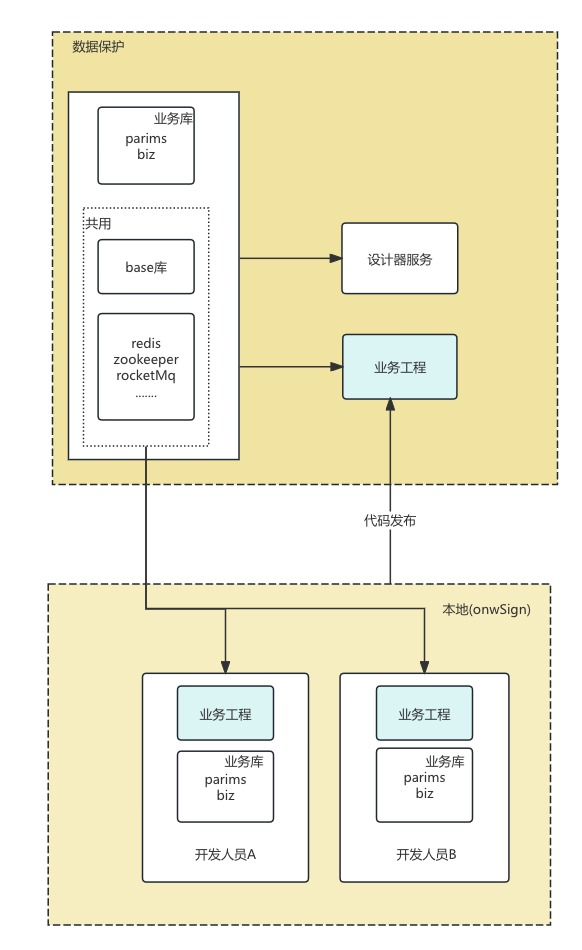
IV. Development Process Example Diagram
V. Collaborative Development Support
(Ⅰ) Version Support
Version 4.7.x already includes distributed support.
(Ⅱ) Usage Steps
1. Introduce the Collaborative Development Package into the Business Backend Boot Project
<dependency>
    <groupId>pro.shushi.pamirs.distribution</groupId>
    <artifactId>pamirs-distribution-session-cd</artifactId>
</dependency>2. Configure ownSign in the YML File
pamirs:
  distribution:
    session:
      allMetaRefresh: false
ownSign: demoNote: For more YAML configurations, please refer to Module API.
Configuration Instructions:
allMetaRefresh, full refresh of metadata in Redis, which is rarely needed in most cases;
- Full refresh occurs automatically on the first startup or after Redis cache is cleared.
- Configuring to true forces a full refresh, generally unnecessary.
- 【Recommended】The default incremental mode (allMetaRefresh: false) writes less data to Redis, resulting in faster startup.
- 【Mandatory】ownSign is an environment isolation setting; different developers in the same project team must configure different ownSign values (each configures their own to avoid interference).
3. Constraints on Business System DB and Cache
- 【Mandatory Requirement】The business database and designer must share Redis, with consistent Redis prefix, tenant, and system isolation keys (these three values affect RedisKey concatenation).
- 【Mandatory Provision】The base database's business system and designer should share the same database.
- 【Mandatory Requirement】The public database, i.e., pamirs (including resources, users, permissions, files, etc.), must be shared.
- 【Mandatory Constraint】The alias of the "business database" data source must be unified; each developer should configure it locally or add suffixes to remote databases for differentiation.
4. How to Use Collaboration
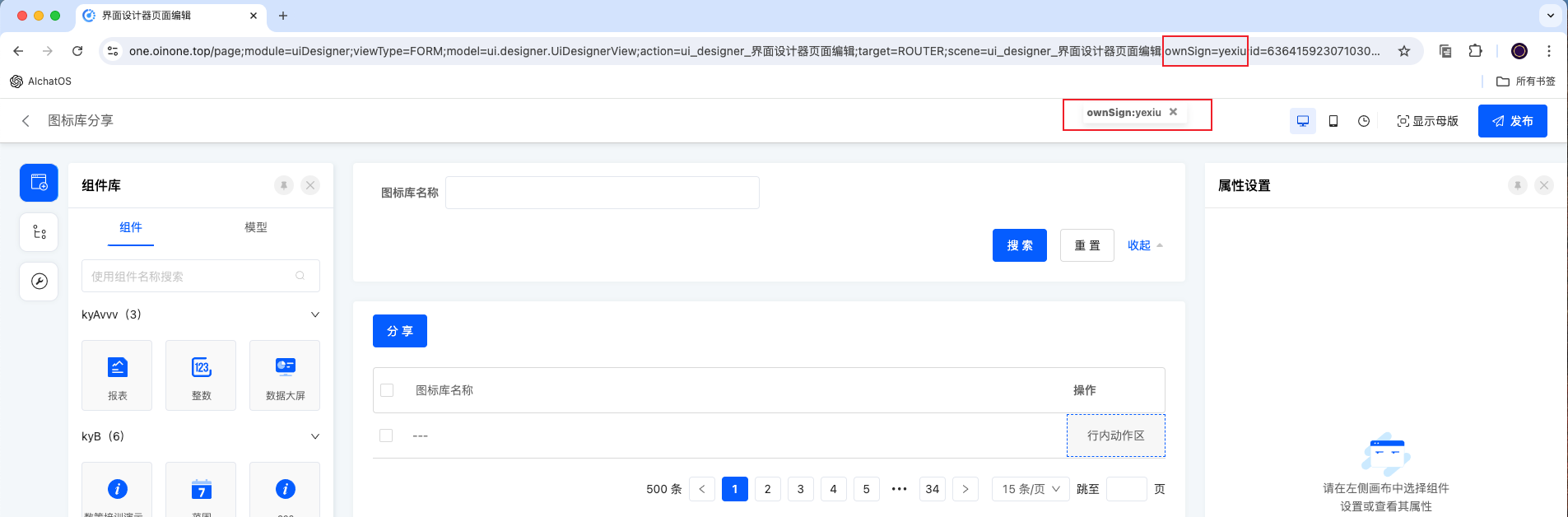
When accessing the designer, developers add ";ownSign=yexiu" to the end of the URL and press Enter. OwnSign-related information will then be stored in the browser cache. For subsequent URL visits, this content does not need to be re-entered. To remove the ownSign value, simply delete the floating window on the interface.
Note:
The ownSign added to the designer URL must match the ownSign value in the developer's local project YML file. (Each developer uses their own unique ownSign.)