I. Overview
Note:
- The default Dubbo registration center for Oinone projects is ZK, but in actual projects, Nacos may be required as the registration center.
- Oinone defaults to introducing nacos-client-1.4.1. This low version does not support authentication configuration; this client version supports both Nacos service 1.x and 2.x versions.
II. Adding Dependencies to the Project
Introduce dependencies in the project's main pom.
<dependency>
    <groupId>org.apache.dubbo</groupId>
    <artifactId>dubbo-registry-nacos</artifactId>
    <version>2.7.22</version>
</dependency>Introduce dependencies in the pom of the project's boot engineering.
<dependency>
    <groupId>org.apache.dubbo</groupId>
    <artifactId>dubbo-registry-nacos</artifactId>
</dependency>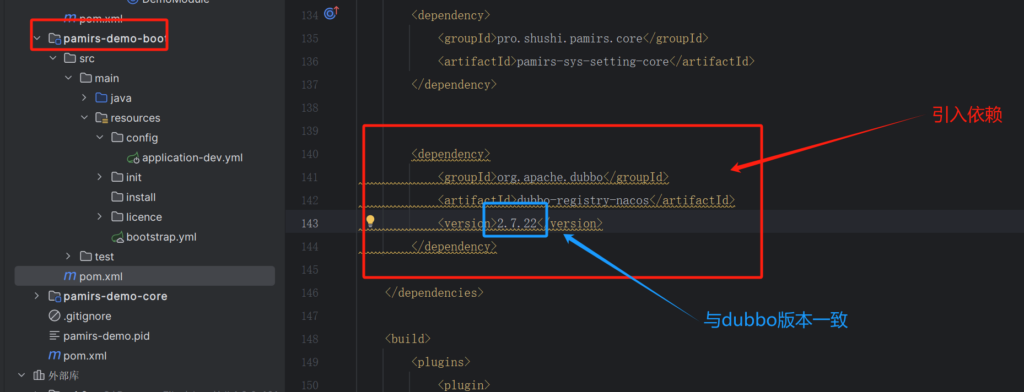
III. Configuration Modification
Modify Dubbo service registration to Nacos.
Configure in the bootstrap.yml file or modify Dubbo configuration in the application.yml file.
dubbo:
  application:
    name: pamirs-demo
    version: 1.0.0
  registry:
    id: pamirs-demo-registry
    address: nacos://192.168.0.118:8848
    username: nacos # Username for authentication (modify according to the situation), no need to configure username and password if authentication is not enabled
    password: nacos # Password for authentication (modify according to the situation), no need to configure username and password if authentication is not enabled
    # Configuration to close writing Dubbo configuration to the configuration center when using Nacos registration center
    use-as-metadata-center: false
    use-as-config-center: false
  config-center:
    address: nacos://192.168.0.118:8848
    username: nacos # Username for authentication (modify according to the situation), no need to configure username and password if authentication is not enabled
    password: nacos # Password for authentication (modify according to the situation), no need to configure username and password if authentication is not enabled
  metadata-report:
    failfast: false # Turn off the error reporting function
    address: nacos://192.168.0.118:8848
    username: nacos # Username for authentication (modify according to the situation), no need to configure username and password if authentication is not enabled
    password: nacos # Password for authentication (modify according to the situation), no need to configure username and password if authentication is not enabled
  protocol:
    name: dubbo
    port: -1
    serialization: pamirs
  scan:
    base-packages: pro.shushi
  cloud:
subscribed-services:IV. Notes on Building Distributed Projects with Oinone
(Ⅰ) Service Publication Scope of Oinone Remote Services
Generalized service scope, optional values: module, namespace module: Publish remote services by module dimension namespace: Publish remote services by Fun's namespace dimension By default, services are published by module dimension.
pamirs:
  distribution:
    service:
     #serviceScope: optional values namespace, module
serviceScope: module(Ⅱ) Turning Off Dubbo Service Registration Metadata Reporting Logs
logging:
 level:
   root: info
   pro.shushi.pamirs.framework.connectors.data.mapper.PamirsMapper: error
   pro.shushi.pamirs.framework.connectors.data.mapper.GenericMapper: error # mybatis sql logs
   RocketmqClient: error
   org.apache.dubbo.registry.zookeeper.ZookeeperRegistry: error
   org.apache.dubbo.registry.integration.RegistryDirectory: error
   org.apache.dubbo.config.ServiceConfig: error
   com.alibaba.nacos.client.naming: error
   org.apache.dubbo.registry.nacos.NacosRegistry: error
   org.apache.dubbo.registry.support.AbstractRegistryFactory: error
   org.apache.dubbo.registry.integration.RegistryProtocol: error
   org.apache.dubbo.registry.client.metadata.store.RemoteMetadataServiceImpl: off
   org.apache.dubbo.metadata.store.zookeeper.ZookeeperMetadataReport: off
org.apache.dubbo.metadata.store.nacos.NacosMetadataReport: off(Ⅲ) Redundant Configurations Appearing in the Nacos Configuration List
When Dubbo integrates with the Nacos registration center, redundant configurations will appear. For detailed references: Many irrelevant configurations will be automatically created in the configuration list: https://github.com/apache/dubbo/issues/6645 Redundant configurations appear in the configuration list: https://github.com/alibaba/nacos/issues/8843
They can be turned off according to the following configuration.
Note:
It is mainly these three configurations (use-as-config-center, use-as-metadata-center, metadata-report.failfast), and the generated configurations need to be manually deleted.
dubbo:
 application:
   name: pamirs-demo
   version: 1.0.0
   metadata-type: local
 registry:
   id: pamirs-demo-registry
   address: nacos://192.168.0.129:8848
   username: nacos
   password: nacos
   # Configuration to close writing Dubbo configuration to the configuration center when using Nacos registration center
   use-as-metadata-center: false
   use-as-config-center: false
 config-center:
   address: nacos://192.168.0.129:8848
   username: nacos
   password: nacos
 metadata-report:
   failfast: false # Turn off the error reporting function
   address: nacos://192.168.0.129:8848
   username: nacos
   password: nacos
 protocol:
   name: dubbo
   port: -1
   serialization: pamirs
 scan:
   base-packages: pro.shushi
 cloud:
subscribed-services:Note: For more YAML configurations, please go to Module API for consultation.