Ⅰ. Hardware and Software Overview
- Server Hardware and Software Overview
Hardware Overview: Domestic信创 (IT application innovation) server, Loongson CPU, mips64 architecture
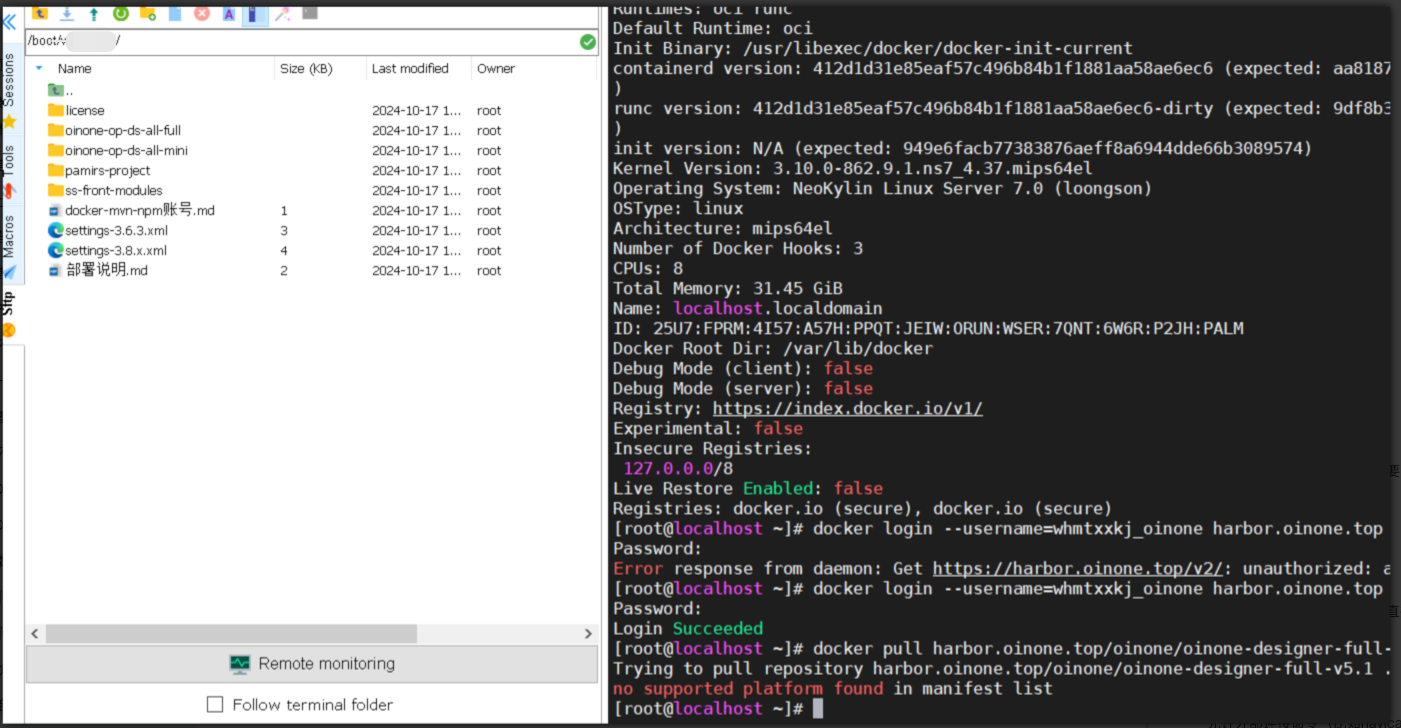
- Deployment Method: The currently provided designer image package does not include an image package for the mips architecture, so the designer can only be deployed via the Jar method.
Ⅱ. Middleware Installation
- Manual middleware installation requires the following middleware list:
1. Go runtime environment
2. Java 1.8        Version: 1.8_221+
3. MySQL           Version: 8.0+
4. Redis           Version: 4.x or 5.x
5. ZooKeeper       Version: 3.5.8+
6. RocketMQ        Version: 4.x, recommended 4.7.x
7. Nginx No version requirement- NeoKylin is derived from CentOS, and CentOS uses yum as the package manager.
(Ⅰ) Install GO Runtime Environment
The golang official website: https://golang.google.cn/dl/ provides packages for the mips64 architecture.
(Ⅱ) Install JDK
sudo yum update

# Use the yum command to list all available JDK packages
yum list java-1.8*

# Execute installation
sudo yum install java-1.8.xxxThe JDK8 version supporting the mips64 architecture is 1.8_181. Since Oinone requires JDK1.8.221+, which is lower than this version, the JCE needs to be overridden to solve the 128-bit encryption key limitation issue.
(Ⅲ) Install Redis and Nginx
The installation method is similar to that of JDK, directly installed via yum.
(Ⅳ) Install ZooKeeper and RocketMQ
The Java 8 environment has been installed in the second step, and ZooKeeper and RocketMQ can be installed according to normal versions.
(Ⅴ) Install MySQL
1. Attempt to Install MySQL 8.x Version
- The MySQL official website does not provide an installation package for the mips64 architecture, which needs to be compiled manually.
- Initially tried to download the MySQL 8.0 package, and the following two options (Operating System and OS Version) were set with reference to the screenshot below:
 Attempts were made from 8.0.11 to 8.0.40, but none worked. During the compilation process, either the GCC+ version was incorrect or the cmake (cmake3) version was incorrect; the versions of these two dependent components supporting the mips64 architecture are all lower than the requirements for compiling MySQL8.0.X.
- Installing MarriDB via yum was successful, but the MySQL version was very low, only 5.5.15 (2011 version).
2. Compile and Install MySQL5.7 (mips64 Architecture)
The content of compiling MySQL5.7 comes from [Tencent Cloud] - [Developer Community], specific link: Source Code Compilation and Installation of MySQL (Galaxy Kirin v10 mips Architecture)
Upload and Extract the Source Package
Please select a version with built-in boost for the source package, such as: mysql-boost-5.7.33.tar.gz, my path is under /opt/softapp/
tar -zxvf mysql-boost-5.7.33.tar.gz
cd mysql-5.7.33/Compile the MySQL Source Code
Note that the DWITH_BOOST in the following script needs to be changed to your local source code path, please modify it according to the actual situation.
cmake . -DCMAKE_INSTALL_PREFIX=/usr/local/mysql \
-DSYSCONFDIR=/etc \
-DWITH_MYISAM_STORAGE_ENGINE=1 \
-DWITH_INNOBASE_STORAGE_ENGINE=1 \
-DWITH_ARCHIVE_STORAGE_ENGINE=1 \
-DWITH_BLACKHOLE_STORAGE_ENGINE=1 \
-DWITH_PARTITION_STORAGE_ENGINE=1 \
-DWITH_FEDERATED_STORAGE_ENGINE=1 \
-DWITH_MEMORY_STORAGE_ENGINE=1 \
-DDEFAULT_STORAGE_ENGINE=InnoDB \
-DWITH_SSL=system \
-DWITH_ZLIB=system \
-DENABLED_LOCAL_INFILE=1 \
-DWITH_EMBEDDED_SERVER=1 \
-DENABLE_DOWNLOADS=1 \
-DWITH_EXTRA_CHARSETS=all \
-DWITH_READLINE=1 \
-DWITH_SYSTEMD=1 \
-DWITH_BOOST=/opt/softapp/mysql-5.7.33/boost/boost_1_59_0Create Database User and Data Directory
useradd -M -s /sbin/nologin -r mysql
mkdir -p /usr/local/mysql/data
chown -R mysql.mysql /usr/local/mysql/Execute Make Installation
make
sudo make installConfiguration File my.cnf
mv  /etc/my.cnf  /etc/my.cnf.bak
vim /etc/my.cnfTwo items are added based on the configuration from Tencent Cloud - Developer Community:
Case sensitivity: lower_case_table_names=2
Default time zone: default-time-zone = '+08:00'
[mysql]
default-character-set=utf8

[mysqld]
port=3306
user=mysql
general_log = 1
general_log_file= /var/log/mysql/mysql.log
socket=/var/log/mysql/mysql.sock
basedir=/usr/local/mysql
datadir=/usr/local/mysql/data
bind-address = 0.0.0.0
default_storage_engine = InnoDB
character-set-server=utf8
collation-server=utf8_general_ci
lower_case_table_names=2
autocommit=1
symbolic-links=0
skip-networking = 0
log-error=/var/log/mysql/mysql_err.log
pid-file=/var/log/mysql/mysql.pid
default-time-zone = '+08:00'Configure Startup Script
cd /etc/systemd/system
vim mysqld.service[Unit]
Description=MySQL DBMS
[Service]
LimitNOFILE=10000
Type=simple
User=mysql
Group=mysql
PIDFile=/usr/local/mysql/mysqld.pid
ExecStart=/usr/local/mysql/bin/mysqld --datadir=/usr/local/mysql/data
ExecStop=/bin/kill -9 $MAINPID
[Install]
WantedBy=multi-user.targetAdd Permissions and Set to Start on Boot
chmod +x mysqld.service
systemctl enable mysqld.serviceInitialize the Database
No password, if a temporary password is needed, remove the -insecure parameter.
/usr/local/mysql/bin/mysqld --initialize-insecure --user=mysql --basedir=/usr/local/mysql --datadir=/usr/local/mysql/dataInitialization error:
[root@localhost system]# /usr/local/mysql/bin/mysqld --initialize-insecure --user=mysql --basedir=/usr/local/mysql --datadir=/usr/local/mysql/data
2024-07-07T06:24:46.415658Z 0 [Warning] TIMESTAMP with implicit DEFAULT value is deprecated. Please use --explicit_defaults_for_timestamp server option (see documentation for more details).
2024-07-07T06:24:46.433398Z 0 [ERROR] Could not open file '/var/log/mysql/mysql_err.log' for error logging: No such file or directory
2024-07-07T06:24:46.433548Z 0 [ERROR] AbortingSolution: Create the file
mkdir  /var/log/mysql
touch /var/log/mysql/mysql_err.log
chown -R mysql:mysql /var/log/mysqlSuccessful initialization:

Start MySQL
systemctl start mysqldLog in to MySQL
No password, press Enter directly when entering the password.
mysql -u root -pResult (successful login):

Modify Password and Allow External Connections
ALTER USER 'root'@'localhost' IDENTIFIED BY 'your_password';
FLUSH PRIVILEGES;GRANT ALL PRIVILEGES ON *.* TO 'root'@'%' IDENTIFIED BY 'your_password' WITH GRANT OPTION;Ⅲ. Start the Designer Backend via Jar
Refer to the documentation: Backend Code-Free Designer Jar Package Startup Method.
Ⅳ. Deploy Designer Frontend with Nginx
- You need to ask the
Oinone customer servicefor the frontend dist resource package that matches the backend designer Jar package; upload the dist package to the server and start it with Nginx. - Nginx configuration is as follows:
server {
  # Modify according to actual details
  listen 8090;
  # Modify according to actual details
  server_name 127.0.0.1;

  location / {
    # Modify according to actual details (path corresponding to frontend dist file)
    root /Users/admin/nginx/html/mis/v3/dist;
    try_files $uri $uri/ /index.html;
    index  index.html index.htm;
  }

  location /pamirs {
    # Modify according to actual details (backend interface address)
    proxy_pass http://127.0.0.1:8191;
    proxy_set_header X-Real-IP $remote_addr;
    proxy_set_header X-Forwarded-For $proxy_add_x_forwarded_for;
  }
}- After modifying and saving the configuration, execute startup or restart to take effect;
- Nginx can be configured with gzip, etc., similar to normal configuration, which is not repeated here.