Ⅰ、Overview
In daily business operations, there is often a need to navigate between multiple model pages. For example, on a product display page, users should be able to click a link from a specific product row to seamlessly jump to the category detail page; or on an order page, easily view the list of after-sales orders initiated for that order. This article will elaborate on the specific methods to implement these functions on the Oinone platform.
Ⅱ、Configuration via No-Code Capabilities of the Interface Designer
(Ⅰ)Table Row Jumps to Form Page/Detail Page
- Drag a jump action to the table row. After saving the action, at the bottom of the action properties panel on the left, there is a
Request Configurationwhere theContextattribute is used to configure jump parameters. Click theAddbutton to add a parameter row.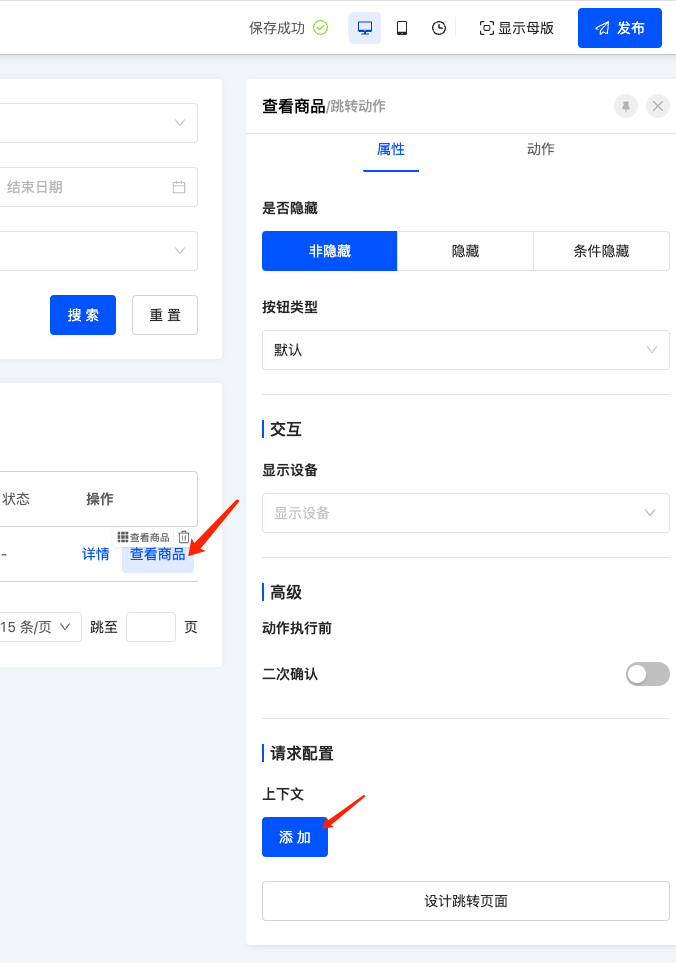
- After clicking the add button, a new row will be displayed with two input fields: the left field for the
target view model's field, and the right field for theexpression of the current view model.
Note:
The keyword activeRecord in the expression represents the data object of the current row.
(Ⅱ)Knowledge Points Related to "Context"
- When the model of the current page is the same as the model of the jumped page, the ID of the current row data will be automatically included as a route parameter.
- The
contextis a custom parameter passed from the current page to the next page. - The
contextwill serve as the input parameter for the data loading function of the jumped page. The backend function needs to query data based on this condition and return it to the frontend. A typical example is an edit page, which queries other field information of the object by ID and returns it. - The data loading function of the jumped page can be selected during the action scenario or set in the page's loading function.
Ⅲ、Calling via Low-Code Approach in Custom Code
Oinone provides a built-in function executeViewAction to implement this feature.
import {
  DefaultComparisonOperator,
  executeViewAction,
  QueryExpression,
  RuntimeViewAction,
  ViewActionTarget,
  ViewType
} from '@oinone/kunlun-dependencies';

export class JumpActionWidget {

  protected goToObjectView() {
    executeViewAction(
      {
        viewType: ViewType.Form,
        moduleName: 'resource',
        model: 'resource.ResourceCountry',
        name: 'redirectUpdatePage',
        target: ViewActionTarget.Router
      } as RuntimeViewAction,
      undefined,
      undefined,
      {
        // This is the ID parameter, required only for form and detail pages
        id: '12223',
        // This is the context parameter, where keys in the context object are default values to be passed to the target page
        context: JSON.stringify({code: 'xxx'}),
        // This is the configuration for expanding and selecting the left menu after navigation
        menu: JSON.stringify({"selectedKeys":["国家"],"openKeys":["地址库","地区"]})
      }
    );
  }

  protected goToListView() {
    const searchConditions: QueryExpression[] = [];
    searchConditions.push({
      leftValue: ['countryCode'], // Field of the query condition
      operator: DefaultComparisonOperator.EQUAL,
      right: 'CN' // Value of the field
    });
    executeViewAction(
      {
        viewType: ViewType.Table,
        moduleName: 'resource',
        model: 'resource.ResourceCity',
        name: 'resource#市',
        target: ViewActionTarget.OpenWindow
      } as RuntimeViewAction,
      undefined,
      undefined,
      {
        // searchConditions are equivalent to the domain and will not be cleared with the page search reset action
        searchConditions: encodeURIComponent(JSON.stringify(searchConditions)),
        // Fields in searchBody will populate the field components in the search area and will be cleared with the page search reset action
        searchBody: JSON.stringify({code: 'CN'}),
        menu: JSON.stringify({"selectedKeys":["国家"],"openKeys":["地址库","地区"]})
      }
    );
  }
}Ⅳ、Extended Knowledge Points
(Ⅰ)Why Doesn't the New Page Jumped to by executeViewAction Belong to the Module Specified by the moduleName Parameter?
The priority of the module where the jumped page is located is as follows:
- The module corresponding to the
resModuleNameattribute in the first parameter - The module where
executeViewActionis executed - The module corresponding to the
moduleNameattribute in the first parameter
(Ⅱ)How to Quickly Obtain the Value of the Selected Menu?
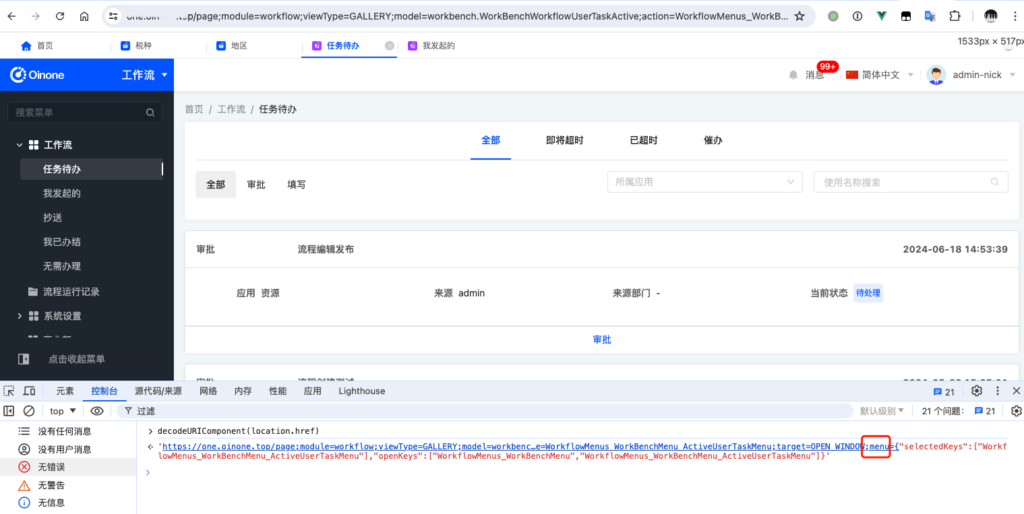
First, manually open the page through the page menu, then execute decodeURIComponent(location.href) in the console of the browser's built-in debugging tool. The menu parameter in the result is the value we need.