This section will introduce how to use Docker Compose to quickly deploy the Oinone designer and access it via a browser.
I. Quick Start
(I) Download docker-compose.yml
# Download docker-compose.yml from Github
curl -L https://raw.githubusercontent.com/oinone/oinone-docker-shared/refs/heads/master/oinone/docker-compose.yml -o docker-compose.yml

# Download docker-compose.yml from Gitee
curl -L https://gitee.com/oinone/oinone-docker-shared/raw/master/oinone/docker-compose.yml -o docker-compose.yml(II) Start the Oinone Designer
# MacOS/Linux
docker compose up -d

# Windows
docker compose -p oinone up -dPS: The first startup takes a long time. Please be patient. You can open a new terminal to view the backend startup logs at this time.
(III) View the Backend Service Startup Logs
docker logs -f oinone-backend(IV) Access the Oinone Designer
Open in the browser: http://127.0.0.1:88
Enter the username/password: admin/admin
(VI) Stop the Oinone Designer
# MacOS/Linux
docker compose down -v

# Windows
docker compose -p oinone down -vII. Start Learning Oinone
After starting the Oinone service and successfully accessing it, we can continue to learn how to use or develop Oinone through the following paths:
- Learn how to use the Oinone product: Click to view the User Manual
- Learn how to use Oinone for business engineering development: Click to view the R & D Manual
- Learn how to configure the Oinone service (advanced): Click to view the Configuration Guide
Appendix
(I) Special Instructions
Starting from March 2026, Oinone images of version v7.2 and above have been pushed to the public network environment, and private image sources are no longer provided for pulling images. Partners who used the old version of the image before can continue to use it, and the way to pull the image remains unchanged.
(II) Oinone Designer Architecture
Built-in Services
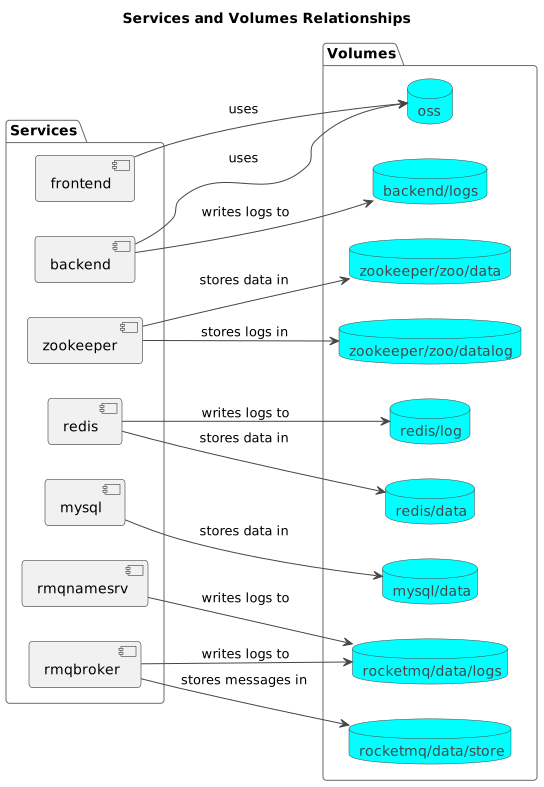
The docker-compose.yml contains all the middleware and front - end and back - end services necessary for the startup of Oinone:
- frontend: v7.2:latest (If the documentation is not updated in time, you can adjust it through the configuration by yourself)
- backend: v7.2:latest (If the documentation is not updated in time, you can adjust it through the configuration by yourself)
- zookeeper: 3.5.8
- redis: 5.0.7
- mysql: 8.0.30
- rocketmq: 4.9.6
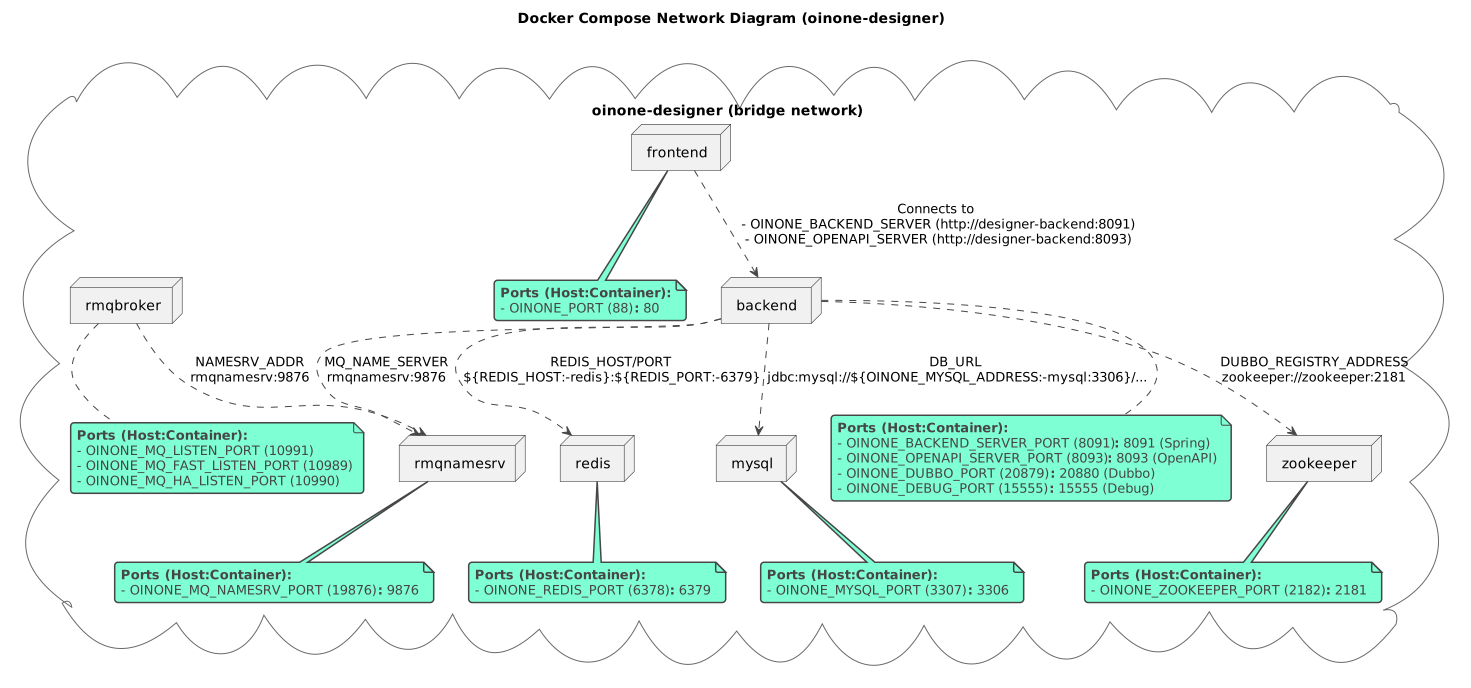
Network Topology Diagram
Mount Volume Topology Diagram